Published 21 October 2026 · By Saurav (opens in a new tab), Backend engineer, Zoorik · Published by Zoorik
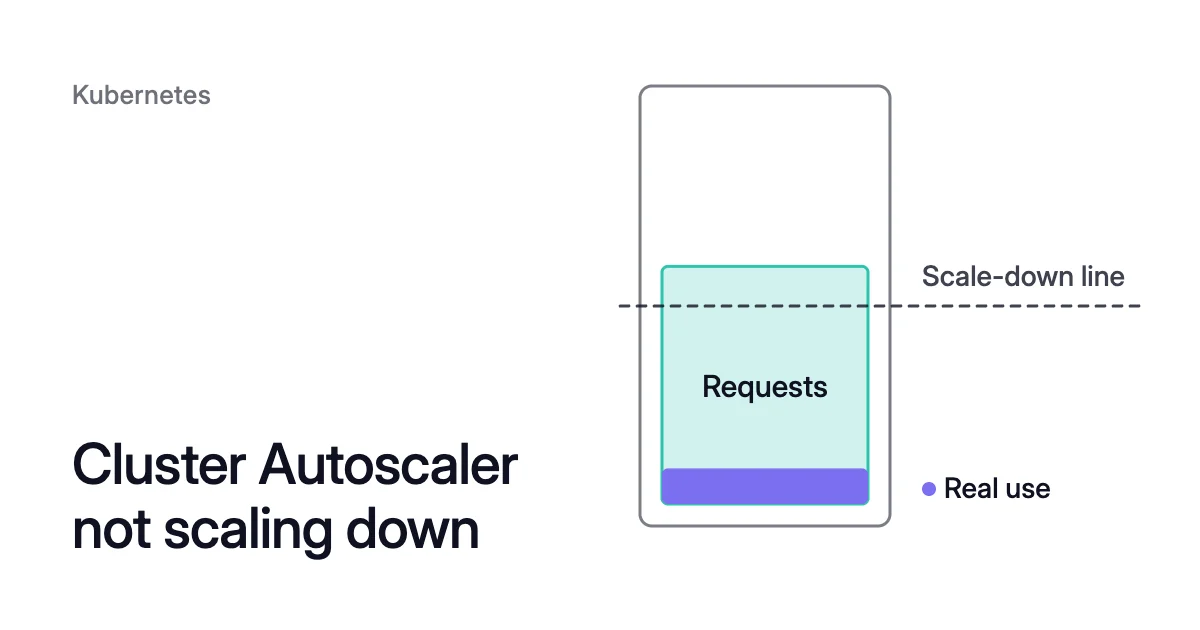
Short answer. When the Cluster Autoscaler is not scaling down, each node it keeps misses one of its conditions. A node’s CPU and memory requests (not use) must each stay under the default 50% of allocatable, and every pod on it must be able to move. A PodDisruptionBudget that allows no disruption, a kube-system pod without one, a pod no controller manages, or a pod marked safe-to-evict “false” can hold its node. So can node pool minimums and the 10-minute timers.
Why an underused node still isn’t removed
Picture a node with 4 CPU and 16 GiB allocatable, the part of its capacity it offers to pods (allocatable vs capacity has the detail). Its pods request 2.2 CPU and 6 GiB but use 0.3 CPU between them. You pay for the whole node, and the Cluster Autoscaler keeps it, because it compares requests with allocatable and never looks at use.
The Cluster Autoscaler adds nodes for pods that can’t be scheduled and removes nodes it calls unneeded. Every 10 seconds, when no scale-up is needed, it checks each node against three conditions in its FAQ. All must hold:
- Requests under half: its pods’ CPU and memory requests each add up to less than 50% of its allocatable, counting DaemonSet pods and mirror pods (static pods run from a manifest). That 50% is the Cluster Autoscaler’s scale-down utilization threshold, 0.5 by default.
- Pods that can move: every pod on it, apart from mirror and DaemonSet pods, can move to another node.
- No opt-out: no
cluster-autoscaler.kubernetes.io/scale-down-disabled: "true"annotation sits on it.
A node that stays unneeded for 10 minutes is removed. The autoscaler taints it so no new pods land there, then evicts its pods through the eviction API, which honours PodDisruptionBudgets. Non-empty nodes go one at a time, empty ones in batches of up to 10.
How to see why the Cluster Autoscaler is not scaling down
Four things can hold a node: its requests, a pod that can’t move, an opt-out or pool minimum, or a timer.
- Check that the autoscaler is up. The last-update annotation on its status ConfigMap should be no more than 3 minutes old, the FAQ says, and is usually 10 seconds old.
$ kubectl get configmap cluster-autoscaler-status -n kube-system -o yaml
- List the autoscaler’s warning events in every namespace.
$ kubectl get events -A --field-selector source=cluster-autoscaler,type=Warning
- Describe a node you expected to go. ScaleDown appears once the autoscaler starts to remove it, and ScaleDownFailed, with the error, when removal fails. A node it never tried to remove shows neither event.
$ kubectl describe node <node-name>
- Read the autoscaler’s logs, which include why it considers a pod unremovable, the FAQ says.
- On Azure Kubernetes Service (AKS): the autoscaler runs in the managed control plane, so its logs come through Azure Monitor. Create a diagnostic setting with the
cluster-autoscalerlog category, then queryAKSControlPlane | where Category == "cluster-autoscaler"in Log Analytics (AzureDiagnosticsin place ofAKSControlPlanein Azure diagnostics mode). The portal’s Node pools page has tiles for autoscale events and warnings. - On Amazon Elastic Kubernetes Service (EKS): you run the autoscaler yourself. The project’s AWS example manifest installs it as the
cluster-autoscalerDeployment in kube-system with--v=4, the level the FAQ recommends for detail on scaling decisions, sokubectl -n kube-system logs deployment/cluster-autoscalershows its reasoning.
- On Azure Kubernetes Service (AKS): the autoscaler runs in the managed control plane, so its logs come through Azure Monitor. Create a diagnostic setting with the
Match the output to the checklist:
- A pod: a log line on why a pod is unremovable, or a ScaleDownFailed error from evicting one (next section).
- An opt-out or minimum: scale-down disabled, or the pool already at its minimum count.
- Neither: a timer below, or requests at 50% of allocatable or more.
Six kinds of pod can keep their node from being removed
A PodDisruptionBudget that allows no disruption
A PodDisruptionBudget (PDB), stable since Kubernetes 1.21 in the policy/v1 API, limits how many of a workload’s pods voluntary evictions can take down at once. With maxUnavailable at 0, or minAvailable at 100% or the replica count, Kubernetes says you are “requiring zero voluntary evictions”, and a node running one of those pods can’t be drained. A single-replica Deployment with minAvailable: 1 is one example.
Before removing a node, the autoscaler checks that each PDB on it allows at least one eviction, and keeps the node if an eviction still fails. Look for 0 under ALLOWED DISRUPTIONS:
$ kubectl get poddisruptionbudgets --all-namespaces
Fix: add replicas, or relax the budget so it allows one disruption. Pod disruption budget best practices covers which field to use.
A kube-system pod with no PDB
A node running a kube-system pod that has no PDB, or one that’s too strict, isn’t removed while --skip-nodes-with-system-pods is on, the default upstream and on AKS. DaemonSet and mirror pods are exempt. The FAQ’s examples are kube-dns and Metrics Server.
Fix: add a PDB for each kube-system workload that can safely move, as the FAQ advises. It warns that restarting Metrics Server loses metrics for more than a minute, and the Horizontal Pod Autoscaler (HPA) relies on them, so add a PDB there only if you accept that.
$ kubectl create poddisruptionbudget <pdb-name> \
  --namespace=kube-system \
  --selector app=<app-name> \
  --max-unavailable 1
Data in emptyDir or hostPath
On AKS’s default profile and with the project’s AWS example manifest for EKS, local storage doesn’t hold a node: both set --skip-nodes-with-local-storage to false. Upstream it defaults to true, so a pod with a hostPath volume, or an emptyDir that doesn’t use medium: Memory, holds its node. Check what yours runs with.
Fix: move data that must survive to a persistent volume, or list the pod’s local volumes in cluster-autoscaler.kubernetes.io/safe-to-evict-local-volumes. The pod is released only when every local volume is listed. Name only volumes whose contents the pod can lose.
A pod nothing would recreate
A pod created directly, rather than by a Deployment, ReplicaSet, Job or StatefulSet, isn’t evicted, because nothing would start it again.
Fix: run it under a controller, or annotate it cluster-autoscaler.kubernetes.io/safe-to-evict: "true" if losing it is acceptable.
A pod marked safe-to-evict “false”
A pod annotated cluster-autoscaler.kubernetes.io/safe-to-evict: "false" is never evicted by the Cluster Autoscaler, so its node stays. AWS’s EKS guide suggests it for pods that are expensive to evict, such as test runners and machine learning tasks, and Microsoft asks you to use it with caution.
Fix: take the annotation off pods that can move, and see the safe-to-evict and do-not-disrupt annotations for both markers.
No other node the pod fits on
The autoscaler simulates the scheduler before it removes anything. If no other node has room for a pod’s requests, a free hostPort, or the labels its node selector needs, the node stays. Anti-affinity that allows one pod per node on a set of nodes holds every node running one of them, the FAQ says, since the set’s other nodes are taken or empty.
Fix: relax the constraint. Sizing requests to real use also frees room on the other nodes.
Node pool minimums and timers can still hold the node
The FAQ’s other reasons:
- Minimum size: the node group is at its minimum.
- Unneeded time: it became unneeded less than 10 minutes ago, the Cluster Autoscaler’s scale-down unneeded time (
--scale-down-unneeded-time). - Recent scale-up: a scale-up happened in the last 10 minutes (
--scale-down-delay-after-add). - Recent failure: a scale-down failed less than 3 minutes ago (
--scale-down-delay-after-failure), or removing this node failed, which adds 5 minutes before it’s tried again. - Scale-down off:
--scale-down-enabled=falseis set on the autoscaler.
In the open-source autoscaler the delay flags apply across all node groups by default (--scale-down-delay-type-local is false), so a scale-up in one pool pauses scale-down in the others for 10 minutes.
AKS node pool not scaling down: the cluster autoscaler profile
On AKS you don’t pass flags. Each node pool has its own minimum and maximum count, and everything else lives in the AKS cluster autoscaler profile. Microsoft says you can’t set one per pool.
Both commands change live behaviour: a smaller minimum lets the autoscaler remove nodes down to it, and the profile change, with example values here, reaches all autoscaled pools at once.
$ az aks nodepool update \
  --resource-group <resource-group> \
  --cluster-name <cluster-name> \
  --name <node-pool> \
  --update-cluster-autoscaler \
  --min-count <new-min> \
  --max-count <current-max>

$ az aks update \
  --resource-group <resource-group> \
  --name <cluster-name> \
  --cluster-autoscaler-profile \
scale-down-unneeded-time=5m,scale-down-utilization-threshold=0.6For cost, Microsoft’s advice on AKS cluster autoscaler scale-down is a shorter unneeded time and delay after add and a higher threshold. It also warns against aggressive scale-down in clusters that scale out and in within short intervals, because node provisioning can then take longer. --cluster-autoscaler-profile "" puts the defaults back. Don’t change an autoscaled pool’s node count by hand, and don’t turn on Virtual Machine Scale Set autoscaling beside the cluster autoscaler.
EKS nodes not scaling down: flags and group sizes
On EKS the settings are arguments to the autoscaler’s Deployment, such as --scale-down-utilization-threshold=0.6 or --scale-down-unneeded-time=5m. The autoscaler respects each Auto Scaling group’s minimum and maximum and only changes its desired size, so a smaller minimum (minSize on a managed node group) lets it remove nodes down to the new figure:
$ aws eks update-nodegroup-config \
  --cluster-name <cluster-name> \
  --nodegroup-name <node-group> \
  --scaling-config minSize=<new-min>
Unlike AKS, one group on EKS can differ from the rest: tags on its Auto Scaling group such as k8s.io/cluster-autoscaler/node-template/autoscaling-options/scaledownutilizationthreshold and .../scaledownunneededtime override the global flags. The autoscaler’s Identity and Access Management (IAM) role needs autoscaling:SetDesiredCapacity and autoscaling:TerminateInstanceInAutoScalingGroup on the cluster’s groups, or removal fails with the error in a ScaleDownFailed event.
Raising the threshold helps less than resizing requests
Raising the threshold makes more nodes candidates, but each of their pods still has to fit on the remaining nodes at its full request. --ignore-daemonsets-utilization, also in the AKS profile, leaves DaemonSet pods out of the sum. The fix that lasts is requests set from measured use. Kubernetes overprovisioning explains how requests grow past use, and pod right sizing shows how to measure it.
How Coral helps the Cluster Autoscaler remove nodes
Coral optimizes Kubernetes on AKS and EKS. It rebalances CPU and memory requests to real use, and its node optimization, on from install, empties spare nodes for your Cluster Autoscaler to remove:
- Checks first. Before draining, Coral simulates the scheduler on the live cluster, and every pod must fit elsewhere with its affinity, taints, spread, ports and zones. Coral also respects PDBs, do-not-disrupt, safe-to-evict “false” and your autoscaler’s minimum pool size.
- One by one. Coral cordons and drains one node at a time, and if a drain can’t finish in 10 minutes, the node goes back into service.
- Your autoscaler deletes. After “Wait before removing empty nodes” (5 minutes by default), Coral hands the empty node to your autoscaler, whose own timers decide when it goes. Coral never adds nodes for demand.
In Coral, Node list → “What’s holding them” names each held node with its reason and fix.
Two limits apply. When a node is removed, a pod whose replacement can’t start first gets a short restart. With only the Cluster Autoscaler, Coral empties nodes but doesn’t move workloads to smaller machines.
On our own AKS development cluster, node optimization removed one 4-CPU worker: $147.46 a month of the $213.89 monthly saving in How we reduced our own cluster’s machine bill by 58%.
Sources: Kubernetes autoscaler, “Cluster Autoscaler FAQ” (opens in a new tab); Kubernetes autoscaler, “Cluster Autoscaler on AWS” (opens in a new tab); Microsoft Learn, “Use the Cluster Autoscaler in Azure Kubernetes Service (AKS)” (opens in a new tab); Microsoft Learn, “Cluster autoscaling in Azure Kubernetes Service (AKS) overview” (opens in a new tab); Amazon EKS Best Practices Guide, “Cluster Autoscaler” (opens in a new tab); AWS CLI Command Reference, “update-nodegroup-config” (opens in a new tab); Kubernetes, “Specifying a Disruption Budget for your Application” (opens in a new tab); Kubernetes autoscaler, “Drainability rule for kube-system pods (cluster-autoscaler-1.33.0)” (opens in a new tab).