Published 24 October 2026 · By Aditya Keshari, Guest author · Full stack engineer at ZS · Published by Zoorik
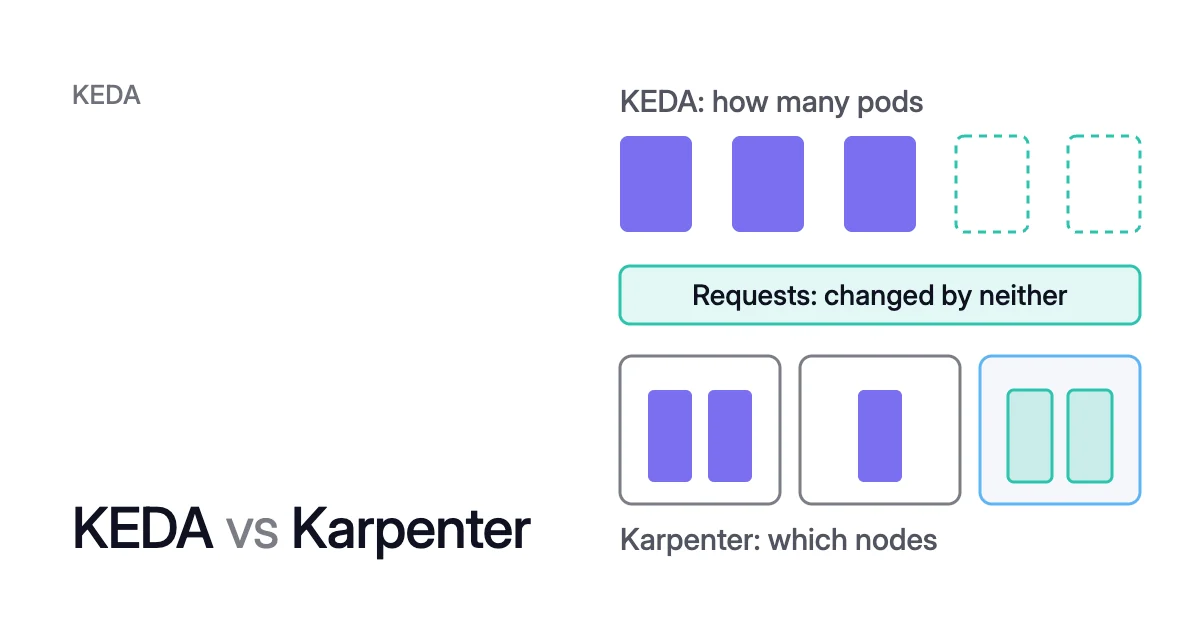
Short answer. KEDA vs Karpenter is pod count against node count. KEDA (Kubernetes Event-driven Autoscaling) sets how many pods run, down to zero, from events such as a queue’s backlog. Karpenter sets the nodes: it launches nodes that fit the requests of pods that can’t be scheduled, and removes nodes it no longer needs. Use KEDA when work waits for pods, Karpenter when pods wait for nodes, and both for zero pods and zero nodes. Neither changes what each pod requests.
When to use KEDA vs Karpenter, and when to run both
Picture a queue worker on EKS or AKS. Overnight its queue is empty, so KEDA has scaled the worker to zero and Karpenter has removed its node. When the morning backlog arrives, KEDA raises the replica count. The new pods don’t fit anywhere, so they wait as pending pods until Karpenter adds nodes for them.
Neither tool changes the third layer, between pod count and node count: each pod’s CPU and memory request. A request is what a container asks the scheduler to reserve. If each worker requests 1 CPU and uses 0.25, Karpenter sizes the nodes for 1 CPU per pod, and three-quarters of that sits idle.
Which you need depends on what waits:
- Use KEDA when work waits for pods. It sets the pod count from the backlog, down to zero.
- Use a node autoscaler when pods wait for nodes. That can be Karpenter, NAP on AKS, EKS Auto Mode or the Cluster Autoscaler.
- Run both for zero pods and zero nodes overnight.
- Rebalance requests when pods reserve more than they use. Neither tool does that for you.
Here is Karpenter vs KEDA, point by point.
| KEDA | Karpenter | |
|---|---|---|
What it changes | The replica count of a Deployment, StatefulSet or any custom resource with a /scale subresource, or how many Jobs run | The nodes in the cluster, and the instance type or VM size of each |
What it decides from | Event sources, such as messages in a Kafka topic or events in an Azure event hub, and CPU or memory | The resource requests, node selectors, affinities and tolerations of pods the scheduler can’t place |
The objects you write | ScaledObject, or ScaledJob for Jobs | NodePool, plus EC2NodeClass on AWS or AKSNodeClass on AKS |
Scale to zero | Yes, with at least one trigger other than CPU or memory | Deletes nodes that are empty |
How it gives capacity back | Its HPA scales pods in, and KEDA goes from 1 to 0 after cooldownPeriod (300 seconds by default) | Consolidation deletes or replaces nodes whose pods fit elsewhere |
The cap you set | maxReplicaCount, 100 by default | spec.limits on each NodePool |
Managed by the cloud | The KEDA add-on on AKS, preconfigured on AKS Automatic | Node auto-provisioning (NAP) on AKS, and EKS Auto Mode on EKS |
Changes pod requests | No. A ScaledObject has no field for them | No. It reads them to size nodes |
The versions here are KEDA 2.21 and Karpenter 1.15, the newest documented in October 2026. KEDA is a graduated Cloud Native Computing Foundation project, and Karpenter and the Cluster Autoscaler are the two node autoscalers that Kubernetes SIG Autoscaling sponsors.
What are KEDA and Karpenter?
KEDA sets the pod count from events, through an HPA
You link a workload to its event source with a ScaledObject. KEDA then creates a Horizontal Pod Autoscaler (HPA), the Kubernetes controller that sets a workload’s replica count from a metric, and names it keda-hpa-<scaled-object-name> by default.
Microsoft’s AKS docs advise against pointing your own HPA and a ScaledObject at the same workload: the two compete. KEDA vs HPA vs VPA compares KEDA with the HPA on its own.
To wake a workload from zero, KEDA checks each trigger every 30 seconds (pollingInterval), and from 1 replica up, the HPA it created does the scaling. Unless you set them, the workload runs between 0 and 100 replicas (minReplicaCount and maxReplicaCount). cooldownPeriod applies only on the way to zero: KEDA waits 300 seconds after the last trigger reported active before scaling the workload back to 0.
Karpenter sizes nodes from pod requests, then consolidates them
Karpenter watches for pods the scheduler can’t place because of resource constraints. It reads their scheduling requirements, launches nodes that meet them, and later removes nodes that are no longer needed. AWS’s EKS best practices guide names the sizing input: Karpenter “considers a pod’s requests to determine which type of instance it provisions.”
Without limits or instance-type constraints, Karpenter keeps adding capacity as long as pods need it. You set its boundaries in a NodePool: the instance types and zones it may use, taints and labels, and spec.limits, the most CPU and memory the pool may launch. How Karpenter works covers these objects.
Karpenter gives capacity back by consolidating. Under the default policy, WhenEmptyOrUnderutilized, it considers any node that can be removed or replaced to reduce cost. WhenEmpty takes only empty nodes. Balanced acts only where the saving outweighs the disruption to running pods.
Karpenter deletes a node when its pods fit on free capacity elsewhere, and replaces it when they fit there plus one cheaper node. consolidateAfter is how long Karpenter waits after pods are added to or removed from a node before the node becomes a candidate. It’s 0 seconds by default.
Unless you set budgets, one default budget of 10% of nodes caps how many of a NodePool’s nodes consolidation can disrupt at once. Pods leave through the Eviction API, so PodDisruptionBudgets (PDBs) hold. A pod annotated karpenter.sh/do-not-disrupt: "true" keeps its node out of consolidation. Karpenter consolidation covers each setting.
What differs between EKS and AKS is who runs Karpenter. On AKS, NAP manages Karpenter for you, and AKS Automatic comes with both KEDA and NAP preconfigured. On EKS, you install self-managed Karpenter with Helm, and the EKS user guide makes configuring and managing it your job. EKS Auto Mode, which builds upon Karpenter, scales cluster compute for you.
KEDA and Karpenter work together only through the pods
Nothing connects the two directly: they meet through the pods KEDA adds and removes. When the backlog clears, KEDA’s HPA scales the pods in, and KEDA takes the workload to zero after its cooldown period. Karpenter then consolidates nodes left empty, or whose pods now fit elsewhere.
Pod requests size the nodes, and neither tool sets them
Both tools depend on the request. The Kubernetes docs on node autoscaling say autoscalers make sure new nodes “have enough resources to satisfy the requests” but don’t take real usage into account. Consolidation, too, “only considers Pod resource requests and not real resource usage when making decisions.” The replica count KEDA chooses then multiplies each request.
The node autoscaling docs warn that a request set too high “might incorrectly prevent consolidating its Node.” The EKS best practices guide asks for accurate requests on all workloads, and calls that “particularly important if using Karpenter’s consolidation feature.”
What a smaller request does depends on the trigger:
- With an event trigger, a smaller request fits more pods on each node. A trigger such as a message count takes a target value (
AverageValueorValue), so the replica count follows the events. - With a CPU or memory trigger on utilization, a smaller request means more replicas. Under
metricType: Utilization, the target is a percentage of the pods’ requests, so the same load reads as higher utilization. That scaler requires a request or a limit on the pods.
The Kubernetes docs rank this layer with the other two: “Correctly setting the resource requests of your Pods is as important to the overall cost-effectiveness of a cluster as optimizing Node utilization.”
Rebalance requests first, then set the caps
Karpenter sizes nodes from the request, and a CPU trigger on utilization measures load against it, so set it first.
- Rebalance requests to measured use. With that trigger, change them in small steps and watch the replica count. Kubernetes pod rebalancing walks through the method.
- Set both caps.
maxReplicaCountbounds the pods KEDA can ask for, and a NodePool’sspec.limitsbounds what Karpenter can launch for them. - Give a spiky workload a non-zero consolidation wait. At 0 seconds, Karpenter can consolidate a node in the gap between two bursts that KEDA is about to fill again. The Karpenter docs say a longer
consolidateAftergives churning workloads time to settle. - Protect long jobs. A Job pod on a node that Karpenter consolidates is evicted mid-run. Annotate the Job’s pod template with
karpenter.sh/do-not-disrupt: "true", or with a duration such as"30m"to protect it only for that long after it starts.
With example values, the ScaledObject caps the worker at 40 replicas, at most 40 × 1 = 40 CPU of requests:
spec:
  minReplicaCount: 0
  maxReplicaCount: 40
And the NodePool caps what Karpenter launches at 100 CPU and sets when to consolidate:
spec:
  disruption:
    consolidationPolicy: WhenEmptyOrUnderutilized
    consolidateAfter: 5m
  limits:
    cpu: 100
memory: 400GiWhere Coral fits with KEDA and Karpenter
Coral optimizes Kubernetes on AKS and EKS by working on the third layer: it rebalances each container’s CPU and memory requests to real use, so the same Karpenter or NAP can run fewer or smaller nodes.
- Rebalancing. On the balanced policy, the default, CPU comes from the 80th percentile of the last 3 days and memory from the highest use in the last 8 days, each plus 10%. Pod sizing starts only when you switch on “Automatically optimize”. Running pods are resized in place on 1.33+ nodes, or restarted one at a time within their PDBs.
- KEDA sizing. For a ScaledObject with a
cputrigger, Coral picks the CPU request by replaying past load (3 days on the default policy) through the trigger’s utilization target, the ScaledObject’s minimum and maximum replicas, and the scaling behavior of KEDA’s HPA. A smaller request wins only if its saving beats the cost of unserved load and extra scaling. Event triggers such as a queue length aren’t replayed, nor is a paused ScaledObject. - KEDA’s HPA. Coral never takes over or converts an HPA that KEDA manages, and creates an HPA only for a Deployment or Argo Rollout that has none. It changes the ScaledObject’s minimum or maximum only in a rebalance’s warm handover: to move a pod, Coral raises the minimum, so a new pod is Ready on another node before the old one is evicted, then scales back.
- Karpenter and NAP. Coral never changes your existing Karpenter or NAP settings and never adds nodes for demand. Pools where either one consolidates underused nodes are left to it. Coral also honours
karpenter.sh/do-not-disrupton pods and nodes. - Cheaper machines. With Karpenter or NAP in place, a rebalance can also move work to smaller or cheaper machines. It creates new fixed-size NodePools named
zoorik-rb-…, and your Karpenter or NAP launches the machines. - No node autoscaler. Connecting the cluster to Coral sets up Karpenter on EKS, or NAP on AKS where the cluster uses Azure CNI (not kubenet), with your approval.
On our own AKS development cluster, Coral removed a spare worker and swapped the remaining worker for a cheaper machine of the same size. The CPU the apps reserve went from 0.78 to 0.43 cores. Eight days after we connected Coral, the machine bill was $154.76 a month instead of $368.65, 58% less.
Sources: KEDA, “ScaledObject specification” (opens in a new tab); KEDA, “CPU” (opens in a new tab); Karpenter, “Disruption” (opens in a new tab); Kubernetes, “Node Autoscaling” (opens in a new tab); Microsoft Learn, “Kubernetes Event-Driven Autoscaling (KEDA) in Azure Kubernetes Service (AKS)” (opens in a new tab); Microsoft Learn, “Overview of Node Auto-Provisioning (NAP) in Azure Kubernetes Service (AKS)” (opens in a new tab); Amazon EKS Best Practices Guide, “Karpenter” (opens in a new tab); Amazon EKS, “Scale cluster compute with Karpenter and Cluster Autoscaler” (opens in a new tab).