Published 24 October 2026 · By Sonia (opens in a new tab), Developer relations, Zoorik · Published by Zoorik
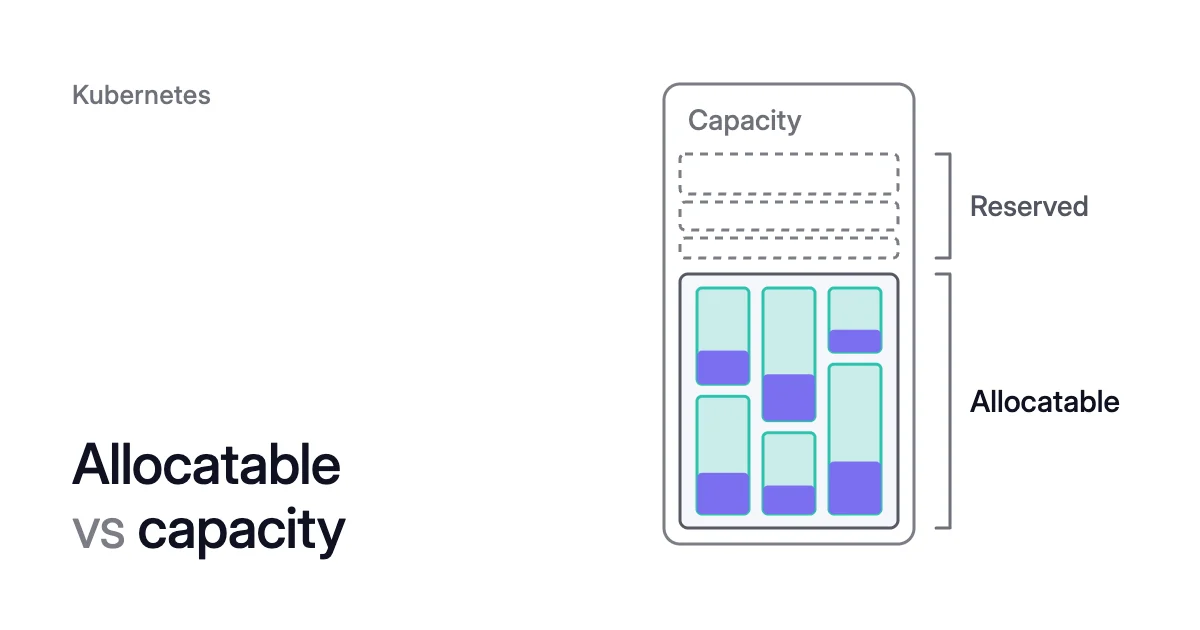
Short answer. Kubernetes allocatable vs capacity is the gap between what a node has and what pods can claim. Capacity covers the node’s total CPU, memory, ephemeral storage and pod count. Allocatable is capacity minus what the node reserves for the kubelet, the container runtime and the OS. For memory and storage, the hard eviction threshold comes off too. The scheduler fills allocatable with pod requests, not pod use, so a node can be full while its CPU sits mostly idle.
Pods get less than the node has
Picture a pod that requests 8 GiB of memory, headed for an 8 GiB EKS node. It never fits there. The node reports a memory capacity of 7,748 MiB, not 8,192. Once the reserves and the hard eviction threshold come off, pods can request 7,074 MiB, the node’s allocatable. That’s 86% of the 8,192 MiB you pay for, and the EKS worked example below shows the arithmetic.
Every node has two gaps. You can change little of the first, capacity minus allocatable, which the machine, the platform and max pods set. Max pods is the most pods a node may run. Your manifests set the second gap, between what pods request and what they use.
| Question | Capacity | Allocatable |
|---|---|---|
What it counts | Everything the node has: CPU, memory, ephemeral storage, pods | The part of capacity that normal pods can use |
Where you read it | .status.capacity, the Capacity block of kubectl describe node | .status.allocatable, the Allocatable block |
What sets it | The machine as the node reports it (7,748 MiB of memory on the 8 GiB instance above), and max pods for the pod count | Capacity minus kube-reserved, system-reserved and the hard eviction threshold |
What counts against it | Nothing is scheduled against capacity | Pod requests: the scheduler, the Cluster Autoscaler and Karpenter all count them here |
Use it for | Pricing: you pay for the whole machine | Fitting pods, and counting how many nodes a pool needs |
Kubernetes node allocatable is capacity minus two reserves and an eviction threshold
A node runs more than your pods. The kubelet, the container runtime, OS daemons and the kernel all need CPU and memory, and without a reservation they compete with pods for it. Kubernetes calls the fix Node Allocatable. The kubelet sets resources aside for those processes, and the scheduler fits pods only into what’s left.
Node Allocatable covers CPU, memory and ephemeral storage. Three amounts come off capacity:
- Kube-reserved is for Kubernetes daemons such as the kubelet and the container runtime, not for system daemons that run as pods. Its size typically depends on how many pods the node can run.
- System-reserved covers OS daemons like sshd and udev, plus kernel memory, which Kubernetes doesn’t count against pods.
- The hard eviction threshold is the free memory or ephemeral storage below which the kubelet starts evicting pods, so CPU has no threshold.
The Kubernetes docs give one example, a node with 16 CPUs, 32Gi of memory and 100Gi of storage. Memory and storage are in binary units (1Gi is 1,024Mi), and CPU is in cores or millicores (m, a thousandth of a core).
| Example node | CPU | Memory | Ephemeral storage |
|---|---|---|---|
Capacity | 16 CPUs | 32Gi | 100Gi |
Kube-reserved | 1 CPU | 2Gi | 1Gi |
System-reserved | 500m | 1Gi | 1Gi |
Hard eviction threshold | none | 500Mi | 10%, so 10Gi |
Allocatable | 14.5 CPUs | 28.5Gi | 88Gi |
Memory and CPU behave differently at the limit. By default, the kubelet evicts pods once their combined memory use passes allocatable, 28.5Gi in the example. CPU never triggers an eviction. Allocatable CPU still holds when the node is busy: if every process on it runs flat out, the pods together get no more than 14.5 CPUs.
Allocatable on AKS and EKS depends on the machine and max pods
On a managed cluster you rarely set these values yourself: AKS and the EKS-optimized Amazon Linux AMI set them for you.
AKS
AKS reserves CPU on a sliding scale. A bigger node gives a smaller share of its CPU to kube-reserved, one of the trade-offs in Kubernetes node size best practices. Microsoft adds that extra features can reserve more.
| CPU cores on the node | Kube-reserved CPU | Share of the node’s CPU |
|---|---|---|
1 | 60m | 6% |
2 | 100m | 5% |
4 | 140m | 3.5% |
8 | 180m | 2.25% |
16 | 260m | 1.6% |
32 | 420m | 1.3% |
64 | 740m | 1.2% |
From AKS 1.29, reserved memory is two amounts added together: the hard eviction threshold, memory.available<100Mi, and kube-reserved. Kube-reserved is whichever is less: 20 MB per max pod plus 50 MB, or 25% of the node’s memory.
That ties allocatable memory to max pods. The default max pods varies by network plugin: Azure CNI Overlay defaults to 250, Azure CNI Pod subnet and kubenet to 110, and legacy Azure CNI to 30.
Microsoft’s formula starts from the VM’s full memory and uses decimal GB, with the 100Mi threshold as 0.1 GB. The node OS also reserves some CPU and memory on top, Microsoft notes.
By the formula, a 16 GB node keeps about 15.25 GB for pods at 30 max pods and 13.65 GB at 110. At 250 the 25% cap applies, and pods keep 11.9 GB, 74% of the node.
To change kube-reserved or the eviction thresholds, Microsoft points to a preview: the custom node configuration settings.
Max pods is the setting you do choose, up to 250, when you create the cluster or add a node pool. To change it later, Microsoft says to add a new pool and migrate your pods. Fewer pod slots per node leave more memory for pods, but a pool of many small pods may then need more nodes.
EKS
On EKS-optimized Amazon Linux AMI nodes, the AMI’s bootstrap sets kube-reserved from the instance type. AWS documents the rule in its guide to AWS Batch on EKS. CPU is graduated: 6% of the first core, 1% of the second, 0.5% each of the third and fourth, and 0.25% of every core after that. Memory is 11 MiB per max pod plus 255 MiB, and the hard eviction threshold comes off on top, 100 MiB in AWS’s example.
If Karpenter launches your nodes, it calculates the system and kube reserves on the fly. It has its own graduated kube-reserved defaults, and uses the reserves both to configure the node and to make scheduling decisions for your pods. You can override them with kubeReserved and systemReserved under spec.kubelet in the EC2NodeClass. For Bottlerocket, custom AMIs and EKS Auto Mode nodes, read the figures from the node instead of assuming the Amazon Linux formula.
How to check Kubernetes allocatable vs capacity on a node
kubectl describe node prints the Capacity and Allocatable blocks, then totals the CPU and memory its pods request and limit under “Allocated resources”. Capacity minus allocatable is the node’s two reserves plus its hard eviction threshold.
$ kubectl describe node <node-name>
The Kubernetes docs’ own example, trimmed, is a 2-CPU node that reserves 200m of its CPU (2,000m − 1,800m) and none of its 110 pod slots. Memory shows in Ki, kibibytes.
Capacity:
 cpu:                               2
 memory:                            7679792Ki
 pods:                              110
Allocatable:
 cpu:                               1800m
 memory:                            7474992Ki
 pods:                              110
[ ... lines removed for clarity ...]
Non-terminated Pods:        (5 in total)
[ ... lines removed for clarity ...]
Allocated resources:
  (Total limits may be over 100 percent, i.e., overcommitted.)
  CPU Requests    CPU Limits    Memory Requests    Memory Limits
  ------------    ----------    ---------------    -------------
  680m (34%)      400m (20%)    920Mi (11%)        1070Mi (13%)
For use instead of requests, kubectl top node reads the Metrics API, so it works only where the cluster serves that API. By default it shows each node’s use against allocatable, and --show-capacity switches it to capacity.
$ kubectl top node --show-capacity
A node fills up by requests, not by use
The Kubernetes docs say the scheduler refuses a node when a pod’s requests don’t fit, even when actual CPU and memory use on it is very low. It checks requests alone: for each resource, a pod fits on a node only if its requests plus the requests already there stay within allocatable.
The node in that output shows the arithmetic. Its five kube-system pods request 680m of its 1,800m allocatable CPU, which leaves 1,120m (1,800m − 680m). A new pod that requests more than that won’t fit there, however quiet the node is. System pods take their requests out of allocatable like any other pod, and a DaemonSet does so on every node it runs on.
Requests drive the Cluster Autoscaler too. It considers removing a node only when its pods’ CPU requests and memory requests are each under 50% of its allocatable. DaemonSet pods count toward that by default. The 50% comes from --scale-down-utilization-threshold, 0.5 by default, and Cluster Autoscaler not scaling down covers the other conditions.
Size pods against allocatable, then rebalance requests
When requests sit far above use, idle nodes count as full, new pods get new machines, and the autoscaler keeps the ones you have. Smaller requests reduce the bill only when a node goes. Kubernetes overprovisioning shows how to measure the gap.
- Size your largest pod against allocatable minus DaemonSet requests, never against the machine size.
- On AKS, choose max pods for the density you need. On a 16 GB node, 30 max pods leave pods 3.35 GB more memory than 250 do (15.25 − 11.9 GB).
- Leave the reserves themselves alone unless you have profiled your nodes.
- Put the effort into rebalancing requests. Kubernetes pod rebalancing shows how to set them from measured use.
How Coral rebalances requests inside allocatable
Coral optimizes Kubernetes on AKS and EKS clusters running Kubernetes 1.30 or later, and it works on the second gap: the requests inside each node’s allocatable.
- Rebalancing. On the default balanced policy, Coral sets each container’s CPU request to the 80th percentile of the last 3 days plus 10%. Its memory request is 10% above the highest use in the last 8 days. Running pods are resized in place on 1.33+ nodes where possible, or restarted one at a time within their PodDisruptionBudgets.
- HPA-aware sizing. For a workload with a CPU-utilization Horizontal Pod Autoscaler (HPA), Coral picks the CPU request by replaying past load through that HPA’s own settings.
- Unclaimed capacity. The Node list shows every node’s monthly price, the capacity no pod has claimed, and the nodes Coral can’t empty, each with its reason and fix (see nodes held).
- Spare nodes. Node optimization is on from install. It works out from pod requests how many nodes each pool needs, keeps at least one per pool, and leaves to Karpenter, or AKS node auto-provisioning (NAP), the pools they already consolidate. Coral first checks on the live cluster that every pod on a node fits on another Ready node. Then it cordons and drains one node at a time, and hands the empty node to your Cluster Autoscaler, NAP or Karpenter. In a fixed-size pool that nothing else manages, Coral removes the machine itself. A pod gets a short restart if its replacement can’t start first.
- Opt-in. No pod is resized until you switch on “Automatically optimize” for a policy or a workload.
On our own AKS development cluster of 3 machines and 10 CPUs, Coral found that the apps would fit on fewer machines. It removed one 4-CPU worker on 6 October, taking the machine bill from $368.65 to $221.19 a month, and apps that ran a single copy restarted once on another machine. On 12 October it swapped the remaining worker for a cheaper machine of the same size. Eight days after we connected it, the bill was $154.76 a month, 58% less.
Sources: Kubernetes, “Reserve Compute Resources for System Daemons” (opens in a new tab); Kubernetes, “Resource Management for Pods and Containers” (opens in a new tab); Kubernetes, “kubectl top node” (opens in a new tab); Kubernetes Cluster Autoscaler, “Frequently Asked Questions” (opens in a new tab); Microsoft Learn, “Node resource reservations in Azure Kubernetes Service (AKS)” (opens in a new tab); Microsoft Learn, “IP address planning in Azure Kubernetes Service (AKS)” (opens in a new tab); AWS, “Memory and vCPU considerations for AWS Batch on Amazon EKS” (opens in a new tab); Karpenter, “NodeClasses” (opens in a new tab).