Published 21 October 2026 · By Swapnil Srivastav (opens in a new tab), Software development manager, Zoorik · 11 years’ experience · Published by Zoorik
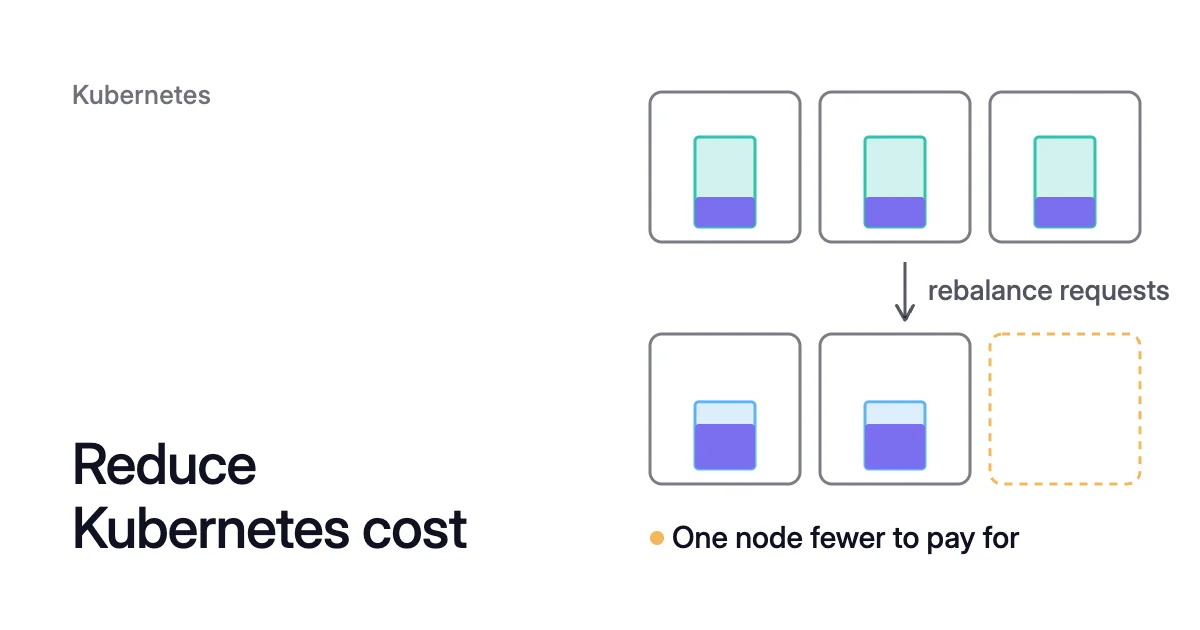
Short answer. To reduce Kubernetes cost, work in two steps, in this order. First, rebalance each container’s CPU and memory requests to what it really uses, because the scheduler and your node autoscaler count what pods request, not what they use. Then let the spare nodes go: the Cluster Autoscaler, Karpenter or AKS node auto-provisioning (NAP) removes a node once it is underused and its pods fit elsewhere. Smaller requests change nothing on the bill until a node is removed.
You pay for nodes, and requests decide how many you run
Picture three nodes, each with 4 CPU allocatable (allocatable is what a node can give pods). A request is what Kubernetes sets aside for a container. The pods on each node request 3 CPU and use 1, and memory follows the same pattern. You keep paying for three nodes while your pods use 3 of their 12 allocatable CPU, and no autoscaler will remove any of them.
On Azure Kubernetes Service (AKS) and Amazon Elastic Kubernetes Service (EKS) the bill is for the virtual machines behind your nodes, and AWS’s EKS Best Practices Guide says EC2 instances are the bulk of the cost in most EKS clusters. So most Kubernetes cost savings come from running fewer nodes.
Requests set the node count. The scheduler places a pod only where the requests already on a node, plus the new pod’s, fit within its allocatable. Even on a nearly idle node, it refuses.
Node autoscalers count the same way. By default, the Cluster Autoscaler considers a node for removal only when its pods’ CPU requests and memory requests are both under 50% of the node’s allocatable. Each node in the picture is 75% requested and 25% used, so all three stay.
AWS’s guide ranks Kubernetes cost reduction in that order too: size the workloads, reduce unused capacity, then choose capacity types such as Spot, covered further down. Kubernetes overprovisioning explains where padded requests come from and how to measure them.
Step 1: rebalance requests to real use
First, see what each node has reserved: kubectl describe nodes <node-name> lists the requests of each pod on a node and, under “Allocated resources”, their totals. Then, for each workload, in order:
- Read each container’s use over days. Use a metrics store that keeps history, such as Prometheus, with a window that holds the nightly batch, or a week if load peaks weekly.
- Check for an HPA before you size CPU. If a Horizontal Pod Autoscaler (HPA) scales the workload on CPU, a smaller request changes what the HPA reads, as the VPA and HPA comparison shows. Microsoft’s AKS guidance says not to run the Vertical Pod Autoscaler (VPA) and the HPA on the same CPU or memory metric.
- Size the two requests differently, giving each sidecar its own.
- CPU: a high percentile of that window plus headroom. A container may use more CPU than its request when the node has room, and at its CPU limit it is throttled rather than stopped.
- Memory: the peak plus headroom. A container that goes past its memory limit can be killed by the kernel under memory pressure.
- Leave limits alone until you know why they were set. Watch for containers with a limit and no request: unless an admission default applies, Kubernetes copies the limit into the request, so a ceiling becomes a reservation.
- Apply the new sizes. In-place pod resize, stable since Kubernetes 1.35 and on by default as a beta from 1.33, changes a running container’s CPU and memory without recreating the pod. Where pods have to be recreated, roll the change out a few at a time so enough replicas stay up.
How to pick the numbers is in Kubernetes pod right sizing.
Step 2: let your autoscaler remove the spare nodes
Kubernetes node consolidation is where smaller requests become savings: pods move off an underused node, and the empty node is removed. AWS’s guide advises against doing it by hand: “We recommend you do not try to optimize compute capacity manually.” Let your node autoscaler do it, and tune how it decides. Kubernetes bin packing shows how the remaining nodes fill.
With the Cluster Autoscaler
The Cluster Autoscaler removes a node only when four main conditions hold at once. Its pods’ requests are under the utilization threshold (--scale-down-utilization-threshold, 0.5 by default), every pod on it can move to another node, it has stayed that way for the unneeded time (--scale-down-unneeded-time, 10 minutes by default), and its node pool or Auto Scaling group is above its minimum count.
Before it removes the node, the Cluster Autoscaler checks that each pod’s PodDisruptionBudget (PDB) allows at least one replica to go, then evicts the pods through the Eviction API, and keeps the node if an eviction fails. Non-empty nodes go one at a time.
On AKS these settings live in the cluster autoscaler profile, which applies to every node pool that uses the autoscaler. The 0.6 below is only an example:
$ az aks update \
  --resource-group <resource-group> \
  --name <cluster-name> \
  --cluster-autoscaler-profile scale-down-utilization-threshold=0.6
A higher threshold makes more nodes eligible for removal and runs the rest fuller, so test a new value first.
With Karpenter or NAP
By default, Karpenter consolidates both empty and underused nodes, without a waiting period, and disrupts at most 10% of a pool’s nodes at once, rounded up to whole nodes. A NodePool’s disruption block sets how far it goes, and NAP on AKS uses the same consolidationPolicy field and budgets. The defaults, written out:
spec:
  disruption:
    consolidationPolicy: WhenEmptyOrUnderutilized
    consolidateAfter: 0s
    budgets:
- nodes: "10%"What keeps a spare node running
When a node stays up with little on it, one of its pods usually can’t move. These cases come from the Cluster Autoscaler FAQ, with Karpenter and AKS where they differ:
| What holds the node | What frees it |
|---|---|
A restrictive PDB, one that allows no pod to be evicted right now. Karpenter also leaves a node alone while a blocking PDB is on it. | Give every PDB room for at least one disruption. For a Deployment of 6 pods that must keep 4 running, AWS’s example sets minAvailable to 4. |
A kube-system pod with no PDB, unless it runs on every node by default as DaemonSet pods do. | Add PDBs to kube-system pods that can safely run elsewhere. |
A bare pod, which no controller would recreate. | Run it under a Deployment. |
A pod that keeps data on the node itself, in a hostPath or an emptyDir that isn’t in memory. On AKS this doesn’t hold the node for the cluster autoscaler: its default profile sets skip-nodes-with-local-storage to false. | Move node-local data to a persistent volume. |
A pod with nowhere else to go: no other node has room for its requests, a free hostPort or the labels its node selector needs. | Make room with step 1’s smaller requests, or make the port or labels available on another node. |
A pod annotated cluster-autoscaler.kubernetes.io/safe-to-evict: "false", or, for Karpenter and NAP, karpenter.sh/do-not-disrupt: "true". | Remove the annotation unless the pod really can’t move. |
Pod disruption budget best practices and Cluster Autoscaler not scaling down go through each case.
Other ways to reduce Kubernetes cost, after the two steps
Buy commitments last: one bought before you rebalance and consolidate would cover capacity you’re about to remove. AWS suggests working out your cluster’s minimum and maximum capacity, covering the minimum with a Savings Plan, and running on Spot the capacity your availability doesn’t depend on. The four below pay off most on the nodes you keep:
- Spot capacity: Azure Spot node pools run on spare capacity in a single fault domain with no service-level agreement, and Azure evicts the nodes when it needs that capacity back. EC2 Spot instances can be reclaimed with a 2-minute notice. Both suit interruptible work.
- Commitments: Azure Reservations and the Azure savings plan for compute run for one or three years. AWS Savings Plans do too.
- Schedules: AKS start/stop shuts down all system and user node pools of a cluster that doesn’t need to run all the time, and keeps its state for when you start it again.
- Visibility: trace the bill to Kubernetes objects. On AKS, the cost analysis add-on breaks cluster cost down by Kubernetes constructs in Microsoft Cost Management, and on EKS you tag your worker nodes so AWS Cost Explorer can show their billing.
How Coral does both steps
Coral optimizes Kubernetes on AKS and EKS clusters running Kubernetes 1.30 or later, taking the same two steps and leaving scale-up to your node autoscaler.
- Requests. Coral rebalances each container’s CPU and memory requests to real use. On the balanced policy, the default for Deployments, DaemonSets and Argo Rollouts, the CPU request is the 80th percentile of the last 3 days plus 10%, and memory is the 8-day peak plus 10%. With a CPU-utilization HPA, Coral sizes CPU instead by replaying those 3 days of load through your HPA’s own settings. Nothing is resized until you switch on “Automatically optimize” for a policy or a workload. Coral sizes pods as they start, and your manifests stay as they are.
- Nodes. Node optimization is on from install. Coral checks that every pod on a node fits on another Ready node, then cordons and drains one node at a time. If a drain can’t finish in 10 minutes, the node goes back into service.
- Machines. After a 5-minute wait, which you can change, Coral hands the empty node to your autoscaler, whose own timers decide when it goes. In a fixed-size pool that nothing else manages, Coral deletes the machine. Pools that Karpenter or NAP already consolidates are left to them, and Coral never creates machines itself.
- Held nodes. Consolidation respects PDBs, any pod or node marked not to be disrupted, and your autoscaler’s minimum pool size. Node list → “What’s holding them” gives each held node’s reason and fix.
- Restarts. Running pods are resized in place on 1.33+ nodes, or restarted one at a time within their PDBs. When a node is removed, a pod whose replacement can’t start first gets a short restart. Mark it do-not-disrupt to prevent that.
On our own AKS development cluster, the apps already fit on fewer machines. So on 6 October, after we gave Coral permission to remove machines, node optimization removed one 4-CPU worker on its own, in under 10 minutes, before sizing was automatic. The machine bill went from $368.65 to $221.19 a month, $147.46 less for that one worker, and apps that run a single copy restarted once on another machine. That is Zoorik’s own AKS cluster, not a customer result, at Azure pay-as-you-go list prices for a 730-hour month. The case study has the full timeline, and its 58% also counts a swap to a cheaper worker on 12 October.
Sources: Kubernetes, “Resource Management for Pods and Containers” (opens in a new tab); Kubernetes, “Feature Gates” (opens in a new tab); Kubernetes autoscaler, “Cluster Autoscaler FAQ” (opens in a new tab); Karpenter, “Disruption” (opens in a new tab); Microsoft Learn, “Use the cluster autoscaler in Azure Kubernetes Service (AKS)” (opens in a new tab); Microsoft Learn, “Configure disruption policies for node auto-provisioning (NAP) nodes in Azure Kubernetes Service (AKS)” (opens in a new tab); Microsoft Learn, “Best practices for cost optimization in Azure Kubernetes Service (AKS)” (opens in a new tab); AWS, Amazon EKS Best Practices Guide, “Compute and Autoscaling” (opens in a new tab).