Published 1 November 2026 · By Pulkit Gaur (opens in a new tab), Data engineer, Zoorik · Published by Zoorik
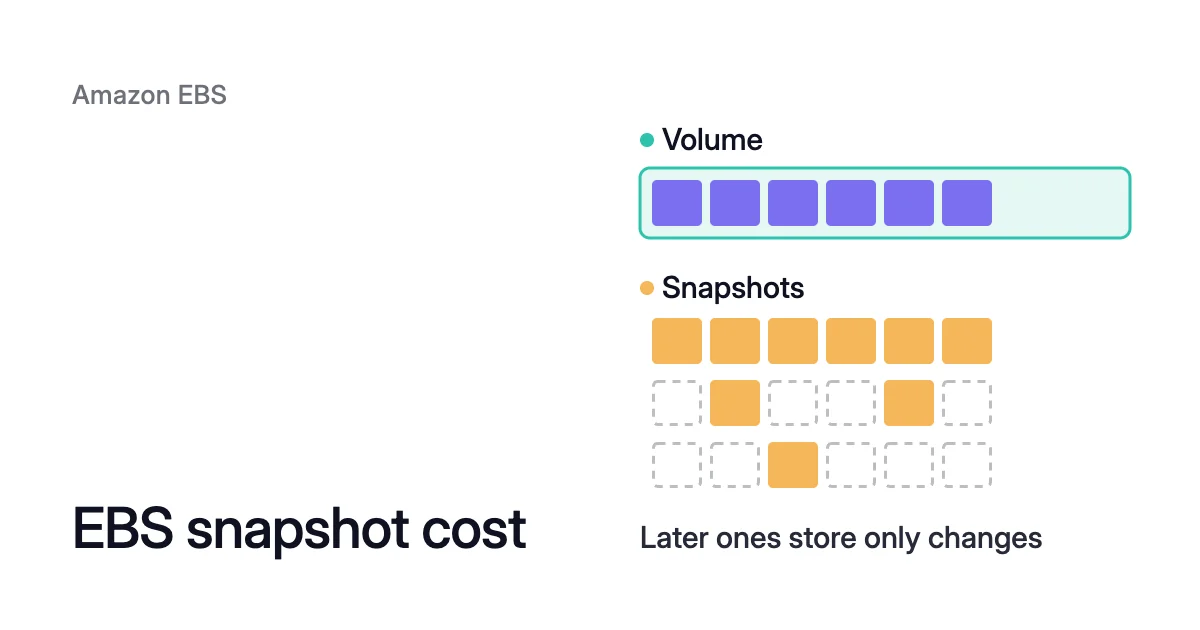
Short answer. EBS snapshot cost depends on the data each snapshot stores, not on its volume’s size, and you pay it until you delete the snapshot. At October 2026 list prices in US East (Northern Virginia), standard snapshot storage is $0.05 per GB-month and the archive tier $0.0125.
EBS snapshot cost follows the blocks each snapshot stores
Take AWS’s own example. An Amazon Elastic Block Store (EBS) volume holds 10 GiB of data. Its first snapshot, Snap A, is a full copy of all 10 GiB.
Then 4 GiB of that data changes. The next snapshot, Snap B, saves only those 4 GiB and refers back to Snap A for the other 6 GiB.
You pay for 14 GiB in all, and you still need only the newest snapshot to create the whole volume again.
Snap B is incremental, like every later snapshot of the same volume. A snapshot is charged for what it holds, while the volume is charged on the size you provision, “until you release the storage.”
AWS bases snapshot storage on the space your data consumes in Amazon Simple Storage Service (Amazon S3). Because “Amazon EBS does not save empty blocks,” a snapshot is often much smaller than its volume.
EBS snapshot pricing, at list price in US East (N. Virginia) in October 2026:
| Charge | Price |
|---|---|
Standard tier storage | $0.05 per GB-month |
Archive tier storage | $0.0125 per GB-month, with a 90-day minimum |
Restoring a snapshot from the archive tier | $0.03 per GB, once per restore |
Fast snapshot restore (FSR) | $0.75 per Data Services Unit-hour (DSU-hour), for each snapshot in each Availability Zone |
Prices differ by Region and change over time. Check the Amazon EBS pricing page for your Region before you plan around them.
Fast snapshot restore and copies add to EBS snapshot pricing
Two charges sit beside storage, and the first can easily outgrow it.
Fast snapshot restore (FSR) makes a volume created from a snapshot fully initialized at creation, so it delivers its provisioned performance at once.
You enable FSR per snapshot and per Availability Zone. Each pair is charged for every minute it’s enabled, with a one-hour minimum.
AWS’s own example puts one snapshot in one zone for 30 days at $540 (720 hours at $0.75). Two snapshots in three zones make six pairs, which AWS puts at 6 × $540 = $3,240.
Copies are the other charge. A snapshot copied to another Region is charged for the data transferred across Regions. Then you also pay standard snapshot storage for the copy in the destination Region.
A copy kept for disaster recovery means you pay for the same data in two Regions.
Deleting an EBS snapshot reduces cost only by its unique data
Deleting an old snapshot can reduce cost by far less than it seems. AWS removes only the data that no other snapshot references. Blocks that a later snapshot still uses are kept, and their cost moves to that later snapshot.
Back to AWS’s example: deleting Snap A takes the total from 14 GiB to 10 GiB, not to 4 GiB. Snap A’s 4 GiB of unique data goes, while the 6 GiB that Snap B still references stays.
Two more rules follow. Data you delete inside the volume doesn’t leave the old snapshots. AWS treats it as unique data of the earlier snapshots until every snapshot that references it is deleted.
Deleting a volume also has no effect on the snapshots made from it. You go on paying for them after the volume is gone.
That last rule also works in your favour. A detached gp3 volume you keep only in case you need its data is charged on its full provisioned size.
In US East (N. Virginia) in October 2026, gp3 lists at $0.08 per GB-month. Our EBS pricing calculator shows what such a volume costs a month, and what its empty space costs.
Snapshot the volume first, then delete it once you’re sure you won’t need the volume itself. The snapshot goes on at $0.05 per GB-month, for the written blocks alone.
EBS snapshot archive pricing: a quarter of the rate for a full copy
The archive tier stores a snapshot at $0.0125 per GB-month, a quarter of the standard rate. But it changes what you store. Archiving turns an incremental snapshot into a full snapshot of every block written to the volume when it was taken.
Archive tier terms: a 90-day minimum and slow restores
The terms are strict. You pay for at least 90 days. If you delete or permanently restore the snapshot sooner, you’re charged for the days left.
Restoring takes up to 72 hours, depending on the snapshot’s size. And you can’t create a volume from an archived snapshot until it’s back in the standard tier.
When archiving pays off
The archive tier fits the only snapshot of a volume, such as the one you keep when a project ends. A lone snapshot is already full, so archiving doesn’t make it any bigger.
Archived, it costs 200 × $0.0125 = $2.50 a month, or $30 a year. That’s $90 a year less.
If you ever restore it, add a one-time 200 × $0.03 = $6. Then add the standard rate for the restored copy, for as long as it stays in the standard tier.
When archiving costs more
The archive tier fits a chain of daily snapshots badly. AWS warns that archiving daily incremental snapshots of a single volume “can lead to higher costs” than leaving them in the standard tier.
The blocks that later snapshots reference stay in the standard tier, now charged to the next snapshot. You pay for the new full copy in the archive tier on top. AWS recommends archiving monthly, quarterly or yearly snapshots instead.
Set an EBS snapshot lifecycle policy, and know what it leaves behind
A lifecycle policy is the part of EBS snapshot cost optimization that keeps working after you’ve cleaned up once. Amazon Data Lifecycle Manager creates, keeps and deletes snapshots on a schedule, so retention stops depending on someone remembering.
Each policy picks its volumes or instances by tag. A policy holds up to 4 schedules.
Retention and archiving in a policy
Retention is the main setting. Without archiving, each schedule keeps its snapshots by count, from 1 to 1,000, or by age, from 1 day to 100 years. When a schedule reaches its limit, the oldest snapshot is permanently deleted.
Seven daily snapshots of a volume hold its data roughly once, plus six days of changes. Keep 30 and they hold it once, plus 29 days’ worth.
A schedule can also archive. Its snapshots must be at least 28 days apart, and it must keep archived ones for at least 90 days. Only one schedule in a policy can archive, and only in a policy that targets volumes.
What a lifecycle policy leaves behind
In these cases, snapshots outlive the policy’s retention:
- Target tag removed. The policy no longer manages that volume’s existing snapshots. They stay until you delete them.
- Volume deleted, count-based schedule. Its existing snapshots stay too.
- Volume deleted, age-based schedule. The policy goes on deleting its snapshots on time, up to but not including the last one.
- Locked or archived by you. The policy leaves such a snapshot alone if it’s still in that state when its retention ends.
- Policy in the error state. Under an age-based schedule, snapshots that expire meanwhile are kept indefinitely. You delete them yourself.
How to find and delete old EBS snapshots
To reduce EBS snapshot costs by deleting snapshots, start with the ones whose volume no longer exists. Run the two list commands in every Region you use. They read only the Region your AWS Command Line Interface is set to.
1. List your snapshots from before a date
This lists the snapshots you own that started before a date, with the volume each one came from:
$ aws ec2 describe-snapshots --owner-ids self \
    --query "Snapshots[?(StartTime<='<yyyy-mm-dd>')].[SnapshotId,VolumeId,StartTime,Description]" \
--output text2. List the volumes that still exist
$ aws ec2 describe-volumes --query "Volumes[*].VolumeId" --output text
3. Pick out the snapshots whose volume is gone
A snapshot whose volume ID isn’t in the list from step 2 usually came from a volume that has been deleted.
Copies are the exception. A snapshot made by a copy carries an arbitrary volume ID, which AWS says you shouldn’t use for any purpose. So a copy can show up here even when its source volume still exists.
4. Handle AMI and AWS Backup snapshots separately
Some snapshots can’t be deleted as they are. You can’t delete the root snapshot of a registered Amazon Machine Image (AMI). And deregistering an AMI doesn’t delete its snapshots by default, so you go on paying for them.
AMI root snapshots carry a description of the form Created by CreateImage(<instance-id>) for <ami-id>.
Snapshots that AWS Backup manages are different again. You delete them as recovery points in AWS Backup, not through EC2.
Deregistration is permanent. EC2 deletes the AMI, and nothing can launch from it afterwards. To deregister one you no longer need and delete its snapshots in the same step:
$ aws ec2 deregister-image --image-id <ami-id> --delete-associated-snapshots
A snapshot that another AMI also uses is kept.
5. Delete the rest
Deleting a snapshot removes that restore point, so check first that no recovery plan or image build depends on it. Then:
$ aws ec2 delete-snapshot --snapshot-id <snapshot-id>
If a Recycle Bin retention rule matches the snapshot, AWS keeps it in the Recycle Bin instead of deleting it at once. It’s charged there at the same rate as any snapshot. Check your retention rules before you count on the saving.
How Amoeba uses EBS snapshots
Amoeba optimizes block storage on Azure managed disks and Amazon EBS. On AWS it moves an EC2 instance’s data volumes onto one btrfs pool sized to your data, built from gp3 volumes.
Its snapshots come at the end of that move. Once the switch onto the pool is checked, Amoeba snapshots each old volume and deletes the volume. It deletes a volume only after that volume’s snapshot is complete.
Amoeba keeps each snapshot for a few days, then deletes it too. It deletes only the snapshots it took, so the snapshots your own policies take are left alone.
You pay for both sets of volumes only while the move runs. Then you pay for the snapshots while they’re kept. AWS charges them like every snapshot above: for the blocks each one stores, not the old volume’s size.
A volume that a later shrink releases is handled differently. Amoeba first moves its data onto the pool’s other volumes. Then it deletes the empty volume, with no snapshot.
If one of your lifecycle policies targeted an old volume, the deleted-volume rules above apply to that policy’s snapshots of it.
What Amoeba creates in your AWS account is listed in its guide. How to shrink an EBS volume explains why the old volumes are replaced at all. EBS cost optimization shows Amoeba on AWS end to end.
Sources: AWS, “Amazon EBS pricing” (opens in a new tab); AWS, “Delete an Amazon EBS snapshot” (opens in a new tab); AWS, “Considerations and limitations for archiving Amazon EBS snapshots” (opens in a new tab); AWS, “Create Amazon Data Lifecycle Manager custom policy for EBS snapshots” (opens in a new tab); AWS, “Amazon EBS fast snapshot restore” (opens in a new tab); AWS, “Deregister an Amazon EC2 AMI” (opens in a new tab); AWS CLI Command Reference, “describe-snapshots” (opens in a new tab); AWS, “Recover deleted EBS volumes, EBS snapshots, and EBS-backed AMIs with Recycle Bin” (opens in a new tab).