Published 2 November 2026 · Published by Zoorik
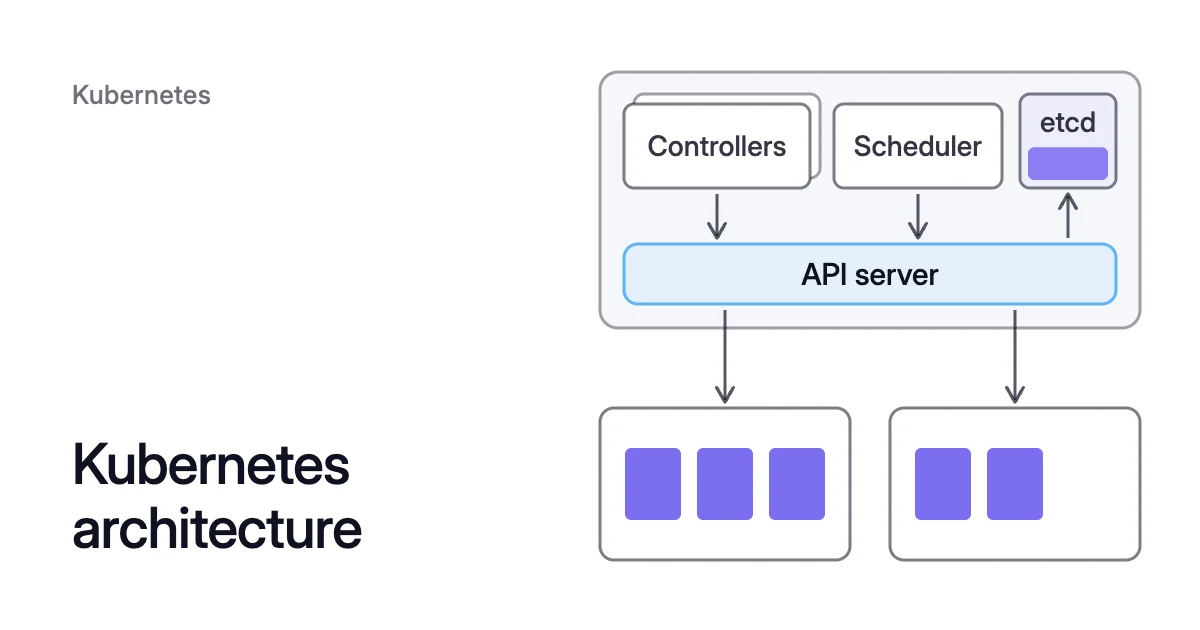
Short answer. Kubernetes architecture is a control plane plus worker nodes. The control plane stores the cluster’s state and decides which node runs each pod. On every node, the kubelet has a container runtime start the pods placed there. On Azure Kubernetes Service (AKS) and Amazon Elastic Kubernetes Service (EKS), the cloud provider operates the control plane for you.
The two halves: control plane and worker nodes
The control plane makes cluster-wide decisions, such as scheduling. It also responds to events, for example by starting a new pod when a Deployment has fewer replicas than it asks for.
Every cluster needs at least one worker node to run pods. In production, the control plane usually runs across several machines, and the cluster runs several nodes. That gives it fault tolerance and high availability.
A pod is a group of one or more containers that share network and storage. Worker nodes host the pods, and the scheduler picks the node for each one.
Kubernetes control plane components
kube-apiserver: the front end of the control plane, which exposes the Kubernetes API. The nodes, the scheduler, the controllers and kubectl all go through it. It scales by running more instances.etcd: the consistent, highly available key-value store that holds all cluster data. The Kubernetes docs advise a backup plan for that data.kube-scheduler: watches for new pods that have no node and picks a node for each. It weighs resource requests, hardware and policy constraints, and affinity rules, among other factors.kube-controller-manager: runs the built-in controllers, such as the Node, Job, EndpointSlice and ServiceAccount controllers. They’re compiled into one binary and run as one process.cloud-controller-manager: links the cluster to your cloud provider’s API. Its Node, Route and Service controllers check for deleted nodes, set up routes and manage load balancers. A cluster on your own premises has none.
How controllers keep the cluster at its desired state
A controller is a control loop, like a thermostat. It watches the state of the cluster, then makes or requests changes that move the current state closer to the desired state.
Built-in controllers act through the API server. The Job controller runs no pods or containers itself. It asks the API server to create or remove pods, then marks the Job finished once the work is done.
What runs on each node
kubelet: the agent on each node. It makes sure the containers in the node’s pods are running and healthy.- Container runtime: runs the containers. Kubernetes supports containerd, CRI-O and any other runtime that implements the Container Runtime Interface (CRI). AKS uses containerd on Linux node pools running Kubernetes 1.19 and later.
kube-proxy(optional): a network proxy that maintains each node’s network rules for Services. A network plugin that forwards Service traffic itself can replace it. AKS clusters on Azure CNI powered by Cilium use Cilium instead.
Add-ons are cluster features that run as ordinary workloads, such as DaemonSets and Deployments, in the kube-system namespace. Every cluster should have cluster DNS. On AKS, kube-system holds coredns, konnectivity-agent and metrics-server, among others.
Pods don’t get the whole node. AKS reserves CPU and memory on each node to keep it working, so pods can use less than the node’s total.
How a pod gets from kubectl apply to a node
You run
kubectl apply. It sends the Deployment to the API server, which stores it in etcd.Controllers see that the Deployment has fewer pods than it asks for. They ask the API server to create the missing pods.
The scheduler sees each new pod with no node. It picks a node and binds the pod to it through the API server.
That node’s kubelet sees the pod and has the container runtime start its containers.
How the scheduler picks a node
Filtering comes first. It keeps the feasible nodes, such as those with enough free resources for the pod’s requests. Scoring then ranks them, and the pod binds to the top-scoring node, with a tie picked at random.
The fit check adds up requests, not use. Even on a node with very low CPU and memory use, the scheduler won’t place a pod whose requests don’t fit.
If no node passes filtering, the pod stays unscheduled. A node autoscaler reacts to such pending pods and can add a node with room for their requests.
How the control plane and nodes talk
Kubernetes uses a hub-and-spoke pattern. All API calls from nodes, and from the pods they run, end at the API server. No other control plane part is designed to expose remote services.
In the other direction, the API server calls each node’s kubelet. It does this to fetch pod logs, to attach to running pods and for port-forwarding.
With the Konnectivity service, beta since Kubernetes 1.18, agents on the nodes open the connections to the control plane. All traffic from the control plane to the nodes then goes through them. On AKS, konnectivity-agent pods run in kube-system.
Kubernetes architecture on AKS and EKS
Both follow the same architecture. Azure operates the AKS control plane in Automatic and Standard modes alike, and each EKS cluster gets a control plane of its own.
| AKS | EKS | |
|---|---|---|
Control plane | Operated by Azure: the API server, etcd, the scheduler and both controller managers | One per cluster, with at least two API server instances and three etcd instances across three Availability Zones in a Region |
Node options | Node pools on Virtual Machine Scale Sets by default, or Virtual Machines node pools, where AKS manages each VM | EKS Auto Mode, Karpenter, managed node groups, self-managed nodes, AWS Fargate and EKS Hybrid Nodes |
Where the nodes live | The node resource group, a second resource group AKS creates for the cluster’s VMs, scale sets and storage | Amazon EC2 instances for managed node groups and self-managed nodes. Fargate needs no instances you manage, and hybrid nodes are your on-premises and edge machines |
On AKS, system node pools host critical system pods such as CoreDNS and konnectivity-agent. User node pools host your apps.
How requests and nodes shape your cloud cost
On AKS, each node is charged as a standard VM, and VM discounts such as Azure reservations apply automatically. So the number and size of your nodes set that part of your cloud cost.
Node autoscalers add nodes with room for pending pods’ requests, and don’t directly look at the pods’ real use. So a pod that requests far more than it uses still gets a node with room for its full request.
Requests set from measured use fit the same pods on fewer nodes, which is what pod right sizing is for.
Sources: Kubernetes, “Cluster Architecture” (opens in a new tab); Kubernetes, “Communication between Nodes and the Control Plane” (opens in a new tab); Kubernetes, “Controllers” (opens in a new tab); Kubernetes, “Kubernetes Scheduler” (opens in a new tab); Kubernetes, “Resource Management for Pods and Containers” (opens in a new tab); Kubernetes, “Node Autoscaling” (opens in a new tab); Microsoft Learn, “Azure Kubernetes Service (AKS) Core Concepts” (opens in a new tab); AWS, “Amazon EKS architecture” (opens in a new tab).