Published 1 November 2026 · By Rupesh, Guest author · SDE II · Published by Zoorik
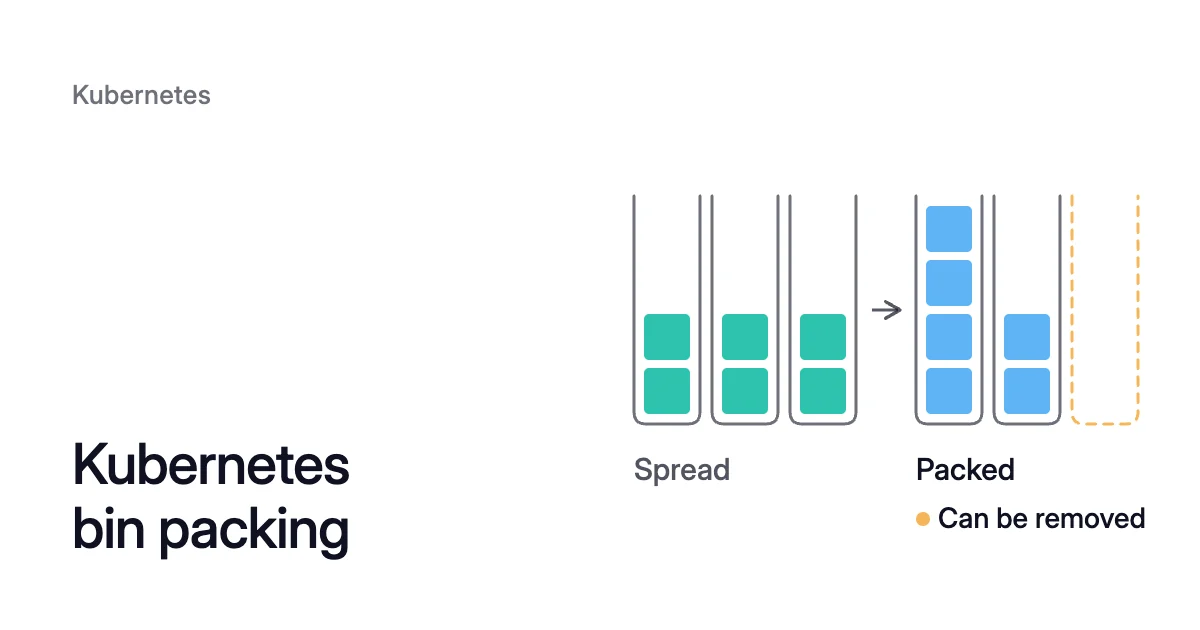
Short answer. Kubernetes bin packing places pods on as few nodes as their requests allow, so spare nodes can be removed. The default kube-scheduler spreads pods and MostAllocated makes it pack, but either way it counts requests, not use, and never moves a running pod.
A Kubernetes bin packing example: requests matter more than spread or pack
Take three nodes with 4 CPU each for pods and six pods that arrive one at a time, each requesting 1 CPU. Count only CPU and the NodeResourcesFit score.
The default, LeastAllocated, sends each pod to the node with the least requested so far, so the pods land two per node. Every node is 50% requested, and none is empty.
MostAllocated does the opposite. Four pods fill node-a, two go to node-b, and node-c stays empty, so an autoscaler can remove it.
Even when LeastAllocated spreads them, each node would be 15% requested (600m ÷ 4,000m). That is low enough for the Cluster Autoscaler to remove two of the three, one at a time, if the pods can move.
The request change did more than the strategy change.
What is bin packing in Kubernetes: a node score built on requests
Bin packing is the classic problem of fitting items of different sizes into as few fixed-size bins as possible. In a cluster the bins are nodes and the items are pods, sized by their CPU and memory requests. Microsoft’s Azure Kubernetes Service (AKS) guide calls it raising pod density on nodes instead of spreading pods across a pool.
The kube-scheduler places each new pod once, in two phases:
- Filtering removes every node that can’t take the pod. NodeResourcesFit checks that the node has room for everything the pod requests. Other plugins check taints, affinity, ports and volumes.
- Scoring ranks the nodes left, and the pod goes to the one with the highest weighted sum of plugin scores. Kubernetes automated bin packing happens here, for every pod, without you naming a node.
Both phases read requests. Karpenter’s docs say it directly: “kube-scheduler scores nodes based on pod resource requests”.
A node whose pods request 3.5 of its 4 CPU looks almost full whether they use 3.5 CPU or 0.2. No scoring strategy closes that gap between requests and use, which is Kubernetes overprovisioning.
A pool rarely packs to 100% either, because a pod can’t be split across nodes. A node with 4 CPU for pods takes two pods that request 1.5 CPU each. That strands the last 1 CPU, which no pod of that size can use.
The filter checks every resource too. A node with spare CPU and no spare memory is full for a pod that needs memory. See allocatable versus capacity for how much of a node pods get.
Spread or pack is a scoring strategy on the default scheduler
There’s no separate Kubernetes bin packing scheduler to install. Packing is a scoring strategy of the default scheduler’s NodeResourcesFit plugin, set in the kubescheduler.config.k8s.io/v1 configuration, stable since Kubernetes 1.25. The plugin offers three:
| Strategy | Which node it favours | Where you can set it |
|---|---|---|
LeastAllocated (the default) | The one with the most CPU and memory not yet requested, so pods spread | Every cluster runs it unless you change it |
MostAllocated | The one with the most already requested, so pods pack | Self-managed clusters, AKS scheduler profiles, EKS control plane configuration |
RequestedToCapacityRatio | Whatever a curve you define gives for each utilization level | Self-managed clusters and AKS scheduler profiles; EKS accepts only the other two |
RequestedToCapacityRatio maps utilization to a score through a shape. A curve from score 0 at 0% utilization up to score 10 at 100% packs, and the reverse spreads.
Microsoft’s recommended production profile for AKS uses a curve of its own. Its score reaches the top of 10 at 50% utilization and holds it to 85%. After that it drops to 5 at 90% and 0 at 100%, so nodes fill without running to the edge.
The NodeResourcesFit score is one of several, and spread scores push replicas onto different nodes. When a pod sets no spread constraints of its own, the scheduler applies built-in defaults. Only pods of a Service, ReplicaSet, StatefulSet or ReplicationController get them.
The defaults are a maxSkew of 3 across kubernetes.io/hostname and 5 across topology.kubernetes.io/zone, both ScheduleAnyway. Microsoft’s AKS bin-packing profiles disable PodTopologySpread because it “can override the weighted score from NodeResourcesFit if left enabled by default.”
To drop only the defaults, set defaultConstraints: [] with defaultingType: List on the plugin, as the Kubernetes docs show.
Why packing at placement never empties a node
A node that is 20% requested keeps its pods until something evicts them. Changing the strategy “affects only future scheduling”, as the Karpenter docs note, and running pods are not moved.
So a cluster drifts. As Deployments scale in and jobs finish, nodes are left part-full. MostAllocated only steers the next pods to the fuller ones.
Emptying a node takes a separate component, and the common ones measure nodes by requests too:
- The Cluster Autoscaler counts a node as unneeded when its pods request under 50% of its allocatable CPU and memory. That 50% is the default
--scale-down-utilization-thresholdof 0.5. Every pod must also be able to run elsewhere. The autoscaler removes the node after 10 minutes unneeded, and removes non-empty nodes one at a time. Why a node stays in service covers the usual blockers. - Karpenter simulates a tight bin packing of pending pods to choose which nodes to launch, and its instance type math “only uses requests”. The scheduler then places the pods, and when it spreads them, Karpenter’s nodes “can end up under-packed”. Consolidation then churns, which is why Karpenter recommends MostAllocated.
So a node whose pods request 60% of its CPU and use 10% counts as 60% full to both. That sets the order for bin packing: requests that match real use first, then packing, then removal.
The Kubernetes cost optimization guide takes a cluster through the same order: requests first, then nodes. The descheduler guide covers another way to move running pods.
Tight packing trades burst room for fewer nodes
Packing leaves less unrequested room on each node, and some workloads live in that room. Take a pod whose limits sit above its requests. Karpenter’s docs warn it may be unable to burst into more memory, risking an out-of-memory (OOM) kill.
It may also be CPU-throttled sooner than under the default spread. More pods share each node too, so one node failing takes more of them down.
Three habits help:
- Set requests from measured peaks, so packing by requests is close to packing by use.
- Give replicated workloads a PodDisruptionBudget and the spread rules they need, in a scheduler profile that keeps PodTopologySpread on.
- On AKS, score nearly full nodes down with a RequestedToCapacityRatio curve, as Microsoft’s does at 90%.
How to turn on bin packing on AKS and EKS
On a self-managed cluster, set type: MostAllocated under the NodeResourcesFit plugin’s scoringStrategy in a KubeSchedulerConfiguration file and pass it with kube-scheduler --config.
On a managed cluster the provider runs the kube-scheduler, so each service exposes the setting its own way. Test it on a non-production cluster first.
EKS: advanced control plane configuration
On Kubernetes 1.31 or later, Amazon Elastic Kubernetes Service (EKS) lets you set nodeResourcesFit.scoringStrategy to LeastAllocated or MostAllocated. Resource weights go from 1 to 100. EKS exposes no other scheduler parameter, so the spread defaults stay.
- Set the strategy:
$ aws eks update-cluster-config \
  --name <cluster-name> \
--kube-scheduler-config '{"nodeResourcesFit":{"scoringStrategy":{"type":"MostAllocated"}}}'- Wait for EKS’s rolling update of the control plane, which takes several minutes:
$ aws eks wait cluster-active --name <cluster-name>
AKS: scheduler profiles
AKS clusters on Kubernetes 1.33 or later take scheduler profiles through a SchedulerConfiguration resource named upstream. In October 2026 Microsoft’s setup guide, “Configure scheduler profiles”, asks for Azure CLI 2.90.0 or later. It asks for no extension or feature flag.
Microsoft’s bin-packing guide still lists the preview prerequisites:
- Azure CLI 2.76.0 or later
- aks-preview extension 18.0.0b27 or later
UserDefinedSchedulerConfigurationPreviewfeature flag
- Turn the feature on and check that its custom resource definition exists:
$ az aks update \
  --resource-group <resource-group> \
  --name <cluster-name> \
  --enable-upstream-kubescheduler-user-configuration

$ kubectl get crd schedulerconfigurations.aks.azure.com
- Apply a profile with
kubectl apply -f. Microsoft’s MostAllocated profile weights CPU eight times above memory and disables PodTopologySpread:
apiVersion: aks.azure.com/v1alpha1
kind: SchedulerConfiguration
metadata:
  name: upstream
spec:
  rawConfig: |
    apiVersion: kubescheduler.config.k8s.io/v1
    kind: KubeSchedulerConfiguration
    profiles:
      - schedulerName: cpu-binpack-scheduler-mA
        plugins:
          multiPoint:
            enabled:
              - name: NodeResourcesFit
            disabled:
              - name: PodTopologySpread
        pluginConfig:
          - name: NodeResourcesFit
            args:
              apiVersion: kubescheduler.config.k8s.io/v1
              kind: NodeResourcesFitArgs
              scoringStrategy:
                type: MostAllocated
                resources:
                  - name: cpu
                    weight: 8
                  - name: memory
weight: 1- Set
spec.schedulerName: cpu-binpack-scheduler-mAin the pod template of each workload that should use it. Pods without that field keep the default scheduler.
AKS doesn’t support plugins that target its aks-system scheduler, or a profile with that name.
How Coral helps empty spare nodes
A scoring strategy places new pods. It doesn’t make requests match use or empty the part-full nodes you already run. Coral optimizes Kubernetes on AKS and EKS clusters running Kubernetes 1.30 or later, and works on both halves.
- Requests. Coral rebalances each container’s CPU and memory requests to what it uses, with headroom on top. Pod sizing starts when you switch on “Automatically optimize” for a policy or a workload.
- The Evictor. Coral’s Evictor moves pods off lightly used nodes and leaves each empty node for your autoscaler. It drains only in pools whose setting allows it, which is off by default. Even then, it never overrides a PodDisruptionBudget.
- Node optimization. Coral works out from pod requests how many nodes each pool needs, and every pool keeps at least one node. Before each drain it checks on the live cluster that every pod fits elsewhere, with its affinity, taints, spread, ports and zones. Nodes drain one at a time, and a drain that can’t finish in time puts the node back into service.
- Removal. Coral hands each emptied node to your Cluster Autoscaler, AKS node auto-provisioning (NAP) or Karpenter, whose own timers decide when it goes. It deletes machines itself only in fixed-size pools that nothing else manages. Pools that Karpenter or NAP already consolidates are left to them.
When a pod has to move
For pods of a Deployment or an Argo Rollout, Coral first tries a warm handover:
- Coral scales the owner up by one.
- It waits until the new pod is Ready on another node.
- Then it evicts the old one.
No process state moves, and open connections to the old pod end.
Warm handover isn’t used for these, among others:
- StatefulSets
- the Recreate strategy
- ReadWriteOnce volumes
- an app scaled by a Horizontal Pod Autoscaler, during consolidation
Those pods are evicted within their PodDisruptionBudget, and an app that runs a single copy restarts briefly. A pod annotated karpenter.sh/do-not-disrupt: "true" is never moved, and its node is kept.
The guide’s section on consolidation lists the steps and the wait before removal. The FAQ explains how consolidation avoids scheduling failures later.
What Coral did on our own cluster
On our own AKS development cluster, on 6 October 2026, Coral worked out that the apps would fit on fewer machines. It moved them and removed one of the two 4-CPU workers on its own in under 10 minutes. That is $147.46 a month less at Azure pay-as-you-go list prices.
Apps that run a single copy restarted once on another machine. The full run is in the case study.
Sources: Kubernetes, “Resource Bin Packing” (opens in a new tab); Kubernetes, “Scheduler Configuration” (opens in a new tab); Kubernetes, “Pod Topology Spread Constraints” (opens in a new tab); Kubernetes Cluster Autoscaler, “Frequently Asked Questions” (opens in a new tab); Karpenter, “Scheduling” (opens in a new tab); Amazon EKS User Guide, “Configure advanced Kubernetes control plane parameters” (opens in a new tab); Microsoft Learn, “Configure scheduler profiles on Azure Kubernetes Service (AKS)” (opens in a new tab); Microsoft Learn, “Bin Pack Nodes with scheduler profiles on Azure Kubernetes Service (AKS)” (opens in a new tab).