Published 1 November 2026 · By Iqbal, Guest author · SDE II · Published by Zoorik
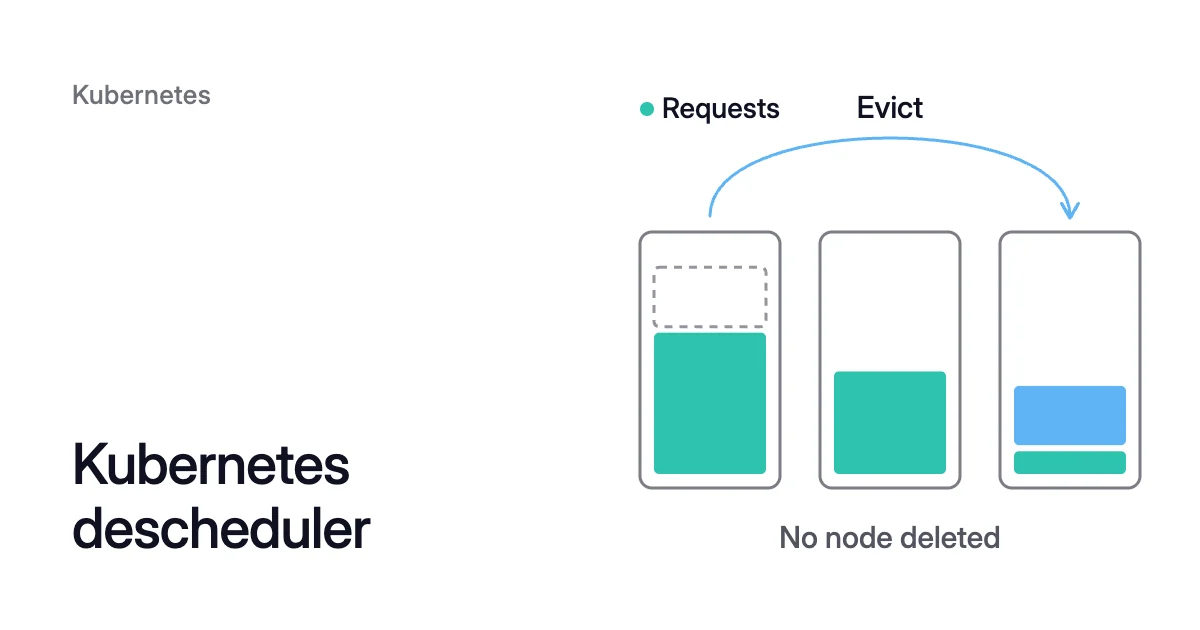
Short answer. The Kubernetes descheduler evicts pods from nodes where they no longer belong, so the scheduler can place their replacements better. Most strategies target pods that break a placement rule, keep restarting or have failed, and the descheduler never schedules a pod or deletes a node.
The Kubernetes descheduler evicts pods so the scheduler can place them again
Picture three identical nodes after one fails. Its pods restart on the other two, and its replacement joins almost empty. Requests on node-a, node-b and node-c sit at 70%, 45% and 10% of each node’s allocatable resources.
Nothing moves them back. Kubernetes picks a node for each new pod once, and Amazon’s EKS documentation puts it plainly: “The Kubernetes scheduler never relocates a pod that is already running.”
Placement drifts in quieter ways too:
- a node gains a taint
- a node loses a label
- an affinity rule stops matching
When the descheduler, a SIG Scheduling project, finds pods like these, it evicts them. Choosing where they go next isn’t its job. The pod’s controller creates a replacement, and the default scheduler places it by the same rules as the first time.
Every eviction goes through the Eviction API. So a PodDisruptionBudget, or PDB, that allows no more disruptions keeps the pod where it is. Removing a node that ends up empty is your autoscaler’s job.
Under the default settings, these pods are never evicted:
- pods with the
system-cluster-criticalorsystem-node-criticalpriority class - pods that no ReplicaSet, StatefulSet, Job or ReplicationController owns, because nothing would recreate them
- DaemonSet pods
- pods with local storage, which in the descheduler’s code means an emptyDir or hostPath volume
Pods are evicted even if they use a Persistent Volume Claim (PVC), unless you protect them.
Ten strategies, and only two of them look at how full a node is
The descheduler calls its strategies plugins. Deschedule plugins judge pods one at a time. Balance plugins judge a group of pods against how it was meant to be spread.
| Strategy | Kind | What it evicts |
|---|---|---|
RemoveDuplicates | Balance | Extra pods of one ReplicaSet, StatefulSet or Job on the same node |
LowNodeUtilization | Balance | Pods on busy nodes, so they land on lightly used ones |
HighNodeUtilization | Balance | Pods on lightly used nodes, so they pack onto fewer |
RemovePodsViolatingTopologySpreadConstraint | Balance | The fewest pods needed to bring each constraint back within maxSkew |
RemovePodsViolatingInterPodAntiAffinity | Deschedule | Pods that break an anti-affinity rule |
RemovePodsViolatingNodeAffinity | Deschedule | Pods whose node no longer matches their node affinity |
RemovePodsViolatingNodeTaints | Deschedule | Pods that no longer tolerate their node’s NoSchedule taints |
RemovePodsHavingTooManyRestarts | Deschedule | Pods that reach a restart count |
PodLifeTime | Deschedule | Pods matched by age, state, condition or exit code |
RemoveFailedPods | Deschedule | Pods in the Failed phase |
LowNodeUtilization spreads pods, and HighNodeUtilization packs them
Both utilization strategies measure a node by what its pods request, as a percentage of the node’s allocatable CPU, memory and pod capacity.
Actual use doesn’t count by default, so kubectl top can tell a different story. LowNodeUtilization can read real usage from Metrics Server or Prometheus instead. HighNodeUtilization can’t yet.
LowNodeUtilization fills lightly used nodes
Descheduler LowNodeUtilization takes two maps, thresholds and targetThresholds. A node under thresholds for every resource is underutilized. A node over targetThresholds for any one resource is overutilized.
The strategy evicts pods from the overutilized nodes and expects their replacements to land on the underutilized ones. It does nothing when either group is empty.
When it reads usage from Prometheus, it evicts at most one pod from each overutilized node per cycle, unless evictionLimits.node allows more.
HighNodeUtilization empties them
HighNodeUtilization takes only thresholds. Pods on underutilized nodes are evicted so they’re recreated on busier ones. The project describes the strategy as a way to trigger scale-down when you run node autoscaling.
The same three nodes under each strategy
The Helm chart’s default policy turns on LowNodeUtilization, with thresholds of 20% and targetThresholds of 50%. If your goal is fewer nodes, change that before you install.
HighNodeUtilization at the 20% thresholds in the example below evicts node-c’s pods instead. MostAllocated then prefers the busier node-a, which has room (70% + 10% = 80%).
Three nodes can become two. Removing node-c reduces the pool’s machine cost by a third.
How a Kubernetes descheduler policy decides what to evict
Each policy is a DeschedulerPolicy object, still at API version descheduler/v1alpha2. You pass it to the binary with --policy-config-file.
Its top level holds limits that apply to every eviction, all unlimited when unset:
maxNoOfPodsToEvictPerNodemaxNoOfPodsToEvictPerNamespacemaxNoOfPodsToEvictTotal(per cycle)
Below them sit one or more profiles. Each has a pluginConfig list of each plugin’s arguments and a plugins block that enables strategies under deschedule or balance.
The DefaultEvictor plugin filters pods for every strategy, and three of its arguments do most of the safety work:
- Node fit: with
nodeFiton (it’s off by default), a pod is evicted only if another node could take it. That node must match the pod’s node selector and node affinity, and the pod must tolerate its taints. It also needs free capacity for the pod’s requests and can’t be unschedulable, and pod anti-affinity must allow the move. - Few replicas:
minReplicasspares pods whose owner runs fewer replicas than its value. - Protections:
podProtections, new in v0.34, switches built-in protections off underdefaultDisabled. It adds others underextraEnabled, such asPodsWithPVCorPodsWithoutPDB. Older releases such as v0.33 set the same protections with booleans likeignorePvcPods.
From v0.34, a pod can ask to stay with the descheduler.alpha.kubernetes.io/prefer-no-eviction annotation. Each strategy decides whether to respect it. It binds for all of them only when DefaultEvictor sets noEvictionPolicy to Mandatory.
At --v=4 or higher, the descheduler logs why each skipped pod wasn’t evictable.
Install the descheduler Helm chart in dry-run mode first
The chart comes from the project itself, and its version tracks the descheduler’s. As a Job, a CronJob or a Deployment, the descheduler runs in kube-system as a critical pod, so it isn’t evicted itself.
By default the chart runs a CronJob every 2 minutes, with a profile that enables seven strategies:
- Balance: RemoveDuplicates, RemovePodsViolatingTopologySpreadConstraint and LowNodeUtilization.
- Deschedule: RemovePodsHavingTooManyRestarts (at 100 restarts), RemovePodsViolatingNodeTaints, RemovePodsViolatingNodeAffinity and RemovePodsViolatingInterPodAntiAffinity.
It also changes two protections. Pods with a PVC are protected, and pods with local storage are not. So with the chart’s defaults, a pod with an emptyDir or hostPath volume can be evicted.
A Kubernetes descheduler example: pack nodes for scale-down
- Write a values file. It replaces the default profile with HighNodeUtilization alone and runs the descheduler as a Deployment every 5 minutes. It also turns on dry-run mode, which previews the evictions without making them:
# pack-values.yaml
kind: Deployment
deschedulingInterval: 5m
cmdOptions:
  v: 3
  dry-run: true
deschedulerPolicy:
  profiles:
    - name: pack
      pluginConfig:
        - name: DefaultEvictor
          args:
            nodeFit: true
        - name: HighNodeUtilization
          args:
            thresholds:
              cpu: 20
              memory: 20
      plugins:
        balance:
          enabled:
- HighNodeUtilization- Install the chart version whose minor matches your cluster’s, such as 0.33.0 for Kubernetes 1.33. The project’s compatibility matrix pairs each release since v0.18 with one Kubernetes minor version: the current v0.37, of October 2026, with 1.37. It also says a release is tested only against the three latest minor versions.
$ helm repo add descheduler https://kubernetes-sigs.github.io/descheduler/
$ helm install descheduler descheduler/descheduler --namespace kube-system --version <chart-version> -f pack-values.yaml
- Read the descheduler’s logs until the evictions it reports are the ones you expect.
- Set
MostAllocatedscoring, as below. - Check that every app it would touch has a PDB and a second replica. A real eviction restarts the pod elsewhere.
- Set
dry-runtofalseand runhelm upgradeto make those evictions real.
Both clouds now let you set MostAllocated:
- EKS: advanced control plane configuration sets kube-scheduler’s
nodeResourcesFit.scoringStrategytoMostAllocatedon Kubernetes 1.31 or later. - AKS: scheduler profiles on Kubernetes 1.33 or later set
NodeResourcesFittoMostAllocated. A profile applies to pods that name it inschedulerName, or to the whole cluster underdefault-scheduler. You turn them on with--enable-upstream-kubescheduler-user-configuration.
- Azure CLI 2.76.0 or later
- the aks-preview CLI extension version 18.0.0b27 or later
- the
UserDefinedSchedulerConfigurationPreviewfeature flag
Packing has a cost the EKS documentation spells out. When a densely packed node becomes unhealthy or its instance is retired, more pods are affected at once.
Kubernetes descheduler alternatives: your autoscaler may already remove the node
If the aim is to reduce cloud cost, the eviction is the small part. A node costs money until something deletes it, and that’s your autoscaler’s job. Check what it already does before you add a second component that evicts pods on its own schedule.
- Cluster Autoscaler: by default, it checks every 10 seconds for nodes it could remove. A node qualifies when its summed CPU and memory requests are under 50% of allocatable and its pods can all move. A node unneeded for 10 minutes is drained and removed, one non-empty node at a time.
- Karpenter: consolidation with
consolidationPolicy: WhenEmptyOrUnderutilized, the default, removes or replaces any node it can to reduce cost.WhenEmptyremoves only empty nodes. On AKS, node auto-provisioning (NAP) is based on Karpenter. - Scheduler scoring:
MostAllocatedalone packs new pods only. Running pods stay where they are until something evicts or restarts them.
The descheduler earns its place where the autoscalers don’t look:
- a pod left on a node whose taints or labels changed
- replicas bunched onto one node after an outage
- a topology spread that drifted
- a pod restarting on a node that can’t attach its volume
By default, the scheduler, the descheduler and the Cluster Autoscaler all judge a node by requests, not use. A node whose pods request 60% of its CPU but use 15% looks busy to all three, so none of them empties it.
Requests that match real use come first and node removal second. That’s the order the Kubernetes cost optimization guide follows. Kubernetes bin packing explains why placement alone never empties a node, even with the scheduler set to pack.
How Coral empties lightly used nodes
Coral optimizes Kubernetes on AKS and EKS. Its Evictor does the node-emptying part of this job inside your cluster.
Despite the name, it’s a part of Coral, not the descheduler’s DefaultEvictor plugin. The Evictor:
- moves pods off lightly used nodes and leaves your autoscaler to remove each empty node
- drains only in node pools whose setting allows it, which is off by default
- never deletes a machine and never overrides a PDB
- has a “Dry run” that lists the nodes it would empty in the Event log, without moving any pod
Node optimization handles the rest. Before it drains a node, Coral checks on the live cluster that every pod fits on another Ready node. The check takes in affinity, taints, spread, ports and zones.
Coral cordons and drains one node at a time. Where a Deployment or Argo Rollout qualifies, Coral first starts a replacement on another node. It waits until that copy is Ready before the old pod goes.
Other pods are evicted within their PDB, so a single-replica app among them restarts briefly.
Coral waits for the time set in “Wait before removing empty nodes”, then hands the empty node to your autoscaler. It deletes the machine itself only in fixed-size pools that nothing else manages. Pools that Karpenter or NAP already consolidate are left to them.
Once you switch on “Automatically optimize”, Coral also rebalances CPU and memory requests to real use. Nodes then stop looking fuller than they are.
On our own AKS development cluster, Coral moved the apps off one 4-CPU worker and removed it in under 10 minutes. That reduced the cluster’s machine cost by $147.46 a month. Apps that ran a single copy restarted once on another machine.
The case study has the full run.
Sources: Kubernetes SIGs, “Descheduler for Kubernetes” (opens in a new tab) (README and source code, release-1.37, with release-1.33 and the v0.34.0 release notes for what changed in v0.34); Kubernetes SIGs, “Descheduler for Kubernetes” (opens in a new tab) Helm chart (README and values.yaml, release-1.37); AWS, “Advanced Kubernetes control plane configuration” (opens in a new tab); Microsoft Learn, “Configure scheduler profiles on Azure Kubernetes Service (AKS)” (opens in a new tab); Microsoft Learn, “Bin Pack Nodes with scheduler profiles on Azure Kubernetes Service (AKS)” (opens in a new tab); Kubernetes Autoscaler, “Cluster Autoscaler FAQ” (opens in a new tab); Karpenter, “Disruption” (opens in a new tab); Microsoft Learn, “Overview of node auto-provisioning (NAP) in Azure Kubernetes Service (AKS)” (opens in a new tab).