Published 1 November 2026 · By Harsh, Guest author · Network engineer at Palo Alto Networks · Published by Zoorik
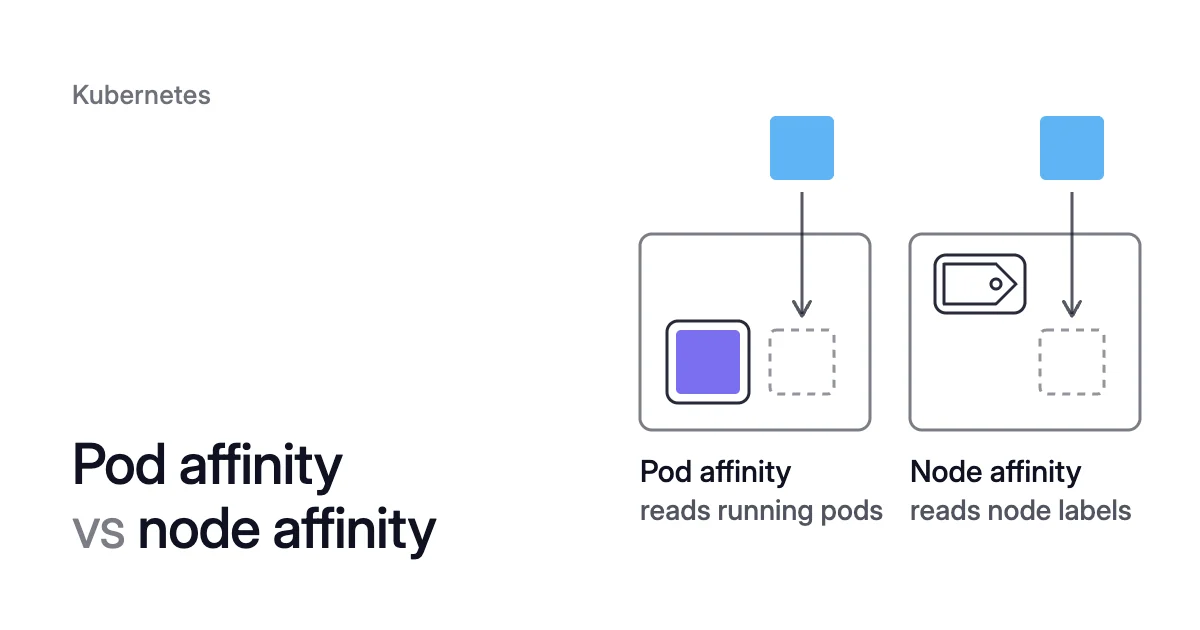
Short answer. Pod affinity vs node affinity comes down to what each rule reads: the node’s own labels, or the pods running in a topology domain. Node affinity picks nodes by label, and pod affinity and anti-affinity place a pod near other pods or away from them.
The difference between pod affinity and node affinity is what the rule reads
Picture a web Deployment with 3 replicas that must stay in one node pool on Azure Kubernetes Service (AKS). No two replicas may share a node.
Staying in the pool depends only on the node’s own label, so it’s node affinity. Keeping replicas apart depends on which pods already run on each node, so it’s pod anti-affinity. Make that rule required, and the pool needs 3 nodes whatever the replicas request.
Node affinity sits in .spec.affinity.nodeAffinity and reads the node’s own labels. Those can be topology.kubernetes.io/zone, a node pool label your cloud adds, or one you add yourself.
Inter-pod affinity sits in .spec.affinity.podAffinity and .spec.affinity.podAntiAffinity. It reads the labels of pods already running in a topology domain.
The domain is set by topologyKey, which names a node label: with kubernetes.io/hostname each node is its own domain. With topology.kubernetes.io/zone, each zone is one domain.
Required rules filter nodes, preferred rules score them
Scheduling a pod takes two passes. First the scheduler filters out every node where the pod can’t run. Then it scores the nodes that are left and picks the highest.
Each kind of affinity comes in two strengths, one for each pass:
- Required. A
requiredDuringSchedulingIgnoredDuringExecutionrule is a hard filter. A node that breaks it is never a candidate. - Preferred. A
preferredDuringSchedulingIgnoredDuringExecutionrule carries a weight from 1 to 100, which is added to the score of every node that meets it. For anti-affinity, the weight is subtracted from every node whose domain already runs a matching pod. When no node meets a preferred rule, the pod still lands on one that passes the filters.
Rules are checked only when a pod is scheduled, which is what IgnoredDuringExecution in each name means. The Karpenter docs note that Kubernetes never implemented any other variant. A rule applies again, in full, only when a pod is placed: on a rollout, a scale-up or a node drain.
Node affinity vs node selector: exact labels, or operators and preferences
Use nodeSelector when one exact label match says everything. Use node affinity when you need an OR, a NotIn, a numeric comparison or a preference.
nodeSelector is the simplest constraint: a map of labels. Kubernetes schedules the pod only onto nodes that carry every one of them.
Node affinity covers the same ground and adds three things:
- operators:
In,NotIn,Exists,DoesNotExist,GtandLt - OR logic: terms in
nodeSelectorTermsare ORed, and the expressions inside one term are ANDed - preferred rules, which only shift the score
If a pod sets both nodeSelector and node affinity, a node has to satisfy both.
List your nodes’ labels first:
$ kubectl get nodes --show-labels
This node affinity keeps a pod in one AKS node pool and prefers one zone inside it:
spec:
  affinity:
    nodeAffinity:
      requiredDuringSchedulingIgnoredDuringExecution:
        nodeSelectorTerms:
        - matchExpressions:
          - key: kubernetes.azure.com/agentpool
            operator: In
            values:
            - <pool-name>
      preferredDuringSchedulingIgnoredDuringExecution:
      - weight: 50
        preference:
          matchExpressions:
          - key: topology.kubernetes.io/zone
            operator: In
            values:
- <zone>So the scheduler drops every node outside the pool, then adds 50 to the score of each remaining node in that zone.
kubernetes.azure.com/agentpool is an AKS reserved label that holds the node pool’s name. On Amazon Elastic Kubernetes Service (EKS), managed node groups carry labels prefixed eks.amazonaws.com. Among them is eks.amazonaws.com/capacityType, with the value ON_DEMAND or SPOT.
The EKS docs suggest that label for keeping stateful or fault-intolerant apps on On-Demand nodes. Fault-tolerant ones can go on Spot.
Node anti-affinity and taints
NotIn and DoesNotExist give you node anti-affinity, which keeps a pod off nodes with a given label. Taints work from the node’s side.
The docs call node affinity a property of pods that attracts them to nodes. Taints are “the opposite”: a tainted node repels pods that don’t tolerate the taint.
A toleration lets a pod onto a tainted node but doesn’t send it there. So dedicating a pool to one workload takes both halves. The taint keeps other pods out, and node affinity keeps that workload in.
Pod affinity and anti-affinity place a pod next to, or away from, other pods
Kubernetes pod affinity pairs a label selector over pods with a topologyKey. In the docs’ own example, each web replica requires a node (topologyKey: kubernetes.io/hostname) that already runs a cache pod labelled app=store.
Pod anti-affinity flips the test, so the pod avoids domains that already run matching pods. Its common job is spreading a Deployment’s replicas so that one node failure can’t take them all.
A preferred anti-affinity rule on hostname asks the scheduler to spread replicas when it can. It lets two share a node when it must:
# in the Deployment's pod template (spec.template.spec)
affinity:
  podAntiAffinity:
    preferredDuringSchedulingIgnoredDuringExecution:
    - weight: 100
      podAffinityTerm:
        labelSelector:
          matchExpressions:
          - key: app
            operator: In
            values:
            - web
topologyKey: kubernetes.io/hostnamematchLabelKeys, stable since Kubernetes 1.33, adds the incoming pod’s own label values to the selector. With pod-template-hash, it counts only pods from the same Deployment revision, so a rolling update doesn’t break the rule.
Only In, NotIn, Exists and DoesNotExist work here. Gt and Lt are for node affinity only, and topologyKey can’t be empty.
Inter-pod rules cost scheduling time. The docs say they “require substantial amounts of processing” and don’t recommend them in clusters larger than several hundred nodes.
The Cluster Autoscaler FAQ adds that its latency targets hold only if no pod uses pod affinity or anti-affinity. Anti-affinity also needs every node to carry the topologyKey label.
Pod anti-affinity vs node affinity
Node affinity asks what the node is, and pod anti-affinity asks what already runs there. “Not on Spot nodes” is node affinity with NotIn. “Not on a node that already runs another replica” is pod anti-affinity.
Sometimes “what runs there” really means “nodes of one kind”. Then label those nodes and use node affinity, which stays true as pods come and go.
Pod affinity vs node affinity: node labels per node, or pods per domain
| nodeSelector | Node affinity | Pod affinity | Pod anti-affinity | |
|---|---|---|---|---|
Matches | Node labels | Node labels | Labels of pods already in the domain | Labels of pods already in the domain |
Field | spec.nodeSelector | spec.affinity.nodeAffinity | spec.affinity.podAffinity | spec.affinity.podAntiAffinity |
Judged per | Node | Node | Domain named by topologyKey (node, zone) | Domain named by topologyKey (node, zone) |
Hard rule | Always hard | required… | required… | required… |
Soft rule | None | preferred…, weight 1 to 100 added | preferred…, weight 1 to 100 added | preferred…, weight 1 to 100 subtracted |
Operators | Exact match on every label | In, NotIn, Exists, DoesNotExist, Gt, Lt | In, NotIn, Exists, DoesNotExist | In, NotIn, Exists, DoesNotExist |
Large clusters | No warning in the docs | No warning in the docs | Not recommended past several hundred nodes | Not recommended past several hundred nodes |
Typical use | One fixed label | Pool, zone, capacity type, hardware | Keep chatty services together | Spread replicas |
How it can hold a node | Pods can move only to labelled nodes | Same, for required terms | Pods can move only to where their partner runs | Required hostname rule needs one node per replica |
A required rule can keep a node, and its cost, in the cluster
Draining a node evicts its pods. Their controllers create replacements, and the scheduler places each one under the same rules as before. So a replacement with nowhere to go stays Pending.
The Cluster Autoscaler checks for that before it removes a node. Its FAQ says it simulates the kube-scheduler: “if there’s no other node where a given pod can schedule, the pod’s node won’t be scaled down.”
Required anti-affinity holds one node per replica
Required anti-affinity on kubernetes.io/hostname is the plain case: a Deployment with 3 replicas runs one per node, so it needs 3 nodes. That holds whatever those replicas request.
Suppose they can run only in a 3-node pool. Every node in it could be close to idle, and still none could go.
The FAQ names this pattern. Pods that fit one per node on some subset of nodes “will always block CA from scaling down their nodes”.
The replacement would stay Pending, so the Cluster Autoscaler keeps node-3, and the same check keeps node-1 and node-2. The floor is the replica count, so 4 replicas would need 4 nodes.
The docs’ web-and-cache example locks the same way. Both Deployments carry required hostname anti-affinity, and the web tier also requires a cache pod on its node. So in the docs’ three-node cluster, each node ends up with one pair that can’t move.
Other required rules narrow where a pod can go
These don’t pin a pod to one node, but each one narrows its choices:
- One pool. Required node affinity to one pool means the pod can move only inside that pool. If the pool’s other nodes are full, its node stays.
- One per zone. Required anti-affinity on
topology.kubernetes.io/zoneallows one matching pod per zone. So a fourth replica in a three-zone cluster stays Pending. - Volumes. A volume can carry node affinity too. Topology-aware provisioners set it on the PersistentVolumes they create. That ties the pods using that volume to nodes in its zone.
Preferred rules depend on the autoscaler
The Cluster Autoscaler respects nodeSelector and required node affinity when it picks a node group to grow. That works if the groups are labelled to match. Preferred rules play no part in that choice.
When Karpenter builds a pod’s requirements, it starts by treating preferred affinities as required. It relaxes them one at a time, only when they can’t be met.
Karpenter also uses them to judge whether a pod can shift to another node. Its docs warn that preferred affinities “can result in more nodes being created than expected”.
Choosing the rule: preferred by default, required only where the app needs it
Default to preferred, and make a rule required only where breaking it breaks the app.
- If the pod needs something only some nodes have, such as a zone, a pool, a GPU or On-Demand capacity, use required node affinity. For one exact label, nodeSelector is enough.
- If the pod runs better on some nodes but fine on any, use preferred node affinity.
- If other pods must stay off a pool, taint the pool and give the toleration to the pods that belong there. Then add node affinity to those pods.
- If two services talk a lot, use preferred pod affinity on hostname or zone. Make it required only if the app can’t work across zones.
- If replicas should sit apart, use preferred pod anti-affinity on hostname or a topology spread constraint. That page compares the two.
- If two replicas on one node would be unsafe, use required hostname anti-affinity. ZooKeeper, a quorum store, is the docs’ high-availability example. Count one node per replica, plus a spare so a drain has somewhere to put the evicted one.
Within the room these rules leave, requests decide how many nodes the pods fill. How bin packing works covers that half. The Kubernetes cost optimization guide takes requests first, then nodes.
Cluster Autoscaler not scaling down lists the other reasons a node stays.
How Coral checks affinity before it drains a node
Coral optimizes Kubernetes on AKS and EKS. It rebalances CPU and memory requests and drains spare nodes so your autoscaler can remove them. When it consolidates nodes, its drain follows the same scheduling rules:
- The check. Before it drains a spare node, Coral simulates the scheduler on the live cluster. Every pod on the node must fit elsewhere, with its affinity, taints, spread, ports and zones. If one pod has nowhere to go, the node isn’t drained.
- The limits. It respects PodDisruptionBudgets, do-not-disrupt and your autoscaler’s minimum pool size. Every pool keeps at least one node.
- The drain. It cordons and drains one node at a time. If a drain can’t finish, the node goes back into service.
Where requests sit above real use, rebalancing them leaves more room on the nodes that stay. So more pods fit elsewhere, and more nodes can go. A required one-per-node rule still keeps its nodes, because that floor comes from the rule and not from requests.
The Coral FAQ and the guide’s consolidation section have the detail.
Sources: Kubernetes, “Assigning Pods to Nodes” (opens in a new tab); Kubernetes, “Taints and Tolerations” (opens in a new tab); Kubernetes, “Pod” (opens in a new tab) (API reference: NodeAffinity, WeightedPodAffinityTerm); Kubernetes, “Well-Known Labels, Annotations and Taints” (opens in a new tab); Kubernetes autoscaler, “Cluster Autoscaler FAQ” (opens in a new tab); Karpenter, “Scheduling” (opens in a new tab); Microsoft Learn, “Use labels in an Azure Kubernetes Service (AKS) cluster” (opens in a new tab); AWS, “Simplify node lifecycle with managed node groups” (opens in a new tab).