Published 1 November 2026 · By Harsh, Guest author · Network engineer at Palo Alto Networks · Published by Zoorik
Short answer. Topology spread constraints tell the kube-scheduler how unevenly pods may sit across zones or nodes, with maxSkew as the largest allowed gap between domains. If no node fits within it, DoNotSchedule leaves the pod Pending and can block scale-down, while ScheduleAnyway places it and only prefers the better spread.
How topology spread constraints decide where a pod goes
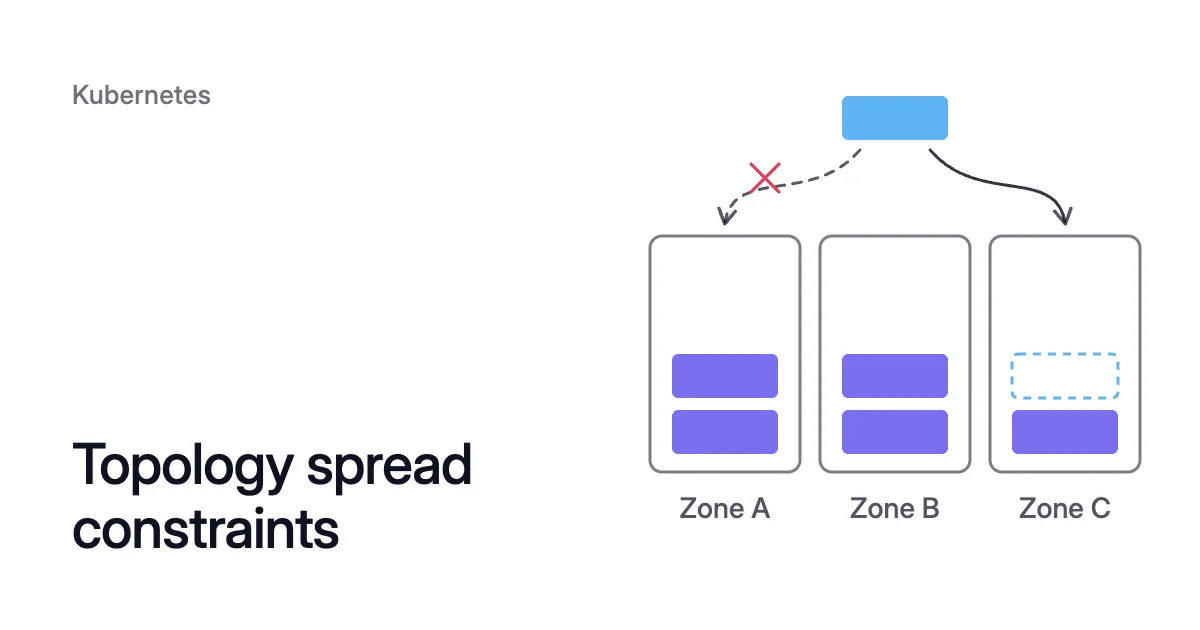
In the Kubernetes docs’ example, zone A holds 2 matching pods and zone B holds 1, under a maxSkew of 1 and DoNotSchedule. A new pod in zone A would make the counts 3 and 1, a skew of 2. So the pod can only go to zone B.
If zone B has no room, the pod stays Pending, however much room zone A has. A drain runs the same count for every evicted pod, so a spread rule can also keep a node, and its cost, in your cluster.
Pod topology spread constraints live in the pod’s spec.topologySpreadConstraints, which for a Deployment means its pod template. Each entry names a node label as its topologyKey. Nodes that share a value of that label form one domain: each zone for topology.kubernetes.io/zone, each node for kubernetes.io/hostname.
Nodes without the label are skipped, both in the count and as places to run the pod.
maxSkew and the global minimum
With DoNotSchedule, the scheduler checks each candidate node. It adds the new pod to that node’s domain count, then subtracts the global minimum: the lowest count in any eligible domain. A node whose result is above maxSkew is filtered out.
In the docs’ example that minimum is 1, in zone B. Zone A gives 2 (2 + 1 − 1), above the limit. Zone B gives 1 (1 + 1 − 1), which is allowed.
With a maxSkew of 2, either zone works.
whenUnsatisfiable: DoNotSchedule or ScheduleAnyway
DoNotSchedule is a hard rule. If no node keeps the skew within maxSkew, the pod stays Pending. Its FailedScheduling event gives the reason “node(s) didn’t match pod topology spread constraints”.
ScheduleAnyway is a preference. Kube-scheduler still places the pod, and gives priority to nodes that reduce the skew. The EKS best practices guide advises the hard setting only if it’s better for pods not to run than to break the spread.
The fields, and a Deployment that uses them
| Field | What it does |
|---|---|
maxSkew | How far a domain’s count of matching pods may run ahead of the lowest count. Must be greater than 0. |
topologyKey | The node label that defines a domain. |
whenUnsatisfiable | DoNotSchedule makes the rule a filter, so the pod waits. ScheduleAnyway makes it a score, so the pod lands. |
labelSelector | Which pods are counted. Only pods in the incoming pod’s own namespace count. |
minDomains | How many domains to expect. With fewer, the lowest count is taken as 0. DoNotSchedule only, and no feature gate needed from Kubernetes 1.30. |
matchLabelKeys | Label keys whose values are copied from the incoming pod into the selector. Beta, on by default since 1.27. |
nodeAffinityPolicy | Honor, the default, counts only nodes that match the pod’s node affinity or nodeSelector. Stable since 1.33. |
nodeTaintsPolicy | Ignore, the default, counts every node. Honor leaves out nodes with taints the pod doesn’t tolerate. Stable since 1.33. |
Entries combine with a logical AND, so a node must satisfy every one. Below, a Deployment keeps the zone counts of its 6 replicas within 1 of each other as pods are placed. Its second entry prefers to spread them across nodes.
apiVersion: apps/v1
kind: Deployment
metadata:
  name: web
spec:
  replicas: 6
  selector:
    matchLabels:
      app: web
  template:
    metadata:
      labels:
        app: web
    spec:
      topologySpreadConstraints:
      - maxSkew: 1
        topologyKey: topology.kubernetes.io/zone
        whenUnsatisfiable: DoNotSchedule
        labelSelector:
          matchLabels:
            app: web
        matchLabelKeys:
        - pod-template-hash
        nodeTaintsPolicy: Honor
      - maxSkew: 1
        topologyKey: kubernetes.io/hostname
        whenUnsatisfiable: ScheduleAnyway
        labelSelector:
          matchLabels:
            app: web
      containers:
      - name: web
image: <image>Both selectors match the pod’s own labels on purpose. A pod outside its own selector doesn’t count itself. Such “ghost pods” can pile up in one domain, the docs warn.
pod-template-hash is the label the Deployment controller adds per revision, so each revision spreads on its own during a rollout.
Pods get a soft spread even without a rule
With no cluster defaults set, kube-scheduler acts as if each pod without its own constraints had two soft ones. They are maxSkew 3 on kubernetes.io/hostname and maxSkew 5 on topology.kubernetes.io/zone, both ScheduleAnyway.
These built-in defaults have been stable since Kubernetes 1.24. They apply only to pods that belong to a Service, ReplicaSet, StatefulSet or ReplicationController. A scheduler profile can replace them through the PodTopologySpread plugin’s arguments.
Topology spread constraints on AKS
AKS tightens the zone default. Microsoft’s zone resiliency guidance says that from Kubernetes 1.33, the AKS default scheduler uses maxSkew 1 for topology.kubernetes.io/zone. The rule is still ScheduleAnyway.
Set your own constraints in the pod spec where a workload needs more.
A strict zone rule can leave pods Pending even after a scale-up, the same page explains. The Cluster Autoscaler “isn’t zone-aware”. Virtual Machine Scale Sets pick the zone for a new node in a pool that spans zones.
So a scale-up can add a node in a zone that still breaks a DoNotSchedule rule. Microsoft’s answer is one node pool per zone, with --balance-similar-node-groups set to true.
That flag balances the pools only at scale-up, the Cluster Autoscaler FAQ notes. Scale-down ignores their relative sizes.
Topology spread constraints vs anti-affinity: spread allows a bounded gap
Pod anti-affinity also keeps replicas apart, but it only asks whether a domain already holds a matching pod. The Kubernetes docs state the limit: a required rule allows only a single pod in each topology domain. A preferred rule gives up the ability to enforce it.
A spread constraint sets a bounded gap instead. A zone or node can hold several replicas, as long as none runs more than maxSkew ahead of the lowest.
The difference shows when nodes go. Take 3 replicas on a 3-node pool.
With required anti-affinity on kubernetes.io/hostname, each replica needs a node to itself. So the pool can’t go below 3 nodes, however little the replicas request.
Use a hostname spread instead, with a maxSkew of 1, DoNotSchedule and nodeTaintsPolicy set to Honor. When the third node is drained, its replica can join one of the other two. Counts of 2 and 1 are within the limit.
Without Honor, the draining node still counts with 0 pods, as the scale-down section below explains. Both rules spread replicas when there’s room. Only the spread constraint lets this pool go from 3 nodes to 2.
Pod affinity vs node affinity covers the affinity rules themselves.
A hard spread rule can keep a node from scaling down
The Cluster Autoscaler simulates kube-scheduler behavior, its FAQ says. In the FAQ’s words, “if there’s no other node where a given pod can schedule, the pod’s node won’t be scaled down.”
Spread is part of that decision. A DoNotSchedule rule narrows where each evicted pod may go. The node stays when that narrow set is full.
When the only allowed zone is full
With that replica evicted, the counts are 2, 2 and 1, so the global minimum is 1, in zone C. Zone A or B would give 2 (2 + 1 − 1), above a maxSkew of 1. Only zone C passes, with 1 (1 + 1 − 1).
So free room in zones A and B doesn’t help. If c1, the other node in zone C, has no room for the pod’s requests, c2 stays.
With an even spread and a maxSkew of 1, every evicted pod must go back to its own zone. So draining a node needs spare room in that zone. With a maxSkew of 2, the other zones pass too, at the price of a less even spread.
Taints on a draining node
- Cordoning puts an unschedulable taint on the node.
- The Cluster Autoscaler taints the nodes it removes.
- Karpenter adds
karpenter.sh/disrupted:NoSchedule.
The default ignores taints in the count. The draining node then stays in the skew with zero matching pods, and can pull the global minimum to 0. Kubernetes issue 106127 reports this during node upgrades.
Setting nodeTaintsPolicy to Honor leaves untolerated tainted nodes out of the count.
When a zone loses its last node
The scheduler learns domains only from nodes that exist. Once the last node in zone C goes, zone C no longer counts as a domain. Its replicas then fit the rule in zones A and B, and the workload ends up in two zones with no error.
If that isn’t acceptable, set minDomains to 3. With fewer than 3 eligible zones, the global minimum is taken as 0, so the evicted pods wait for a node in a third zone.
An autoscaler that simulates the scheduler then keeps the last zone-C node. The EKS guide suggests the same field for zones that have no nodes yet.
When a Deployment scales down
The docs warn there’s no guarantee the constraints stay satisfied when pods are removed. They point to the Descheduler to rebalance the spread.
Cluster Autoscaler not scaling down lists the other reasons a node stays. Kubernetes bin packing covers how requests decide how many nodes the pods fill.
Topology spread constraints with Karpenter: a soft rule can still hold a node
Karpenter reads spread constraints when it launches nodes. Its docs list three supported topologyKey values:
topology.kubernetes.io/zonekubernetes.io/hostnamekarpenter.sh/capacity-type
NodePools don’t balance zones by themselves, so zone balance comes from zonal constraints on your pods. The EKS data plane guide says EKS Auto Mode and Karpenter both launch nodes in the right Availability Zones to meet them.
On AKS, node auto-provisioning (NAP) runs Karpenter too.
Kube-scheduler only prefers a ScheduleAnyway spread. Karpenter treats preferences, spread among them, as requirements in most circumstances. It relaxes them one at a time, only when they can’t be met.
Its docs warn that a preferred spread can create more nodes than you expect. They also say consolidation “may not disrupt nodes in order to avoid violating preferences, even if kube-scheduler can fit the host pods elsewhere.”
Karpenter consolidation covers the rest of that decision.
Spread settings that still let nodes go
Spread rules help decide which nodes can be removed, so they are part of Kubernetes cost optimization.
- Make zone spread hard only where an uneven spread is worse than a Pending pod, as the EKS guide advises. Keep node-level spread on
ScheduleAnyway. - Leave spare room in each zone under a hard zone rule, or use a
maxSkewof 2 so an evicted pod can change zones. - Set
nodeTaintsPolicytoHonoron Kubernetes 1.33 or later, so a draining node doesn’t hold the global minimum at 0. - Set
minDomainsto your zone count only when running in fewer zones isn’t acceptable. Accept that a node per zone then stays for that workload. - Match each
labelSelectorto the pod template’s labels. For Deployments, addpod-template-hashtomatchLabelKeys.
How Coral checks spread before it drains a node
Coral optimizes Kubernetes on AKS and EKS. It rebalances CPU and memory requests, and it drains spare nodes so your autoscaler can remove them. Spread rules sit inside that drain decision.
- The check. Before draining, Coral simulates the scheduler on the live cluster. Every pod it has to move must fit elsewhere, with its affinity, taints, spread, ports and zones. If one pod has nowhere to go, the node isn’t drained.
- The drain. Coral respects PodDisruptionBudgets and do-not-disrupt. In consolidation it also respects your autoscaler’s minimum pool size, and every pool keeps at least one node. Nodes drain one at a time, and a drain that can’t finish in time puts the node back into service.
- The warning. The Optimization constraints page lists workload setups that make optimization risky, topology spread among them, with the fix for each. It’s advisory only. Setting the
coral.zoorik.com/ignore-optimization-constraintsannotation to"true"on a pod template hides a workload from that page only.
Where requests sit above real use, rebalancing them leaves more room on each node. Room in the right zone is what a hard spread rule needs before a node can go.
A floor set by minDomains or required anti-affinity comes from the rule itself, so it stays until you change the rule. For the detail, see the Coral FAQ and the guide’s consolidation section.
Sources: Kubernetes, “Pod Topology Spread Constraints” (opens in a new tab); Kubernetes, “scheduler/framework/plugins/podtopologyspread” (opens in a new tab) (scheduler source: filtering.go, common.go, plugin.go); Kubernetes, issue 106127, “Take taints/tolerations into consideration when calculating PodTopologySpread skew” (opens in a new tab); Kubernetes autoscaler, “Cluster Autoscaler FAQ” (opens in a new tab); Karpenter, “Scheduling” (opens in a new tab); Karpenter, “Disruption” (opens in a new tab); Microsoft Learn, “Zone resiliency recommendations for Azure Kubernetes Service (AKS)” (opens in a new tab); AWS, “EKS Data Plane” (opens in a new tab) (EKS best practices guide).