Published 1 November 2026 · By Saurav (opens in a new tab), Backend engineer, Zoorik · Published by Zoorik
Short answer. AKS node auto provisioning (NAP) is Microsoft’s managed Karpenter: it picks VM sizes for pods that can’t be scheduled, and consolidates empty or underused nodes. On AKS Standard, enable it with az aks update --node-provisioning-mode Auto on a cluster using Azure CNI Overlay or Node Subnet, not kubenet.
AKS node auto provisioning is Karpenter that AKS runs for you
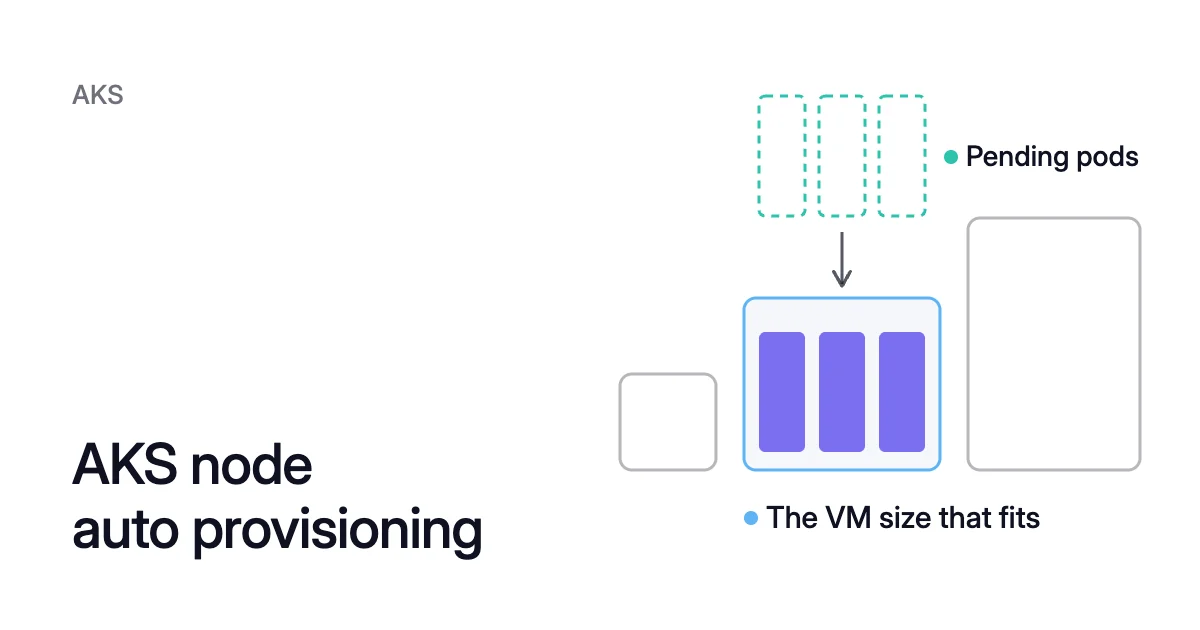
Picture three pods on an AKS cluster with NAP on, each requesting 2 CPU. No node has room for them, so they stay pending. NAP reads their requests, 6 CPU in all.
It “uses pending pod resource requirements to decide the optimal VM configuration,” within the rules of the NodePool those pods match. Then it launches the VM.
When nodes empty out or run underused, the NodePool’s consolidation policy decides whether NAP removes them. Karpenter consolidation covers those policies in depth.
What NAP runs, and the objects it uses
Microsoft’s overview says NAP “automatically deploys, configures, and manages Karpenter on your AKS clusters.”
It’s built on the open-source Karpenter project and the AKS Karpenter provider. AKS runs it in the managed control plane, and Microsoft says it’s always on the latest Karpenter version. To read its logs, turn on AKS control plane logs.
Three kinds of object do the work:
- NodePool resources are yours to write. They say which VM sizes, capacity types and totals NAP may use.
- AKSNodeClass resources, also yours, hold Azure settings such as the node image family and the subnet.
- NodeClaims come from NAP, which writes one for each node it launches.
kubectl get nodeclaimslists them.
NAP sizes nodes from requests, not use
NAP sizes new nodes from what pending pods request, not from what they use. Microsoft’s pre-migration checklist for NAP asks you to size workloads for consolidation. It also asks for proper requests, limits, replicas and PodDisruptionBudgets.
NAP still looks for room for all 6. Once they run, 6 − 1.5 = 4.5 CPU of that room is reserved and idle. That’s 4.5 ÷ 6, or three-quarters of what they request.
With NAP, requests decide which nodes you pay for, so Kubernetes cost optimization starts with requests. The EKS and AKS pricing calculator shows what a VM size costs a month.
AKS NAP status in October 2026: generally available, with limits
Guides written before NAP became generally available in July 2025 can be out of date. This is where NAP stands on Microsoft’s own pages:
| Question | Answer, October 2026 |
|---|---|
Status | Generally available since July 2025 |
AKS Automatic | Preconfigured by default |
AKS Standard | Off until you set the node provisioning mode to Auto |
Azure CLI | 2.76.0 or later |
Supported networking | Azure CNI Overlay or Azure CNI Node Subnet. Microsoft recommends Overlay with the Azure CNI Powered by Cilium data plane |
Not supported | kubenet, Calico network policy, Azure CNI Pod Subnet with dynamic IP allocation |
Other limits | No Windows node pools, no IPv6 clusters, no service principals (use a managed identity), and you can’t stop a NAP cluster |
Custom virtual network | Needs a Standard Load Balancer |
Cluster autoscaler on the same cluster | Only with the AllowClusterAutoscalerAndNAP feature flag, as a migration step |
How to enable NAP on AKS depends on where your cluster starts
Check three things before you run anything:
- the Azure CLI version, with
az --version - that the cluster uses a managed identity
- its network plugin
The plugin and whatever scales your nodes today then set the path:
- A kubenet cluster needs a network move first.
- A cluster autoscaler hands over to NAP.
- A self-hosted Karpenter install makes way for it.
Otherwise, enabling NAP takes one update.
New and existing clusters
For a new cluster, Microsoft’s example turns NAP on at creation, with the networking it recommends:
$ az aks create \
  --name <cluster-name> \
  --resource-group <resource-group> \
  --node-provisioning-mode Auto \
  --network-plugin azure \
  --network-plugin-mode overlay \
  --network-dataplane cilium \
  --generate-ssh-keys
For an existing cluster on a supported Azure CNI mode with no cluster autoscaler, it’s one update:
$ az aks update \
  --name <cluster-name> \
  --resource-group <resource-group> \
  --node-provisioning-mode Auto
To confirm that NAP is active, Microsoft’s check is kubectl get crd | grep karpenter. Once NAP is on, it lists the NodePool and AKSNodeClass CRDs. In an ARM template the same switch is properties.nodeProvisioningProfile.mode, which defaults to Manual.
Clusters on kubenet
NAP won’t run on kubenet, so the cluster has to move to Azure CNI Overlay first. Microsoft calls that move “a one-way, irreversible operation.” It needs:
- Kubernetes 1.27 or later
- no network policy enabled
- a user-assigned managed identity, so that AKS can detach kubenet’s route table
The move reimages every node pool at the same time, so plan it like a node image upgrade. Then run:
$ az aks update \
  --name <cluster-name> \
  --resource-group <resource-group> \
  --network-plugin azure \
  --network-plugin-mode overlay
If you also want the Cilium data plane, add it as a second update (--network-dataplane cilium) before you enable NAP. Microsoft notes that a cluster with NAP on can’t be updated to Cilium without turning NAP off first.
Clusters running the cluster autoscaler
Microsoft gives two paths. The simple one takes three steps:
- Switch the autoscaler off. Nodes aren’t removed when it goes off, so capacity holds while you switch.
$ az aks update \
  --resource-group <resource-group> \
  --name <cluster-name> \
  --disable-cluster-autoscaler
- Turn NAP on with the
az aks updatecommand above. - Keep the system pool, and empty your user node pools gradually, in waves. Scaling a pool to zero evicts its pods, and NAP launches nodes for the pods that move. Watch replica counts and PodDisruptionBudgets as you go.
$ az aks nodepool scale \
  --resource-group <resource-group> \
  --cluster-name <cluster-name> \
  --name <pool-name> \
  --node-count 0
The second path runs both side by side under the AllowClusterAutoscalerAndNAP feature flag. Taints keep the two sets of nodes apart. Microsoft warns that both react to pending pods and “can lead to double provisioning of nodes,” so treat it only as a migration step.
Karpenter vs Cluster Autoscaler explains how the two remove nodes differently.
Clusters running self-hosted Karpenter
If you run Karpenter on AKS yourself, from the AKS provider’s Helm chart, Microsoft documents how to switch to NAP:
- Run the latest Karpenter first.
- Keep the Karpenter CRDs. Deleting them deletes the NodeClaims, which can disrupt workloads.
- Uninstall the chart.
- Enable NAP with
--node-provisioning-default-pools None, so your existing NodePools stay in charge.
NAP NodePools are separate from AKS node pools
On a NAP cluster, “node pool” means two things:
- An AKS node pool is a group of identical VMs that you manage through the AKS API and
az aks nodepoolcommands. Your system node pool belongs to this kind, and AKS still requires one for system components such as CoreDNS. - A NAP NodePool is a Karpenter custom resource you apply with kubectl. Microsoft is plain about which of the two NAP reads: it “doesn’t use Azure CLI commands to manage node behavior.”
With --node-provisioning-default-pools Auto, the default, NAP creates two NodePools. The one named default:
- allows on-demand Linux VMs on amd64 from the D family
- consolidates nodes that are empty or underused
- never expires them
Microsoft documents it like this:
apiVersion: karpenter.sh/v1
kind: NodePool
metadata:
  name: default
spec:
  disruption:
    consolidationPolicy: WhenEmptyOrUnderutilized
  template:
    spec:
      nodeClassRef:
        group: karpenter.azure.com
        kind: AKSNodeClass
        name: default
      expireAfter: Never
      requirements:
      - key: kubernetes.io/arch
        operator: In
        values:
        - amd64
      - key: kubernetes.io/os
        operator: In
        values:
        - linux
      - key: karpenter.sh/capacity-type
        operator: In
        values:
        - on-demand
      - key: karpenter.azure.com/sku-family
        operator: In
        values:
- DThe second, system-surge, gives critical add-ons their own on-demand capacity on amd64 nodes. It’s for add-ons that tolerate the CriticalAddonsOnly=true:NoSchedule taint.
With None, NAP creates no NodePools, so you write your own: NAP needs at least one. Switching an existing cluster from Auto to None leaves the defaults in place until you delete them.
A few rules shape your own NodePools:
- Keep their requirements from overlapping. When more than one matches a pod, NAP uses the one with the highest
weight, from 1 to 100. spec.limitscaps the memory and CPU a NodePool can hold. Without limits, NAP schedules within your Azure quota.- If a NodePool allows both spot and on-demand, NAP prefers spot.
- A NodePool with a
replicasfield is a static pool. It keeps that many nodes whatever the demand, takes only anodeslimit, and isn’t consolidated. - Selectors such as
karpenter.azure.com/sku-family,karpenter.azure.com/sku-nameandtopology.kubernetes.io/zonenarrow the VM sizes and zones NAP may pick.
Node auto provisioning on AKS with Terraform is one cluster property
Microsoft’s Terraform reference for AKS covers the AzAPI provider. There, the cluster resource takes the same properties as an ARM template. On Microsoft.ContainerService/managedClusters, NAP is the nodeProvisioningProfile property.
Its mode is Auto or Manual, and defaults to Manual. Its defaultNodePools is Auto or None, and defaults to Auto. Pair it with Azure CNI in networkProfile.
This example uses the API version from Microsoft’s ARM template for NAP:
resource "azapi_resource" "aks" {
  type      = "Microsoft.ContainerService/managedClusters@2025-05-01"
  name      = "<cluster-name>"
  parent_id = "<resource-group-id>"
  location  = "<region>"

  identity {
    type = "SystemAssigned"
  }

  body = {
    properties = {
      dnsPrefix = "<dns-prefix>"
      agentPoolProfiles = [
        {
          name   = "system"
          mode   = "System"
          count  = 3
          vmSize = "<vm-size>"
        }
      ]
      networkProfile = {
        networkPlugin     = "azure"
        networkPluginMode = "overlay"
        networkDataplane  = "cilium"
      }
      nodeProvisioningProfile = {
        mode = "Auto"
      }
    }
  }
}The moves to Azure CNI Overlay and to the Cilium data plane each reimage every node pool. AKS won’t take both in one operation, so read the plan before each apply. NAP goes last because a cluster with NAP on can’t move to Cilium.
NodePools and AKSNodeClasses aren’t properties of that resource: they’re Kubernetes objects, applied to the cluster once it exists.
How to disable node auto provisioning on AKS: empty NAP’s nodes first
AKS lets you turn NAP off only when no NAP nodes are left and every NodePool has spec.limits.cpu set to 0. Microsoft’s order:
- Set
spec.limits.cpu: 0on every NodePool. NAP stops creating nodes, and running ones stay. - Add a taint with key
karpenter.azure.com/disableand effectNoScheduleto every NodePool’s template. NAP starts moving pods to non-NAP nodes where they fit, within PodDisruptionBudgets and disruption limits. - Scale up your fixed-size AKS node pools, or add new ones, so those pods have somewhere to go.
- Run
kubectl get nodes -l karpenter.sh/nodepooluntil it returns no nodes. If some remain, the cluster likely lacks fixed-size capacity, so add more. - Switch the mode back:
az aks update --name <cluster-name> --resource-group <resource-group> --node-provisioning-mode Manual.
Microsoft also documents a shorter route, and recommends against it. That route “might leave some pods pending and doesn’t honor Pod Disruption Budgets (PDBs).”
It skips steps 2 and 3 and deletes each NAP node with kubectl delete node. If you take it anyway, check the label above first, so you delete only NAP nodes.
How Coral works with NAP
Coral optimizes Kubernetes on AKS and EKS clusters running 1.30 or later. NAP picks machines for the requests it’s given, but doesn’t change those requests.
Coral rebalances each container’s CPU and memory requests to what it uses. With smaller requests, NAP can run fewer or smaller nodes. Coral never adds nodes for demand, so scale-up stays with NAP.
What connect turns on
With your approval, connecting an AKS cluster with no node autoscaler to Coral turns on NAP. It also adds Coral’s node class, zoorik-base. Connect lists every cloud change and asks once, and --dry-run prints them all without changing anything.
A few cases go differently:
- Kubenet. NAP needs Azure CNI, so a kubenet cluster gets no autoscaler this way. Nothing adds nodes until one exists.
- The Cluster Autoscaler. Connect leaves it in place and doesn’t turn on NAP.
- Later. If you decline the cloud changes,
zoorikctl cluster preparesets up NAP when you’re ready. - Disconnect. NAP stays.
Consolidation and rebalancing with NAP
- Pools NAP consolidates. Coral leaves them to NAP. It deletes machines itself only in fixed-size pools that nothing else manages.
- Cheaper machines. With NAP in place, Coral can rebalance work onto smaller or cheaper machines. It creates fixed-size NodePools for the move, and NAP launches the new machines. The old nodes are then drained and removed one by one.
- Disruption. A rebalance never goes past a PodDisruptionBudget. Where Coral starts a new copy of a pod first, that copy must be Ready and serving before the old one goes. Other pods are evicted, so an app with a single copy gets a short restart.
- Protected pods. A pod annotated
karpenter.sh/do-not-disrupt: "true"is never moved, and its node is kept. A node Coral can’t empty in time is kept too.
On our own AKS development cluster, Coral removed one of two 4-CPU workers. It then rebalanced the remaining worker onto a cheaper machine of the same size. Eight days after we connected it, the cluster cost $154.76 a month instead of $368.65.
How we reduced AKS cluster costs by 58% has the details. For a side-by-side view, see what Coral and NAP each do. For where NAP sits beside the HPA, the VPA and the Cluster Autoscaler, see HPA vs VPA vs Cluster Autoscaler.
Sources: Microsoft Learn, “Overview of node auto-provisioning (NAP) in Azure Kubernetes Service (AKS)” (opens in a new tab); Microsoft Learn, “Enable or disable node auto-provisioning (NAP) in Azure Kubernetes Service (AKS)” (opens in a new tab); Microsoft Learn, “Overview of networking configurations for node auto-provisioning (NAP) in Azure Kubernetes Service (AKS)” (opens in a new tab); Microsoft Learn, “Configure node pools for node auto-provisioning (NAP) in Azure Kubernetes Service (AKS)” (opens in a new tab); Microsoft Learn, “Migrate from cluster autoscaler to node auto-provisioning” (opens in a new tab); Microsoft Learn, “Update Azure CNI IP address management (IPAM) mode and data plane technology for AKS clusters” (opens in a new tab); Azure Updates, “Generally Available: Node auto-provisioning support in AKS” (opens in a new tab); Microsoft Learn, “Microsoft.ContainerService/managedClusters 2025-05-01 - Bicep, ARM template & Terraform AzAPI reference” (opens in a new tab).