Published 1 November 2026 · By Sushant Phulsundar (opens in a new tab), Guest author · Software developer II · Published by Zoorik
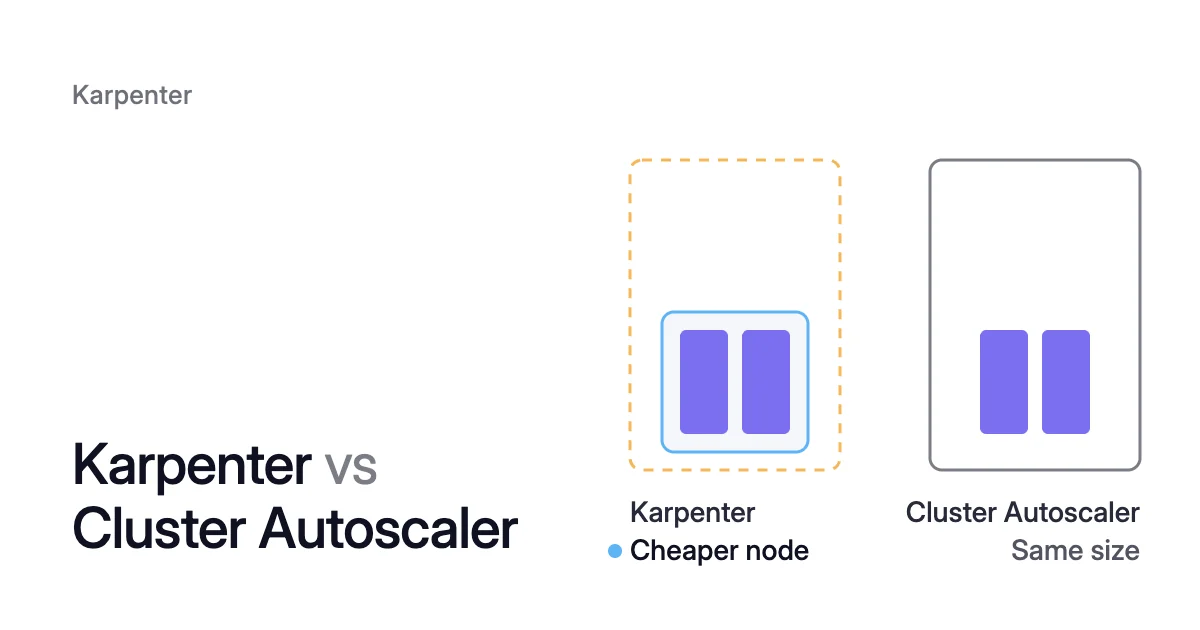
Short answer. In Karpenter vs Cluster Autoscaler, the Cluster Autoscaler only grows or shrinks preset node groups, while Karpenter picks machines and swaps nodes for cheaper ones. Both count pod requests, not real use, and can share a cluster if taints keep each workload on one autoscaler’s nodes.
Two underused nodes: what each autoscaler leaves you
Picture a node group of two on-demand nodes, minimum size 1. Each has 8 CPU allocatable, the share of its capacity offered to pods. Their pods request 1.5 CPU per node, and memory and DaemonSet requests are small.
The Cluster Autoscaler ends with one 8-CPU machine holding 3 CPU of requests. Karpenter can end with one cheaper machine, such as 4 CPU. Its NodePool, the rules you write for what it may launch, must allow that type.
Once one node has been unneeded for 10 minutes, the Cluster Autoscaler evicts its pods onto the other node. The survivor then holds 1.5 + 1.5 = 3 CPU of requests, and 3 ÷ 8 = 37.5%.
That’s still under the threshold, but its pods have nowhere else to go. It stays.
Karpenter, on its default policy, can delete one node for the same reason. Then it can replace the survivor with one cheaper node that still fits its pods and DaemonSets. Its default budget, 2 × 10% = 0.2 nodes rounded up to 1, lets it disrupt one node at a time.
To see what that swap is worth, the EKS and AKS pricing calculator prices an 8-CPU and a 4-CPU node per month.
In the worked example, both autoscalers counted requests. The Kubernetes docs say consolidation “only considers Pod resource requests and not real resource usage when making decisions”.
If those pods use 0.3 CPU per node, neither autoscaler sees the gap. You keep paying for room no process uses. Requests set from measured use change the result, as Kubernetes pod right sizing and the requests Karpenter can’t fix explain.
Karpenter vs Cluster Autoscaler: node groups or individual machines
The Cluster Autoscaler “adds or removes Nodes to pre-configured Node groups”. These usually map to a cloud group of virtual machines (VMs). Karpenter works with individual VMs and doesn’t rely on those groups.
To a cluster user, the Kubernetes docs say, the two should feel alike. Each adds nodes for pods that can’t be scheduled. Each also consolidates nodes that are “no longer optimally utilized.”
Kubernetes SIG Autoscaling sponsors both node autoscalers. So Karpenter vs Kubernetes Cluster Autoscaler is a choice between two Kubernetes projects.
The Cluster Autoscaler’s cloud integrations are part of the Kubernetes project. Karpenter is a library that cloud providers such as AWS and Azure build their autoscalers on.
The two sit one layer below the pod autoscalers, which HPA vs VPA vs Cluster Autoscaler compares. Both run on Amazon Elastic Kubernetes Service (EKS) and Azure Kubernetes Service (AKS).
| What you decide on | Cluster Autoscaler | Karpenter |
|---|---|---|
What it changes | The node count of node groups you set up in advance: Auto Scaling groups on EKS, node pools on AKS | Individual machines, within the rules of a NodePool you write |
Machine types | Set in advance per group. Its FAQ assumes every machine in a group has identical capacity and labels | Chosen per batch of pending pods from the types the NodePool allows. On AWS it passes up to 60 instance types to EC2 Fleet |
When it adds a node | A pod is unschedulable. It checks every 10 seconds and picks which group to grow with an expander (upstream default: the group left with the least idle CPU) | A pod is unschedulable. It batches pending pods and bin-packs them by the CPU, memory and GPUs they request |
When it removes a node | CPU and memory requests both under 50% of allocatable, every pod can move, and the node has been unneeded for 10 minutes | Its pods fit on other nodes (delete), or on those plus one cheaper node (replace). No wait by default ( consolidateAfter: 0s) |
Swaps a node for a cheaper one | No | Yes, the replace action |
Pace of removal | One non-empty node at a time. Empty nodes up to 10 at once | A NodePool disruption budget: 10% of the pool’s nodes by default |
Node lifecycle | Node autoscaling only | Also replaces nodes that drift from their NodePool or fail health checks (node auto repair, alpha, when enabled), and drains nodes past expireAfter (720h by default) |
Kubernetes version | More tightly coupled to Kubernetes versions, per AWS’s best practices | Not as tightly coupled. A compatibility matrix lists the supported Kubernetes versions per release |
On EKS | You run it against Auto Scaling groups | You install and run it, or use EKS Auto Mode, which builds on it |
On AKS | Built in: you switch it on per node pool | Node auto-provisioning (NAP), which runs Karpenter for you |
The Cluster Autoscaler removes whole nodes and never resizes them
The Cluster Autoscaler’s FAQ assumes that inside a node group “all machines have identical capacity”. So when nodes are too big for their pods, it can only remove whole ones.
Moving to smaller machines is a change you make yourself, usually a new group and a drain. It’s covered for EKS node groups and AKS node pools.
Every 10 seconds, when no scale-up is needed, it checks for unneeded nodes. A node counts as unneeded only when all three hold:
- Requests under half. The CPU requests and the memory requests of the node’s pods each add up to less than 50% of its allocatable. The flag is
--scale-down-utilization-threshold, 0.5 by default. - Pods that can move. Every pod apart from DaemonSet and mirror pods can move to another node.
- No opt-out. The node doesn’t carry the scale-down-disabled annotation.
A node that stays unneeded for 10 minutes is terminated. To empty it, the autoscaler evicts its pods through the eviction API, which honours PodDisruptionBudgets (PDBs). It also taints the node so the pods aren’t scheduled back onto it.
Non-empty nodes go one at a time, and empty ones in bulk, up to 10 at once. Scale-down also stops at the node group’s minimum size. After any scale-up, the autoscaler waits 10 minutes before it looks at scale-down again.
If a node stays that you expected to go, Cluster Autoscaler not scaling down lists the reasons.
Karpenter deletes or replaces nodes, with no threshold to tune
Karpenter calls node removal disruption, and consolidation is the method aimed at cost. It has two actions:
- Delete, when all of a node’s pods can run on free capacity of other nodes.
- Replace, when they fit on that free capacity plus a single cheaper node.
Karpenter looks for candidates in a set order:
- Empty nodes, deleted in parallel.
- Two or more nodes at once.
- Each node on its own.
Which nodes count, and how fast they go
Microsoft’s migration guide maps the Cluster Autoscaler’s utilization threshold to consolidationPolicy. That field decides which nodes count.
The default, WhenEmptyOrUnderutilized, considers any node that can be removed or replaced to reduce cost. WhenEmpty waits until only pods with no disruption cost, such as DaemonSet pods, are left. Karpenter consolidation covers the third value, Balanced, and the other settings.
Two fields set the pace. The first, consolidateAfter, is how long a node must go without pods arriving or leaving before it becomes a candidate. Its default is 0s.
The second, a disruption budget, caps how many of a NodePool’s nodes can be disrupted at once. When you set none, Karpenter uses nodes: 10%, rounded up.
Each removal taints the node karpenter.sh/disrupted:NoSchedule and starts any replacement. Once that’s ready, Karpenter drains the node through the eviction API, which respects PDBs.
Drift and expiry
In the Kubernetes docs’ words, Karpenter “handles all aspects of node lifecycle, not just autoscaling”. It replaces nodes that drift from a changed NodePool or node class.
It also drains nodes older than expireAfter, which defaults to 720 hours (30 days). Disruption budgets don’t hold expiry back.
Can Karpenter and Cluster Autoscaler work together?
Yes, if each workload can land on only one autoscaler’s nodes. Karpenter’s FAQ says it “can work alongside Cluster Autoscaler”. Its NodePools are designed to sit beside static capacity such as EKS managed node groups.
The catch is that the two share one trigger: a pod “the Kubernetes scheduler has marked as unschedulable.”
Running both on AKS also needs the AllowClusterAutoscalerAndNAP feature flag. Microsoft treats the pairing as a migration step. It warns that keeping it indefinitely can make scaling unpredictable.
On EKS, Karpenter’s migration guide ends the overlap once Karpenter is running:
- Stop the Cluster Autoscaler. Scaling it to zero replicas stops all of its scaling, so do it only after Karpenter works.
$ kubectl scale deploy/cluster-autoscaler -n kube-system --replicas=0
- Shrink the old node group to a fixed size for Karpenter and critical add-ons such as CoreDNS: 2 instances for one group spread across Availability Zones. That shrink drains the extra nodes. Without PDBs, the guide warns, workloads will be unavailable.
- Keep that group. AWS’s best practices say to run Karpenter’s controller on a node group or EKS Fargate, never on a node Karpenter manages.
Which autoscaler to choose on EKS and AKS
EKS Karpenter vs Cluster Autoscaler
On EKS, AWS documents three routes:
- EKS Auto Mode creates a node when a pod can’t fit, consolidates workloads and deletes nodes. AWS says it “builds upon Karpenter.”
- Karpenter itself is open-source software you install and manage. It gets AWS technical support when it runs unmodified at a compatible version, and has no AWS Service Level Agreement.
- The Cluster Autoscaler works through Auto Scaling groups.
The same guide says managed node groups and Auto Scaling groups suit workloads “that tend to be more static and consistent”. It also says to consider other autoscalers if you need a feature Karpenter lacks.
Karpenter can also mix Spot and on-demand capacity. With an Amazon Simple Queue Service (SQS) interruption queue, it starts a new node when a Spot instance gets its 2-minute interruption notice. Pods can then move before the instance is reclaimed.
Karpenter vs AKS autoscaler: NAP or the cluster autoscaler
On AKS, the cluster autoscaler is built in. You switch it on per node pool. You tune it through the cluster’s autoscaler profile with az aks update --cluster-autoscaler-profile.
Microsoft lists the same defaults as upstream:
- A 0.5 utilization threshold.
- A 10-minute unneeded time.
- A 10-second scan interval.
NAP is Microsoft’s managed Karpenter on AKS: it deploys and manages Karpenter for you. You write NodePool and AKSNodeClass resources instead of configuring AKS node pools through the CLI. NAP chooses VM sizes from pending pods’ requests.
Microsoft’s comparison sets the cluster autoscaler’s “Preexisting node pools with single VM size per pool” against NAP’s “Dynamic provisioning of mixed VM sizes”. It also says the cluster autoscaler “is maintained, with minimal feature enhancements”. AKS node auto provisioning covers enabling it.
How Coral works with either autoscaler
Coral optimizes Kubernetes on AKS and EKS beside whichever node autoscaler you run. It never adds nodes for demand, so scale-up stays with Karpenter, NAP or the Cluster Autoscaler.
By rebalancing CPU and memory requests to measured use, Coral lets the same autoscaler run fewer or smaller nodes. What it does with the nodes depends on the autoscaler:
- With the Cluster Autoscaler: Coral checks on the live cluster that every pod on a node fits on another Ready node. Then it cordons and drains one node at a time. It hands each empty node to your Cluster Autoscaler, whose own timers decide when it goes. Coral empties nodes but never changes their size.
- With Karpenter or NAP: Coral leaves the pools they already consolidate to them. It can also rebalance the nodes you choose onto cheaper machines that still fit the work. After you compare current and rebalanced cost, Coral creates fixed-size NodePools. Your autoscaler then launches the new machines, and the old nodes are drained and removed one by one.
- With no node autoscaler: connecting the cluster sets up NAP on AKS (which needs Azure CNI) or Karpenter on EKS, with your approval.
When a node is removed, a pod whose replacement can’t start first gets a short restart.
Coral works with Cluster Autoscaler and Coral works with Karpenter cover each pairing.
On our own AKS development cluster, node optimization removed a spare 4-CPU worker, $147.46 a month. Rebalancing then swapped the remaining worker for a cheaper machine of the same size, $66.43 a month less.
Sources: Kubernetes, “Node Autoscaling” (opens in a new tab); Kubernetes autoscaler, “Cluster Autoscaler FAQ” (opens in a new tab); Karpenter, “Disruption” (opens in a new tab); Karpenter, “FAQs” (opens in a new tab); Karpenter, “Migrating from Cluster Autoscaler” (opens in a new tab); AWS, “Scale cluster compute with Karpenter and Cluster Autoscaler” (opens in a new tab); Amazon EKS Best Practices Guide, “Karpenter” (opens in a new tab); Microsoft Learn, “Migrate from cluster autoscaler to node auto-provisioning” (opens in a new tab).