Published 1 November 2026 · By Adil Rana (opens in a new tab), Frontend engineer, Zoorik · Published by Zoorik
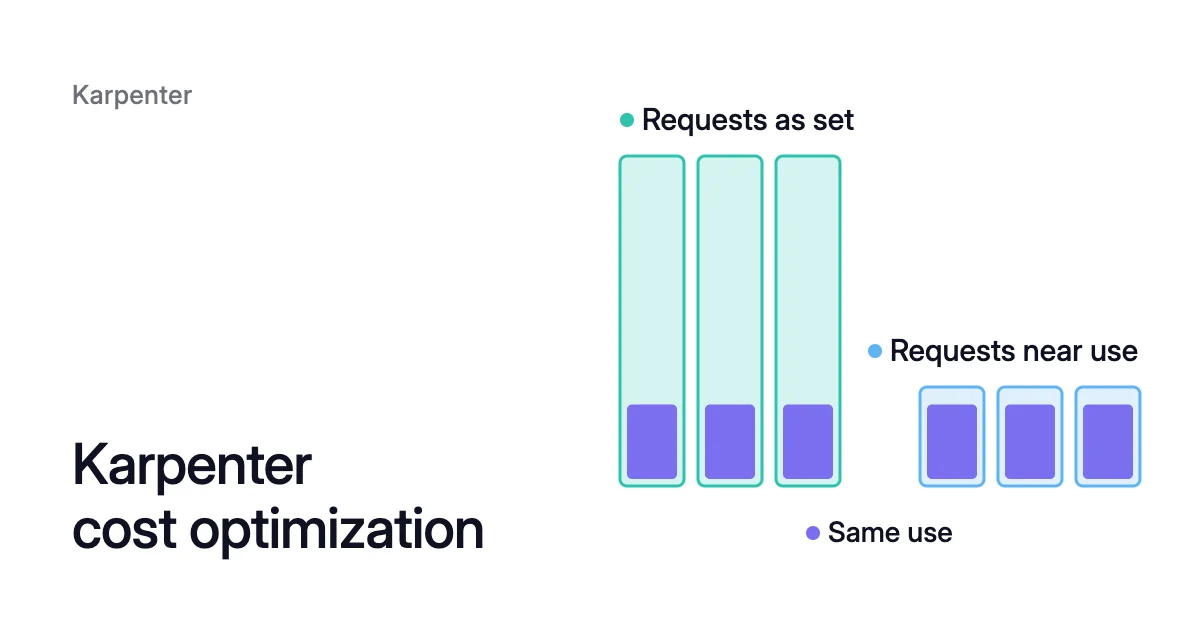
Short answer. Karpenter cost optimization comes from two jobs: launching low-priced instance types that fit pending pods, and consolidating nodes into fewer or cheaper ones. Both jobs count pod requests, not use, so much of the remaining saving can sit in requests set above what pods use.
Karpenter cost savings come from two jobs, both sized by requests
Picture a Deployment of 30 replicas, each requesting 1 CPU and 2 GiB of memory. Their containers peak at 0.25 CPU and 0.8 GiB.
Karpenter has to buy room for 30 CPU, plus DaemonSets and node overhead. The pods use 7.5 CPU at their busiest. Both cost jobs take the 30 CPU as given.
Launching: a low-cost type that fits
The first job is launching. Karpenter watches for pods that the Kubernetes scheduler (kube-scheduler) can’t place. It batches them and bin-packs them “based on CPU, memory, and GPUs required”.
The packing counts node overhead and the DaemonSets that will run on the new node. Then Karpenter launches a low-cost instance type that fits.
Fleet then applies the price-capacity-optimized allocation strategy, which for on-demand capacity works out the same as choosing the lowest price. For spot, Fleet weighs price against the chance of interruption, so you may not get the strictly cheapest spot type.
Consolidation: delete or replace
Consolidation is the second job. Karpenter’s disruption docs describe two actions:
- Deletion removes a node when all its pods fit on free capacity elsewhere.
- Replacement applies when the pods fit on a mix of free capacity and one new, cheaper node.
A NodePool with no disruption settings defaults consolidationPolicy to WhenEmptyOrUnderutilized and consolidateAfter to 0s. So underused nodes are candidates from the start.
Karpenter consolidation covers the policies, timers and budgets. This article follows the v1.15 docs, the latest on karpenter.sh in October 2026.
What does Karpenter cost to run?
Karpenter is an open-source project, so the software has no licence fee. The Karpenter cost that matters is the EC2 instances it launches. Our EKS pricing calculator prices a node pool’s instances at list price.
Around the instances sit two small items:
- The controller, which the Helm chart installs as a Deployment. AWS advises running it on a small node group with at least one worker node, or on EKS Fargate. Never run it on a node that Karpenter manages.
- An Amazon SQS queue, if you use spot. Interruption handling reads it, and you name it in the controller’s
--interruption-queuesetting.
A NodePool without spec.limits keeps adding capacity as pods need it. Only your cloud provider’s quotas cap it. There is no cluster-wide limit, only one per NodePool.
AWS recommends setting limits and creating alarms that warn you when your spend passes a threshold.
AWS Karpenter cost optimization settings worth checking
The cost advice in the EKS Best Practices Guide and Karpenter’s own docs comes down to a few choices. Each one helps Karpenter buy fewer or cheaper machines for the same requests.
Let Karpenter choose from many instance types
By default, Karpenter can use every instance type EC2 offers in your cluster’s region and Availability Zones. AWS advises against narrowing that list too far, especially with Spot Instances.
The more instance types Karpenter may use, the better EC2 can keep your spot instances running. To keep out machines you never want, exclude them with NotIn on node.kubernetes.io/instance-type. Don’t list only a few types you like.
Allow spot for pods that can move
The karpenter.sh/capacity-type requirement takes three values: reserved, spot and on-demand. When a NodePool allows more than one, Karpenter tries them in that order.
It moves down the list whenever the type it wants has no capacity. Here reserved means EC2 capacity reservations, not Reserved Instances.
If you have bought Savings Plans or Reserved Instances, the scheduling docs suggest a separate NodePool for those instance types. Give it a higher weight and limits sized to the commitment, so Karpenter fills it first.
With spot, turn on interruption handling. When a spot instance gets its 2-minute notice, Karpenter starts a new node so the pods can move before the instance is reclaimed.
A general-purpose NodePool along these lines allows both capacity types. It uses the C, M and R instance types of generation 3 or later, which Karpenter’s FAQ recommends for most generic workloads.
The limits block caps the pool. Consolidation considers a node once no pod has been added to it or removed from it for one minute:
apiVersion: karpenter.sh/v1
kind: NodePool
metadata:
  name: general
spec:
  template:
    spec:
      nodeClassRef:
        group: karpenter.k8s.aws
        kind: EC2NodeClass
        name: default
      requirements:
        - key: karpenter.sh/capacity-type
          operator: In
          values: ["spot", "on-demand"]
        - key: karpenter.k8s.aws/instance-category
          operator: In
          values: ["c", "m", "r"]
        - key: karpenter.k8s.aws/instance-generation
          operator: Gte
          values: ["3"]
  limits:
    cpu: "1000"
    memory: 1000Gi
  disruption:
    consolidationPolicy: WhenEmptyOrUnderutilized
consolidateAfter: 1mKarpenter spot-to-spot consolidation: a feature gate and a 15-type floor
Out of the box, consolidation can delete spot nodes, but it won’t replace one with a cheaper spot node. That takes the SpotToSpotConsolidation feature gate. It has been alpha since v0.34 and is still off by default in v1.15.
You turn it on in the Karpenter deployment, with the FEATURE_GATES environment variable or the --feature-gates argument. For example, pass --feature-gates SpotToSpotConsolidation=true.
Even with the gate on, a one-for-one spot replacement needs at least 15 instance types priced below the current node in the launch. Replacing several spot nodes with one has no such floor.
The floor exists because the cheapest spot type isn’t always the one launched, given its interruption risk. Consolidating again and again down to the cheapest type could land on one with very high rates of interruption. Karpenter’s docs call that a “race to the bottom”.
A spot NodePool narrowed to a handful of instance types can’t meet the floor for single-node swaps. That is another reason to keep the list wide.
Pack pods the way Karpenter does
Karpenter packs pods tightly in its simulation, but kube-scheduler places them. Its default LeastAllocated scoring spreads pods across nodes.
Karpenter’s scheduling docs recommend the MostAllocated strategy instead. The scheduler’s placement then matches Karpenter’s packing, and more nodes empty out for consolidation to remove. On EKS you set it through advanced control plane configuration, on Kubernetes 1.31 or later.
Tighter packing leaves less room for pods to burst above their requests. So a pod can be killed for running out of memory (an OOM kill) or have its CPU throttled sooner.
More pods are also affected when one node fails. Kubernetes bin packing covers both strategies.
Karpenter buys what pods request, not what they use
Every setting above helps Karpenter buy the cheapest machine for a given set of requests. None of them changes the requests.
Karpenter’s docs say so directly: “Instance type selection math only uses requests”.
The kube-scheduler works the same way. Its documentation says the scheduler refuses to place a Pod on a node if the capacity check fails. That holds even when “actual memory or CPU resource usage on nodes is very low”.
AWS names the consequence. Karpenter launches the best-fitting nodes “when its information about your workloads requirements is accurate.”
DaemonSets multiply the effect. When Karpenter sizes a node, it adds the requests of every DaemonSet that will run there to the pending pods’ requests. So an oversized DaemonSet request is paid for on every node the DaemonSet runs on.
The 30 replicas, worked through
For memory, they request 30 × 2 = 60 GiB and use 30 × 0.8 = 24 GiB. If the nodes are packed tightly by requests, consolidation finds nothing to remove.
Now set the requests a little above the peak, say 0.3 CPU and 1 GiB. The same replicas then ask for 30 × 0.3 = 9 CPU and 30 × 1 = 30 GiB. That is 30 − 9 = 21 CPU and 60 − 30 = 30 GiB less.
The headroom over the peak is 9 − 7.5 = 1.5 CPU and 30 − 24 = 6 GiB. Karpenter’s next launches are sized for that. Nodes that the old requests held become candidates to delete or replace.
How to find the request gap on a Karpenter node
Three commands show it.
- List the nodes Karpenter launched for one NodePool.
$ kubectl get nodes -l karpenter.sh/nodepool=<nodepool-name>
- Read what a node’s pods request. The
Allocated resourcesblock ofkubectl describe nodestotals the CPU and memory requests and limits of the node’s pods. Each total comes with a percentage.
$ kubectl describe nodes <node-name>
- Read what the pods use, namespace by namespace.
kubectl topshows figures from the cluster’s metrics pipeline. A new pod’s figures can take a few minutes to appear.
$ kubectl top pod --namespace=<namespace> --containers
A node at 90% of its CPU requested, whose pods use a small share of that, is the gap Karpenter can’t see.
So pods whose memory limit sits above their request can burst together and be OOM-killed. For memory and other non-CPU resources, AWS recommends setting requests equal to limits when you use consolidation. Aim for measured use plus headroom, not small requests everywhere.
Size from a window that includes your peaks. kubectl top reports use only at the moment you run it.
When a container uses more memory than its request and its node runs short of memory, its pod is likely to be evicted. A container that uses more than its memory limit may be terminated by the kernel in an OOM kill.
Kubernetes pod right sizing covers choosing requests from usage history, the headroom to leave and how to roll changes out. The Kubernetes cost optimization guide sets out the order: requests, then nodes.
Where Coral fits with Karpenter
Karpenter, and node auto-provisioning on AKS, choose and remove machines from requests they don’t change. Coral optimizes Kubernetes on AKS and EKS, and it rebalances those requests to real use.
For a workload with a CPU-utilization Horizontal Pod Autoscaler (HPA), Coral picks the CPU request by replaying past load through that HPA’s own settings. Your manifests are never changed.
Pod sizing starts only when you switch on “Automatically optimize” for a policy or a workload. Running pods are resized in place on Kubernetes 1.33+ nodes, and on older nodes they restart one at a time within their PodDisruptionBudgets.
The same Karpenter can then run fewer or smaller nodes. A smaller request reduces your cloud cost once the freed capacity lets a node go.
Coral leaves the pools Karpenter consolidates to Karpenter, and never changes your Karpenter settings. A pod or node marked karpenter.sh/do-not-disrupt: "true" stays where it is.
Where Karpenter runs, Coral can also rebalance chosen nodes onto cheaper machines. It creates its own fixed-size NodePools, your Karpenter launches the new machines, and the old nodes are drained and removed one by one.
Coral prices every saving at your cloud’s published list price for the region, with spot nodes at the spot rate and a 730-hour month. Discounts, reservations and savings plans are left out.
If an EKS cluster has no autoscaler, connecting it to Coral sets up Karpenter, with your approval. Coral works with Karpenter sets out who does what. The FAQ covers whether you need Coral with Karpenter.
Sources: Karpenter, “Scheduling” (opens in a new tab); Karpenter, “Disruption” (opens in a new tab); Karpenter, “FAQs” (opens in a new tab); Karpenter, “NodePools” (opens in a new tab); Karpenter, “Settings” (opens in a new tab); Amazon EKS Best Practices Guide, “Karpenter” (opens in a new tab); Amazon EKS User Guide, “Advanced Kubernetes control plane configuration” (opens in a new tab); Kubernetes, “Resource Management for Pods and Containers” (opens in a new tab).