Published 1 November 2026 · By Swati Bhatia (opens in a new tab), Backend engineer, Zoorik · Published by Zoorik
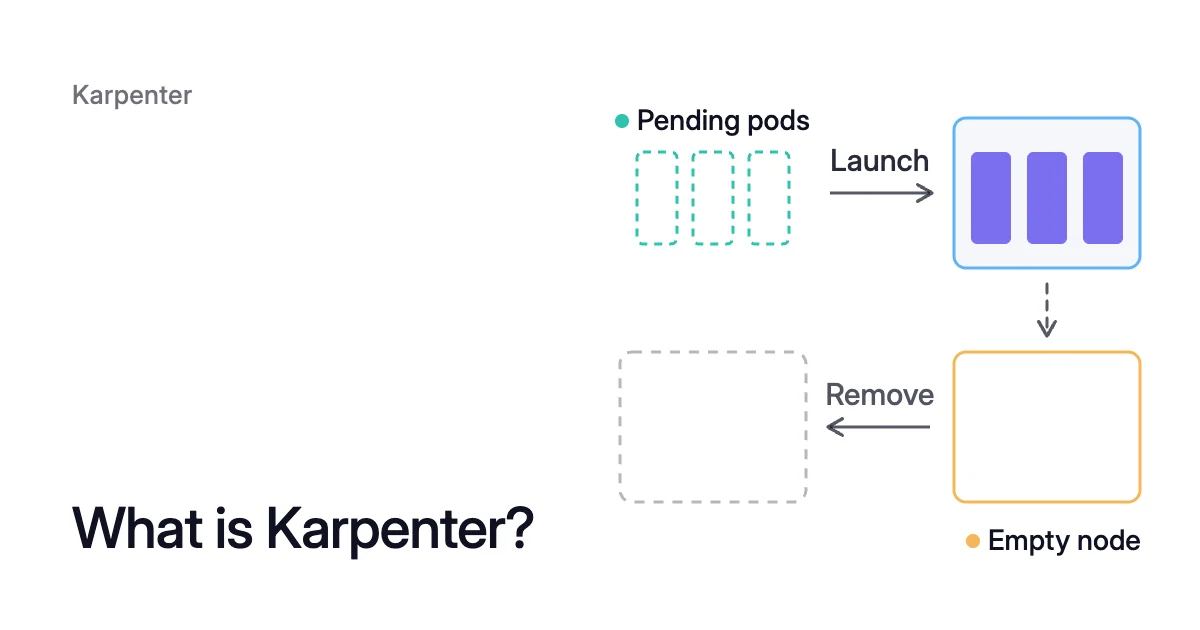
Short answer. Karpenter is an open-source Kubernetes node autoscaler that launches nodes sized to pending pods and removes underused ones or replaces them with cheaper machines. On Amazon EKS you run it yourself, EKS Auto Mode builds on it, and on AKS it runs as node auto-provisioning (NAP).
What is Karpenter in Kubernetes, and what is it used for?
Picture ten pods that each request 2 CPU. They’re pending, because no node in the cluster can fit them. Karpenter adds up their requests, 20 CPU in all, and allows for node overhead and DaemonSets.
It then picks a machine type with room for all of it and launches a node. When the pods finish and leave the node empty, Karpenter deletes it.
That’s the job of a node autoscaler: it changes how many machines a cluster runs. It adds a node when pods are waiting for room, and removes one the pods no longer need. Kubernetes SIG Autoscaling sponsors two of them: the Cluster Autoscaler and Karpenter.
The Kubernetes docs draw the difference in a sentence each. Cluster Autoscaler, they say, “adds or removes Nodes to pre-configured Node groups”. So every machine type it can use has to be set up in advance.
Karpenter works with individual virtual machines and doesn’t rely on cloud resource groups. That lets it pick a different machine type for each node it launches. For how each one removes nodes, see Karpenter vs Cluster Autoscaler.
Karpenter is used for three jobs:
- Launching nodes for pending pods, with a machine type picked to fit them.
- Consolidation, which deletes empty nodes and replaces underused ones with fewer or cheaper machines.
- Node lifecycle, which replaces nodes that reach a set age or no longer match their configuration. It also drains spot nodes before the cloud takes them back.
Karpenter sizes a new node from the pending pods’ requests
The loop starts with pending pods that no node has room for. Karpenter batches those pods and bin-packs them by the CPU, memory and GPUs they request.
On top of those requests, it adds the node’s own overhead and the DaemonSets that will run on the new node. The EKS and AKS pricing calculator shows how much of a node type your pods can use, and what it costs a month.
Each new node must also fit the NodePool the pods match. A NodePool is the resource you write to tell Karpenter what it may launch. It can restrict capacity type, zones, instance types and architectures.
Karpenter does all of this from requests alone. The Kubernetes docs say node autoscalers “don’t directly take into account the real resource usage of the Pods after they start running”. So the ten pods from the opening get room for 20 CPU, plus overhead, however little of it they use.
For on-demand capacity, the Karpenter FAQ says Fleet effectively picks the lowest-priced type. For spot, Fleet weighs price against the chance of interruption, so the result may not be the strictly cheapest spot type.
A Karpenter NodePool limits the nodes it launches, and a node class sets them up
The Karpenter docs say a NodePool “sets constraints on the nodes that can be created by Karpenter”. It also sets constraints on the pods that can run on those nodes.
Its requirements use well-known node labels, such as kubernetes.io/arch (amd64 or arm64) and karpenter.sh/capacity-type (spot, on-demand or reserved). When a NodePool allows more than one capacity type, Karpenter prefers reserved capacity, then spot, then on-demand.
What you leave out matters as much as what you write. If a requirement isn’t set for a well-known label, Karpenter may choose any value the cloud offers.
So requirements: [] opens the pool to every instance type your provider supports.
When several NodePools match a pod, Karpenter uses the one with the highest weight. The docs still recommend NodePools that don’t overlap.
The spec.limits field caps the total resources, such as CPU and memory, that the pool’s nodes can add up to. The example below sets 1,000 CPU and 1000Gi of memory.
apiVersion: karpenter.sh/v1
kind: NodePool
metadata:
  name: default
spec:
  template:
    spec:
      requirements:
        - key: kubernetes.io/arch
          operator: In
          values: ["amd64"]
        - key: karpenter.sh/capacity-type
          operator: In
          values: ["on-demand"]
        - key: karpenter.k8s.aws/instance-category
          operator: In
          values: ["c", "m", "r"]
      nodeClassRef:
        group: karpenter.k8s.aws
        kind: EC2NodeClass
        name: default
      expireAfter: 720h
  limits:
    cpu: "1000"
    memory: 1000Gi
  disruption:
    consolidationPolicy: WhenEmptyOrUnderutilized
consolidateAfter: 1mThe nodeClassRef points to a node class, the cloud provider’s own resource for machine settings. That’s an EC2NodeClass on AWS and an AKSNodeClass on AKS. A NodePool says which machines are allowed, and its node class says how each one is set up.
Karpenter removes nodes whose pods fit elsewhere, and replaces old ones
Karpenter’s word for removing nodes is disruption, and consolidation is the method that reduces cost.
Consolidation deletes or replaces underused nodes
Consolidation deletes empty nodes in parallel. It also tries to delete one node, or two or more at once, launching at most one replacement.
A node can be deleted when all its pods fit in free capacity on other nodes. It can be replaced when they fit in that free capacity plus one cheaper node.
Three fields in the NodePool’s disruption block decide how far it goes:
| Field | What it sets | Default |
|---|---|---|
consolidationPolicy | WhenEmpty considers only empty nodes, whose pods all have no disruption cost, such as DaemonSet pods. WhenEmptyOrUnderutilized also considers underused nodes. Balanced weighs the share of the NodePool’s cost an action saves against the share of its pod disruption it causes. It acts only when the saving is large enough. | WhenEmptyOrUnderutilized |
consolidateAfter | How long Karpenter waits after a pod is added to or removed from a node before that node becomes a candidate. Never turns consolidation off for that NodePool. | 0s |
budgets | How many of the pool’s nodes may be disrupted at once. Percentages round up. | One budget of nodes: 10% |
Consolidation reads the same numbers as provisioning. In the Kubernetes docs’ words, it “only considers Pod resource requests and not real resource usage when making decisions”.
A node full of pods that request far more than they use looks busy, so Karpenter keeps it. Karpenter consolidation covers the policies and budgets in depth.
Expiration, interruption and drift replace nodes
Karpenter also replaces nodes for age, interruptions and changed settings. Expiration and interruption are the automated forceful methods: they start draining a node as soon as their condition is met. Drift is graceful.
- Expiration drains and removes a node once it’s older than the NodePool’s
expireAfter, which defaults to720h, or 30 days. Set it toNeverif nodes shouldn’t age out. - Interruption handling drains a node ahead of events such as a spot interruption. On AWS, a spot interruption comes with a 2-minute notice. Interruption handling there needs an SQS queue and EventBridge rules that send it those events.
- Drift replaces nodes that no longer match a changed NodePool or node class.
To keep a pod where it is, add the do-not-disrupt annotation, karpenter.sh/do-not-disrupt: "true". Consolidation then leaves that pod’s node alone.
Drift does too, unless the node was created with a terminationGracePeriod from its NodePool. Still, the annotation isn’t a hard guarantee. The docs say it “does not exclude nodes from the forceful disruption methods”, so those methods still apply.
Who runs Karpenter on EKS and AKS: you, AWS or Microsoft
Karpenter isn’t tied to one cloud. The Kubernetes project publishes it as a library that cloud providers build on to make their own node autoscaler.
AWS was the first provider, and Azure has one too. In October 2026, the newest release line of the shared project is Karpenter 1.15.
What is Karpenter in EKS and AWS?
On a standard Amazon EKS cluster, Karpenter is software you run. AWS describes it as “open-source software which AWS customers are responsible for installing, configuring, and managing in their Kubernetes clusters”.
AWS gives technical support when you run it unmodified, at a compatible version, on EKS. But there’s no AWS Service Level Agreement for it.
Karpenter publishes the Kubernetes versions each of its releases supports. AWS asks you to test when you upgrade either Karpenter or the cluster.
EKS Auto Mode is the managed route. AWS says Auto Mode “builds upon Karpenter”, and AWS runs its scaling for you. It creates a node when a pod can’t fit, consolidates workloads and deletes nodes.
Auto Mode ships default NodePools and NodeClasses that you shouldn’t edit, and you add your own beside them. By default it terminates nodes after 336 hours (14 days). No node lives more than 21 days, a limit you can make shorter.
Karpenter on AKS: node auto-provisioning
On AKS, Microsoft can run Karpenter for you. NAP deploys and manages it on your cluster, built on the open-source project and the AKS Karpenter provider.
You write NodePool and AKSNodeClass resources, and NAP shows the nodes it launches as NodeClaims. NAP comes preconfigured on AKS Automatic clusters.
It doesn’t support Windows node pools or IPv6 clusters. To turn it on, see how to enable AKS node auto-provisioning.
Karpenter never changes the requests it sizes nodes from
Karpenter chooses and removes machines from the requests it’s given, and it never edits them. A container whose request is four times its real use gets four times the room. That holds on whatever machine type Karpenter picks.
Consolidation counts requests the same way, so it keeps that room too. Even a carefully tuned NodePool pays for every request that’s set too high, which is the limit of Karpenter cost optimization.
The pods use 10 × 0.5 = 5 CPU of it. That leaves 20 − 5 = 15 CPU reserved and idle, three-quarters of the requested CPU. That’s because each request is 2 ÷ 0.5 = 4 times its use.
Setting requests from measured use is a separate job, covered in Kubernetes pod right sizing. The Kubernetes cost optimization guide puts the two jobs in order: requests first, then nodes. HPA vs VPA vs Cluster Autoscaler shows which tool owns which layer: pod count, pod size or node count.
How Coral works with Karpenter
Coral optimizes Kubernetes on AKS and EKS, and it works on the layer Karpenter leaves alone. It rebalances CPU and memory requests to what containers really use. So the same Karpenter NodePools can run fewer or smaller nodes.
Coral never adds nodes for demand, so scaling up stays Karpenter’s job. Coral works with Karpenter sets out who does what, job by job.
- Pools Karpenter already consolidates: Coral’s consolidation leaves them to Karpenter.
- Protected workloads: Coral respects
karpenter.sh/do-not-disrupton pods and nodes. A marked pod is never moved and its node stays, and a marked node is kept. - Cheaper machines: where Karpenter runs, Coral can also move work to smaller or cheaper machines. Its rebalancing creates fixed-size NodePools named zoorik-rb-…, and your Karpenter launches the new machines. The old nodes are then drained and removed one by one.
If an EKS cluster has no node autoscaler yet, connecting it to Coral can install Karpenter, with your approval. Connect lists every cloud change and asks once. Its --dry-run prints every cloud command and every object it would install without changing anything.
Check two things before you approve. On a cluster that uses only aws-auth, installing Karpenter switches authentication to API_AND_CONFIG_MAP, and that can’t be undone. On AKS the same step turns on NAP, which needs Azure CNI, not kubenet.
Sources: Karpenter, “NodePools” (opens in a new tab); Karpenter, “Disruption” (opens in a new tab); Karpenter, “FAQs” (opens in a new tab); Kubernetes, “Node Autoscaling” (opens in a new tab); AWS, “Scale cluster compute with Karpenter and Cluster Autoscaler” (opens in a new tab); AWS, “Automate cluster infrastructure with EKS Auto Mode” (opens in a new tab); AWS, “Create a Node Pool for EKS Auto Mode” (opens in a new tab); Microsoft Learn, “Overview of Node Auto-Provisioning (NAP) in Azure Kubernetes Service (AKS)” (opens in a new tab).