Published 1 November 2026 · By Prashant Soni (opens in a new tab), Guest author · SDE at SITA · Published by Zoorik
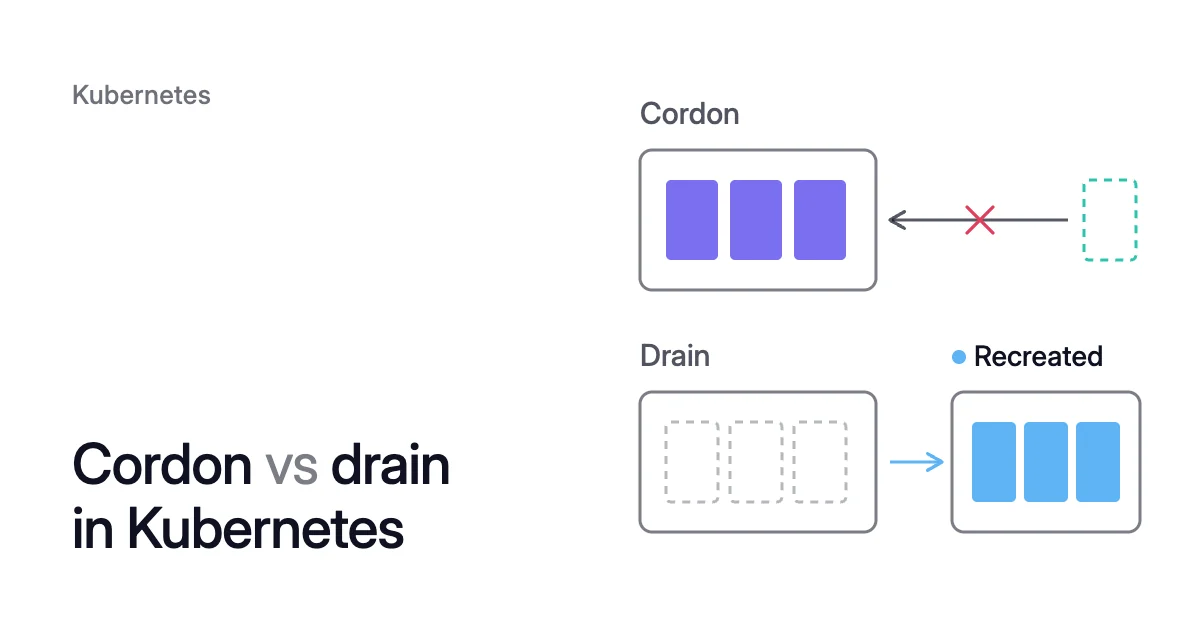
Short answer. Cordon vs drain comes down to the pods already on the node: a cordon leaves them running, and a drain evicts them. Both mark the node unschedulable, and a drain evicts each pod within its PodDisruptionBudget (PDB), so its controller recreates it on another node.
What is cordon in Kubernetes: running pods stay, new ones are kept off
Picture a node due for a kernel patch. A half-finished nightly batch job runs on it, beside a DaemonSet log agent. So do two replicas of a web app, under a PDB that lets one go at a time.
Cordon it, and the batch job finishes with nothing new landing beside it. The web replicas stay too, so the patch waits. The node is still a running virtual machine (VM) that you pay for.
What a cordon changes
To cordon a node is to mark it unschedulable. The kubectl cordon command sets the Node object’s spec.unschedulable field to true. From then on, the scheduler leaves that node out whenever it places a new pod.
The Kubernetes docs are exact about the limit. Marking a node unschedulable “does not affect existing Pods on the Node,” they say. They call it “a preparatory step before a node reboot or other maintenance.”
$ kubectl cordon <node-name>
$ kubectl get nodes
After the cordon, the second command lists the node’s status as Ready,SchedulingDisabled. It’s still Ready, since nothing is wrong with the machine.
To cordon several nodes, name them all in one command, separated by spaces. Microsoft’s guide to resizing an Azure Kubernetes Service (AKS) node pool does this before it drains the old pool.
Which pods still land on a cordoned node
DaemonSet pods still land on a cordoned node. The DaemonSet controller gives every one a toleration for the built-in node.kubernetes.io/unschedulable taint, since Kubernetes 1.10. Node-local agents for networking, storage or logs have to run for as long as the node does.
Pods that tolerate the unschedulable taint themselves get past it, including through a blanket toleration (operator: Exists with no key and no effect). The Safely Drain a Node page says to avoid tolerating it in anything but a DaemonSet.
Pods that set nodeName directly bypass the scheduler altogether. They’re bound to that node even though it’s cordoned.
kubectl drain cordons the node, then evicts its pods within their PDBs
Drain the same node instead. The web replicas move to other nodes one at a time, and the batch job is evicted mid-run. Only the log agent stays.
When kubectl drain returns without an error, every pod it handles has been evicted. Each eviction stayed within the pod’s grace period and its PDB. The Kubernetes docs then call it safe to power down the machine or delete its VM.
How drain evicts pods
Drain begins with a cordon: “The given node will be marked unschedulable to prevent new pods from arriving.”
Then drain evicts each pod through the Eviction API. That API lets the pod’s containers terminate gracefully. It refuses any eviction that would break the pod’s PDB.
A refusal doesn’t end the drain. The Disruptions page says kubectl “periodically retries all failed requests” until the node’s pods are gone or a configurable timeout is reached. Microsoft’s example shows kubectl printing “will retry after 5s”.
You set that timeout with --timeout, where zero “means infinite”.
Pods that drain’s defaults won’t touch
Before it evicts anything, drain checks for four kinds of pod:
- DaemonSet pods. Drain won’t proceed without
--ignore-daemonsets. Even with it, drain leaves them running: the DaemonSet controller ignores the cordon and would recreate them on the same node. - Pods with no controller. No ReplicaSet, StatefulSet, Job, DaemonSet or ReplicationController stands behind them, so nothing would recreate one that was deleted. Drain deletes no pods at all unless you pass
--force, which deletes these ones anyway. - Pods with emptyDir volumes. Their local data is deleted when the node is drained. The
--delete-emptydir-dataflag lets drain continue anyway. - Mirror pods. They can’t be deleted through the API server, so drain skips them.
Drain doesn’t uncordon the node afterwards. Putting it back into service is a separate kubectl uncordon.
For the full procedure, see how to drain a Kubernetes node without downtime. It adds the replicas and budgets that keep apps serving. Every kubectl command and flag here follows the docs for Kubernetes 1.37, the current release in October 2026.
Cordon vs drain: the running pods decide
In the table below, the running-pods row settles kubectl drain vs cordon. A cordon leaves those pods running. A drain evicts all but DaemonSet and mirror pods, and uncordon reopens the node without bringing any evicted pod back.
Taints get two columns because they’re the other way to keep pods off a node.
kubectl cordon | kubectl drain | NoSchedule taint | NoExecute taint | |
|---|---|---|---|---|
What it changes | Sets spec.unschedulable | Cordons, then evicts | Adds a taint with a key you choose | Same, with the evicting effect |
New pods | Kept off, except DaemonSet pods and pods that tolerate node.kubernetes.io/unschedulable | Kept off, as with cordon | Kept off unless they tolerate the taint | Kept off unless they tolerate the taint |
Running pods | Keep running | Evicted, except DaemonSet and mirror pods | Keep running | Evicted at once unless they tolerate it. Tolerating pods with tolerationSeconds go when it runs out |
PDBs | Not involved | Respected, unless you pass --disable-eviction | Not involved | Bypassed: the pods are deleted |
Undo | kubectl uncordon | kubectl uncordon (evicted pods don’t come back) | Remove the taint | Same, and evicted pods don’t come back |
Use it to | Stop new work landing before you decide | Empty a node to reboot, replace or remove it | Reserve nodes for chosen workloads | Clear a node of pods that must not run there |
Kubernetes cordon vs taint: a taint can reserve a node
A taint is a mark on a node that repels pods. A toleration on a pod lets that pod past it. You choose the key, the value and one of three effects:
NoSchedule: no new pods unless they tolerate the taint. Running pods stay.PreferNoSchedule: the control plane tries to keep untolerating pods off the node, but the docs say “it is not guaranteed.”NoExecute: running pods without a matching toleration are evicted immediately. A pod that tolerates it withouttolerationSecondsstays for good. One withtolerationSecondsstays that long, then the node lifecycle controller evicts it.
$ kubectl taint nodes <node-name> dedicated=<group>:NoSchedule
$ kubectl taint nodes <node-name> dedicated=<group>:NoSchedule-
The second command, with the trailing -, removes the taint.
A cordon closes a node, a taint can reserve it
Cordon works like one fixed NoSchedule taint. Kubernetes’ node controller marks an unschedulable node with node.kubernetes.io/unschedulable. By default only DaemonSet pods tolerate it, so a cordon closes the node to almost everything.
A taint is the finer control. It keeps out only the pods without a matching toleration, so it can reserve a node rather than close it.
The docs’ dedicated-nodes example gives the nodes dedicated=groupName:NoSchedule and one group’s pods the toleration. It then adds a matching node label and node affinity to keep that group on those nodes.
NoExecute taints and PDBs
The Disruptions page notes that deleting pods bypasses PodDisruptionBudgets. A NoExecute taint can therefore remove every replica on the node in one go. That’s the outage a PDB exists to stop.
On the node you’re patching, drain evicts one web replica. The budget refuses the second eviction until the first one’s replacement is Ready on another node. A NoExecute taint removes both at once.
kubectl uncordon reopens the node to new pods only
Running kubectl uncordon <node-name> sets spec.unschedulable back to false. The Safely Drain a Node page says it tells Kubernetes “that it can resume scheduling new pods onto the node.”
New is the word to watch. The pods a drain evicted were recreated on other nodes, and they stay there. So an uncordoned node fills up only as new pods are created, from rollouts, scale-ups and replaced pods.
Spreading running pods back out is a job for the Kubernetes descheduler.
Uncordon a node in three cases:
- After maintenance on a node you kept in the cluster.
- After a drain that failed or timed out, when you won’t retry it.
- After you cordoned a node only to look at it.
A cordon you didn’t make may be deliberate. On AKS, you can set a node pool’s undrainable-node behavior to Cordon. Then an upgrade that can’t drain a node cordons it and labels it kubernetes.azure.com/upgrade-status=Quarantined.
Microsoft’s steps for it begin with removing the PDB that blocked the drain, and then that label.
When to cordon and drain a node in Kubernetes
Pick by what should happen to the pods already on the node:
- To let them finish where they are, cordon. Once a long batch job ends, you drain the node or remove it.
- To move them so you can reboot, patch, replace or remove the node, drain. The Kubernetes guide says to issue
kubectl drainfor one node at a time. Drains for different nodes can still run in parallel, in separate terminals, and respect your PDBs. - To retire a whole pool, cordon every node in it, then drain them one at a time. Cordoning first means a pod evicted from the first node can’t land on the second. On AKS, do this before you delete the node pool. Microsoft notes that “When you delete a node pool, AKS doesn’t perform cordon and drain.”
- To keep nodes for some workloads only, taint them. Use
NoScheduleand give those workloads the toleration. Add node affinity if they must stay on those nodes too. - To make pods without a toleration leave now, whatever their budgets say, use a
NoExecutetaint. They all go at once, and no PDB paces them.
How Coral cordons and drains nodes
Coral optimizes Kubernetes on AKS and Amazon Elastic Kubernetes Service (EKS). It rebalances CPU and memory requests to what each container uses. Its node optimization then empties the nodes those smaller requests leave spare, so your autoscaler can remove them.
That’s where Kubernetes cost optimization reduces your cloud cost: fewer machines run. Coral cordons and drains those nodes itself, under five rules:
- A fit check first. Before it moves anything, Coral checks the live cluster. Every pod on the node must fit on another Ready node, with its affinity, taints, spread, ports and zones. The move must also respect PDBs, do-not-disrupt markers and your autoscaler’s minimum pool size.
- One node at a time. Coral never cordons or drains nodes in bulk. Where it can, it starts a replacement pod on another node and evicts the old one once the replacement is Ready. Otherwise it evicts within the pod’s PDB.
- A time limit. If a drain can’t finish in time, the node goes back into service.
- Your cordons stay yours. Coral skips cordoned, NotReady and deleting nodes. It never drains a node someone else cordoned.
- The empty node. After the delay in the “Wait before removing empty nodes” setting, Coral hands the node to your autoscaler. The autoscaler’s own timers decide when it goes. Coral deletes the machine itself only in fixed-size pools that nothing else manages.
When a pod still restarts
When a node is removed, a pod whose replacement can’t start first gets a short restart. Marking it do-not-disrupt prevents that, at the cost of keeping its node.
On our own dev cluster on 6 October, Coral removed a spare 4-CPU worker on its own in under 10 minutes. Apps that run a single copy restarted once on another machine. Every app was running again afterwards, as the case study shows.
Rebalancing and upgrades
Rebalancing replaces the nodes you choose with cheaper machines, and it never goes past a PDB. Each replacement copy must stay Ready and serving, with no restarts, before the old one goes. A node that can’t be emptied in time is kept.
Upgrades cordon and drain nodes of their own. During the upgrade window, we recommend pausing node optimization and the Evictor, the part of Coral that moves pods off lightly used nodes. The Coral FAQ explains how optimization steps around an upgrade.
Sources: Kubernetes, “Nodes” (opens in a new tab); Kubernetes, “kubectl drain” (opens in a new tab); Kubernetes, “Safely Drain a Node” (opens in a new tab); Kubernetes, “Taints and Tolerations” (opens in a new tab); Kubernetes, “Disruptions” (opens in a new tab); Kubernetes, “Node Status” (opens in a new tab); Microsoft Learn, “Resize Node Pools in Azure Kubernetes Service (AKS)” (opens in a new tab); Microsoft Learn, “Upgrade Options and Recommendations for Azure Kubernetes Service (AKS) Clusters” (opens in a new tab).