Published 1 November 2026 · By Ajay Roy, Guest author · Infrastructure engineer at HCL · Published by Zoorik
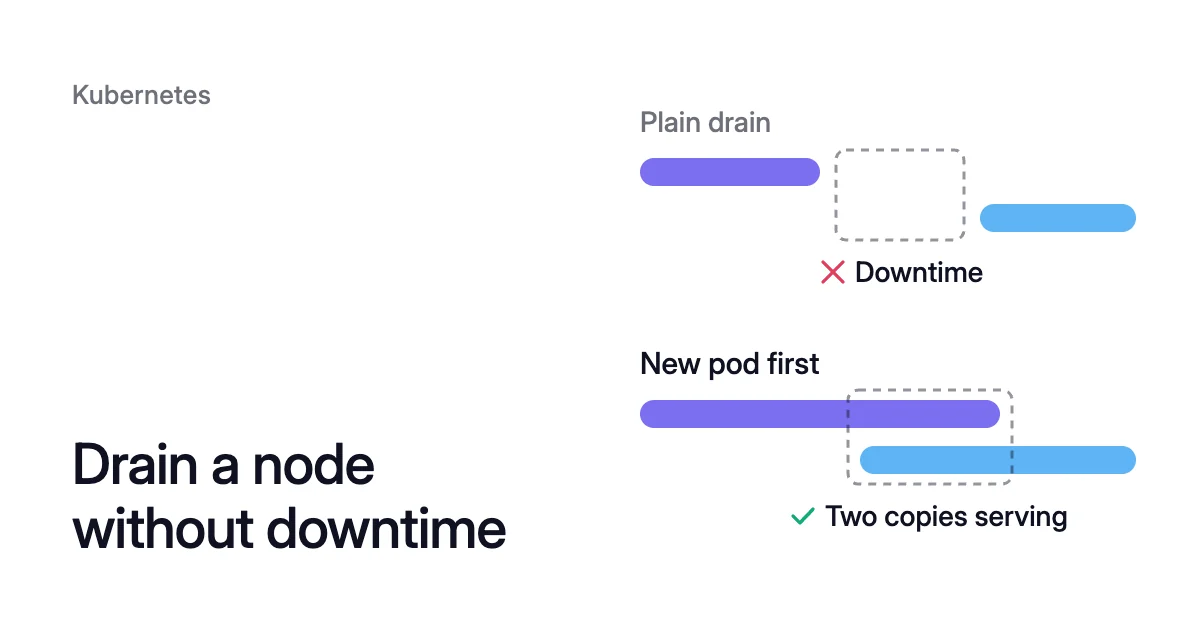
Short answer. To drain a Kubernetes node without downtime, each app needs a second Ready replica elsewhere, a PodDisruptionBudget (PDB) allowing one disruption, and spare node capacity. A plain kubectl drain evicts a pod before its replacement starts, so a single-replica app is down until the new copy is Ready.
Why a plain drain takes a single-replica app down
Picture patching a node that runs one of three web API replicas and the only copy of a cache. The other two API pods keep serving.
The cache serves nothing from the moment its pod is evicted. It stays down until a replacement on another node has pulled its image, started and passed its readiness check.
We measured that gap on our dev cluster during a Coral rebalance on 12 October. None of its single-copy apps qualified for the warm handover described below. Each was down for 5 to 82 seconds, and the 6 apps that run two copies were down for 0 seconds.
What a drain does to each pod
kubectl drain marks the node unschedulable, as kubectl cordon does (how cordon and drain differ). It then evicts the node’s pods through the Eviction API. That API refuses any eviction that would break a pod’s PDB.
An evicted pod is marked for deletion, and its endpoint stops receiving Service traffic. Its containers get SIGTERM and the pod’s grace period, 30 seconds by default. Then the kubelet kills any still running.
Kubernetes never moves a pod to another node. It replaces the pod.
In the drain walkthrough on the Disruptions page, the Deployment creates the replacement only after it notices the old pod terminating. Closing that gap means starting the new copy first.
Two kinds of pod wait longer. A StatefulSet’s replacement keeps the old pod’s name (web-0 stays web-0), so it can’t be created until the old pod has terminated completely.
A ReadWriteOnce volume can be mounted read-write by a single node. A replacement on another node can’t share it with the old pod.
Five things each app needs to drain a Kubernetes node without downtime
All five must hold:
- At least two replicas, on different nodes. Without a PDB, a drain evicts every replica that shares the node at once. Spread them with pod anti-affinity or topology spread constraints.
- A PDB that allows one disruption. With
maxUnavailable: 1, drain evicts one pod and is refused the next. It waits until the replacement counts as healthy, meaning its Ready condition is True. No budget protects a single replica.maxUnavailable: 1lets its only pod go, and a budget of zero voluntary evictions means the drain never completes. - A readiness probe that passes only when the app can serve. Ready is what the PDB and the Deployment wait for, so a pod that reports Ready early ends the overlap too soon.
- A clean shutdown. On SIGTERM, the app should finish in-flight requests and exit within
terminationGracePeriodSeconds. ApreStophook runs before the signal if you need one. - Room for the replacement. A new pod that fits on no node stays Pending, and the drain stalls on the next eviction. Add a node first, or let a managed upgrade’s surge node supply it.
The PDB for a three-replica Deployment labelled app: <app>:
apiVersion: policy/v1
kind: PodDisruptionBudget
metadata:
  name: <app>-pdb
spec:
  maxUnavailable: 1
  selector:
    matchLabels:
      app: <app>
unhealthyPodEvictionPolicy: AlwaysAllowThe PDB docs recommend maxUnavailable because it “automatically responds to changes in the number of replicas”.
The last line is explained under hung drains. Pod disruption budget best practices covers choosing the numbers.
How to drain a node in Kubernetes, step by step
- See what runs on the node and what its budgets allow. An app with one replica will restart. A budget with 0 under ALLOWED DISRUPTIONS will block the drain.
$ kubectl get pods --all-namespaces --field-selector spec.nodeName=<node-name> -o wide
$ kubectl get poddisruptionbudgets --all-namespaces
- Cordon the node. New pods stop landing on it:
kubectl cordon <node-name>. - Move single-replica Deployments off it with the rolling restart in the next section.
- Drain it. If every pod there has a controller, this evicts all but DaemonSet and mirror pods. It also deletes the data in the evicted pods’ emptyDir volumes. Check first that none holds data you need.
$ kubectl drain <node-name> --ignore-daemonsets --delete-emptydir-data --timeout=30m
- Do the maintenance. If you keep the node, run
kubectl uncordon <node-name>to make it schedulable again.
The kubectl drain flags
kubectl drain <node-name> --ignore-daemonsets --delete-emptydir-data is the form most drains need. Drain won’t proceed without the first flag while a DaemonSet pod is on the node. It won’t proceed without the second while a pod uses emptyDir.
The flags, from the kubectl reference for Kubernetes v1.37:
| Flag | What it does | Default |
|---|---|---|
--ignore-daemonsets | Skips DaemonSet pods. Drain never deletes them: their controller ignores the unschedulable mark and would replace them on the same node. | Off |
--delete-emptydir-data | Evicts pods that use emptyDir. That local data is deleted. | Off |
--timeout | How long drain waits before giving up. | Not set. Zero means no limit. |
--grace-period | Seconds each pod gets to shut down. | -1, the pod’s own setting |
--force | Also deletes pods no controller manages, which otherwise stop the drain. Nothing recreates them. | Off |
--disable-eviction | Deletes pods instead of evicting them, which bypasses PDBs. | Off |
Set a kubectl drain timeout whenever you script a drain. Drain retries refused evictions until every pod is gone or the timeout is reached. Without one, a blocked PDB holds the job open for good.
When drain gives up, the node stays cordoned. Uncordon it if you’re abandoning the work. --dry-run=client previews a drain, printing what would be sent without sending it.
A rolling restart moves a single-replica Deployment first
A rolling restart gives a single-replica Deployment the overlap a plain drain can’t. It starts the new pod first, on another node because yours is cordoned.
So the restart can run 1 + 1 = 2 pods and must keep 1 − 0 = 1 available. The old pod stays until the new one is Ready.
$ kubectl rollout restart deployment/<name> -n <namespace>
$ kubectl rollout status deployment/<name> -n <namespace>
When rollout status reports success, the Ready pod is on another node.
Before you drain, sort the node’s apps:
- Drain an app with two or more replicas as it is, once it meets the five needs.
- Restart a single-replica Deployment with rolling updates first.
- Expect any other single-replica app to restart.
A restart gives no overlap to a StatefulSet, a pod with a ReadWriteOnce volume or a Deployment with the Recreate strategy. Recreate kills all existing pods before it creates new ones. Those restart however you drain them, so move them in a quiet hour, or run a second replica where the app supports one.
When a drain hangs, and whether to ignore the PDB
A stuck drain is waiting on an eviction that keeps being refused. The usual causes:
- A PDB that allows zero voluntary evictions, such as
maxUnavailableof 0, orminAvailableof 100% or of the replica count. - Pods under a budget that aren’t Ready, such as a crash-looping app. Under the default
IfHealthyBudgetpolicy, drain can evict them only while the app isn’t already disrupted.unhealthyPodEvictionPolicy: AlwaysAllow, stable since Kubernetes 1.31, lets drain evict them, and the Disruptions page recommends it. - A replacement stuck Pending for lack of room.
Adding a replica so the budget allows one eviction is usually the better fix.
For a single-instance stateful app, the PDB docs suggest a maxUnavailable of 0, with an agreement that the operator asks first. When ready for the downtime, the app owner deletes the PDB, then recreates it.
Kubernetes node maintenance on AKS and EKS waits on your PDBs
Managed upgrades drain nodes for you, so the per-app rules above still decide whether an upgrade is quiet.
AKS rolling node pool upgrades
On Azure Kubernetes Service (AKS), a rolling node pool upgrade adds a surge node first, one node by default. Microsoft recommends a surge of 33% for production pools. AKS then cordons and drains old nodes one at a time, or as many at once as there are surge nodes.
Each node gets a drain timeout of 30 minutes by default, settable from 5 minutes to 24 hours. If it runs out with pods still running, the upgrade stops until a later PUT operation resumes it. A wait after each drain is settable too, up to 30 minutes and 0 by default.
Set the timeout, in minutes, per node pool:
$ az aks nodepool update \
  --resource-group <resource-group> \
  --cluster-name <cluster-name> \
  --name <node-pool> \
  --drain-timeout 45
EKS managed node group updates
On Amazon Elastic Kubernetes Service (EKS), a managed node group update with the default strategy creates new nodes first. Once a new node is Ready, it cordons an old node and drains it. EKS waits 60 seconds after evicting every pod before it terminates the node.
Pods that don’t leave within 15 minutes fail the update with a PodEvictionFailure error, unless you set the force flag. That flag, on the update-nodegroup-version request, deletes them.
AWS names an aggressive PDB, or several PDBs pointing at one pod, among the causes. So forcing deletes pods a budget was holding. That carries the same risk as --disable-eviction.
How Coral drains nodes
Coral optimizes Kubernetes on AKS and EKS. One of its levers for Kubernetes cost optimization is draining spare nodes so your autoscaler can remove them. Its drains follow the rules above, plus a step for single-replica apps:
- Check first: before a consolidation drain, the agent checks the live cluster. Every pod on the node must fit on another Ready node, with its affinity, taints, spread, ports and zones.
- One node at a time: consolidation cordons and drains one node at a time. If a drain can’t finish in time, the node goes back into service.
- Warm handover: for a Deployment or an Argo Rollout, even one that runs a single copy, Coral scales it up by one. It waits until the new pod is Ready on another node, evicts the old pod within its PDB, then scales back. A Ready copy keeps serving throughout. No process state moves, and open connections to the old pod end.
- Eviction within the PDB: where warm handover isn’t used, Coral evicts the pod through the Eviction API, within its PDB.
- Held nodes: a node stays when a pod on it can’t move safely. Examples are a PDB that allows no disruption, emptyDir or hostPath data, or a pod marked do-not-disrupt. Node list → “What’s holding them” names each reason and its fix.
When a single-copy app still restarts
Warm handover isn’t used for these, among others:
- StatefulSets and Jobs
- the Recreate strategy
- ReadWriteOnce volumes and GPU pods
- a Deployment whose replica count Argo CD or Flux sets
An HPA-scaled app gets a handover only in a rebalance, where Coral raises the autoscaler’s minimum instead. All of these fall back to eviction, so a single-copy app among them gets a short restart, as under a plain drain.
That is why every single-copy app restarted on 12 October. Argo CD sets the replica count of some, and the rest are StatefulSets or use the Recreate strategy.
A bare pod with no controller keeps its node unless it is marked safe to evict. A pod annotated karpenter.sh/do-not-disrupt: "true" is never moved, and its node is kept.
Upgrades and rebalances
Coral skips cordoned, NotReady and deleting nodes, and never drains a node someone else cordoned. During an upgrade window, we recommend pausing node optimization and the Evictor, which moves pods off lightly used nodes.
A rebalance replaces the nodes you choose with cheaper machines, and it never goes past a PDB. Each handover copy must stay Ready and serving, with no restarts, before the old one goes. A node that can’t be emptied in time is kept.
Sources: Kubernetes, “kubectl drain” (opens in a new tab); Kubernetes, “Disruptions” (opens in a new tab); Kubernetes, “Specifying a Disruption Budget for your Application” (opens in a new tab); Kubernetes, “Pod Lifecycle” (opens in a new tab); Kubernetes, “Deployments” (opens in a new tab); Kubernetes, “Persistent Volumes” (opens in a new tab); Microsoft Learn, “Configure rolling upgrades for Azure Kubernetes Service (AKS) node pools” (opens in a new tab); AWS, “Understand each phase of node updates” (opens in a new tab).