Published 2 November 2026 · Published by Zoorik
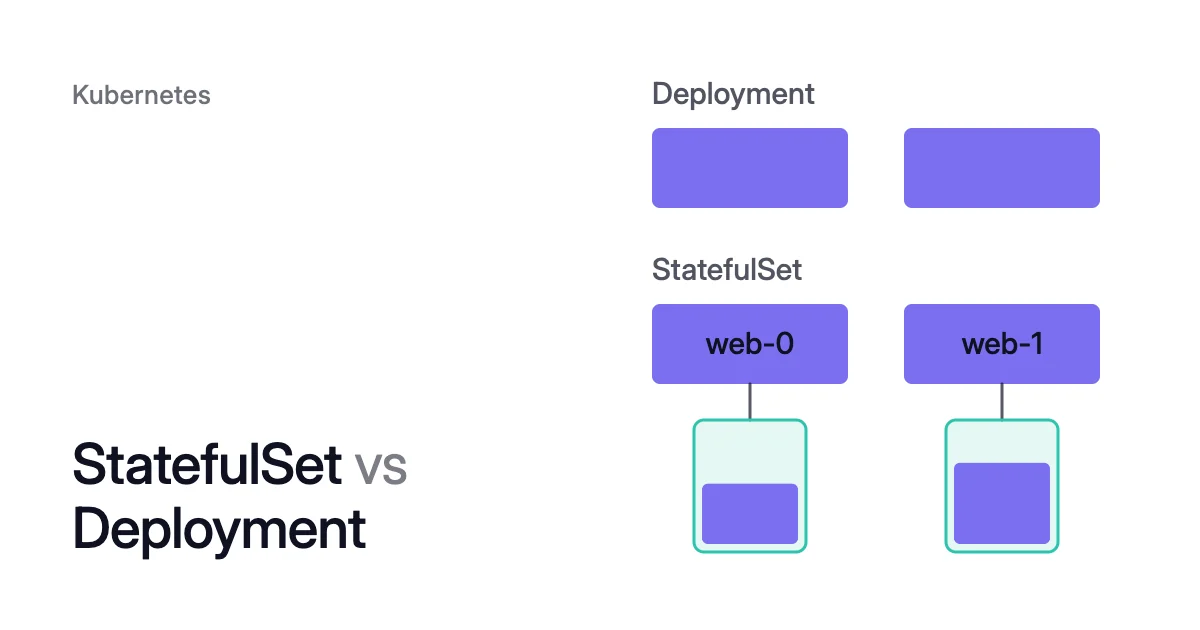
Short answer. Deployment vs StatefulSet comes down to identity. A Deployment runs interchangeable pods. A StatefulSet gives each pod a stable name, its own volume and an order.
What a Deployment runs: interchangeable pods through a ReplicaSet
A Deployment manages a set of pods for an app that usually doesn’t keep state. It creates a ReplicaSet, and the ReplicaSet creates the pods from one pod template.
Pod names carry the template’s hash and a suffix of their own, such as nginx-deployment-75675f5897-7ci7o in the docs’ example. The pods are interchangeable: any one can stand in for another.
The default rolling update scales a new ReplicaSet up as it scales the old one down. By default, maxUnavailable lets at most 25% of the desired pods be unavailable, and maxSurge allows 25% extra. The Recreate strategy kills every existing pod before it creates new ones.
What a StatefulSet adds: stable names, a volume per pod and order
The Kubernetes docs list four guarantees a StatefulSet gives its pods:
- stable, unique network identifiers
- stable, persistent storage
- ordered, graceful deployment and scaling
- ordered, automated rolling updates
Stable means it lasts across rescheduling: a pod keeps its identity whichever node it lands on.
Pods are named <statefulset name>-<ordinal>, so a StatefulSet called web with 3 replicas runs web-0, web-1 and web-2. A headless Service, which you create yourself, gives each pod a DNS name such as web-0.nginx.default.svc.cluster.local.
Its volumeClaimTemplates give each pod its own PersistentVolumeClaim (PVC). When a pod is rescheduled onto a node, it mounts the volumes of those same claims again.
Pods start in order from web-0, each once the one before it is Running and Ready. Scaling down runs in reverse, so web-2 goes first.
Rolling updates, the default update strategy, run from the highest ordinal down, one pod at a time. The controller deletes and recreates each pod, and waits until it is Running and Ready before the next. A partition stages an update: only pods at or above that ordinal change, for a canary or a phased rollout.
Two fields relax the order. With podManagementPolicy: Parallel, scaling creates or terminates all pods at once. Add a maxUnavailable above 1, beta since Kubernetes 1.37, and an update replaces up to that many pods at once.
How to choose between a StatefulSet and a Deployment
Side by side, with their defaults, the two differ on five points.
| Deployment | StatefulSet | |
|---|---|---|
Pod names | The template’s hash plus a suffix of their own | Its name plus an ordinal: web-0, web-1 |
Volumes | None, or one claim that every replica shares | One claim per pod, from volumeClaimTemplates |
Start and stop order | No set order | Start from 0 up, stop from the highest ordinal down |
Updates | Rolling update through a new ReplicaSet, 25% unavailable and 25% extra by default, or Recreate | Rolling update, one pod at a time from the highest ordinal, or OnDelete |
Headless Service | Not needed | Required, and you create it |
Choose a StatefulSet when your pods need any of these:
- a stable network identity, such as a DNS name per pod
- a volume of their own that stays with them
- ordered start, stop, scaling and updates
Without those needs, the docs point to a workload with stateless replicas, such as a Deployment.
When a Deployment’s template names a claim, every replica mounts that same claim. A ReadWriteOnce volume can be mounted read-write by a single node, so the replicas must all run on that node.
ReplicaSet vs StatefulSet: you rarely create a ReplicaSet yourself
A ReplicaSet keeps a set number of identical pods running. It doesn’t support rolling updates directly. So the docs recommend a Deployment instead, unless you need custom update orchestration or no updates at all.
If a Deployment owns a ReplicaSet, don’t manage that ReplicaSet yourself. A StatefulSet manages its pods itself, and records each change to its pod template in a ControllerRevision, which rollbacks use.
What a StatefulSet’s volumes mean on AKS and EKS
Deleting a StatefulSet, or scaling it down, doesn’t delete its volumes. The docs give data safety as the reason. The claims and the disks behind them stay until you delete them.
The persistentVolumeClaimRetentionPolicy field, stable since Kubernetes 1.32, changes that. Its whenDeleted and whenScaled policies each take Retain, the default, or Delete.
On Azure Kubernetes Service (AKS), Azure Disks are mounted ReadWriteOnce and are available to only one node. For a volume that several nodes use at once, Microsoft points to Azure Files.
Zone-redundant storage (ZRS) disks, the Premium_ZRS and StandardSSD_ZRS types, don’t have to be in the same zone as their node. Other Azure Disks do.
On Amazon Elastic Kubernetes Service (EKS), these volumes come from Amazon Elastic Block Store (EBS), through its Container Storage Interface (CSI) driver. An EBS volume and its instance must be in the same Availability Zone. EBS volumes can’t be mounted to Fargate pods.
Pods that use a PersistentVolume are scheduled only to nodes its node affinity allows. So a StatefulSet pod that moves needs a node in its disk’s zone, unless that disk is ZRS.
To grow a StatefulSet’s claims, see how to resize a PVC in a StatefulSet.
How Coral rebalances StatefulSets and Deployments differently
Coral optimizes Kubernetes on AKS and EKS, and rebalances CPU and memory requests under a policy. By default it gives StatefulSets the Resiliency policy, which sizes like Balanced and keeps limits equal to requests on Guaranteed pods. Your own Deployments get Balanced.
Running pods are resized in place where the node allows it, on Kubernetes 1.33 and later. Otherwise a Deployment’s pods are replaced one at a time, each after the last is Ready, within your PodDisruptionBudgets (PDBs).
A StatefulSet’s pods change one at a time too, highest ordinal first, and never with an extra pod.
When Coral drains a node, an eligible Deployment gets a warm handover: a new copy turns Ready elsewhere before the old pod goes. A StatefulSet pod gets a short restart instead, within its PDB.
Coral keeps nodes that hold local data or do-not-disrupt pods. For a careful start, the Coral FAQ’s answer on databases and StatefulSets suggests putting databases on the Read-only policy.
Sources: Kubernetes, “StatefulSets” (opens in a new tab); Kubernetes, “Deployments” (opens in a new tab); Kubernetes, “ReplicaSet” (opens in a new tab); Kubernetes, “Persistent Volumes” (opens in a new tab); Microsoft Learn, “Use Container Storage Interface (CSI) drivers on Azure Kubernetes Service (AKS)” (opens in a new tab); AWS, “Use Kubernetes volume storage with Amazon EBS” (opens in a new tab); AWS, “Amazon EBS volumes” (opens in a new tab).