Published 1 November 2026 · By Shashank Varanasi (opens in a new tab), Guest author · Backend engineer at Accenture · Published by Zoorik
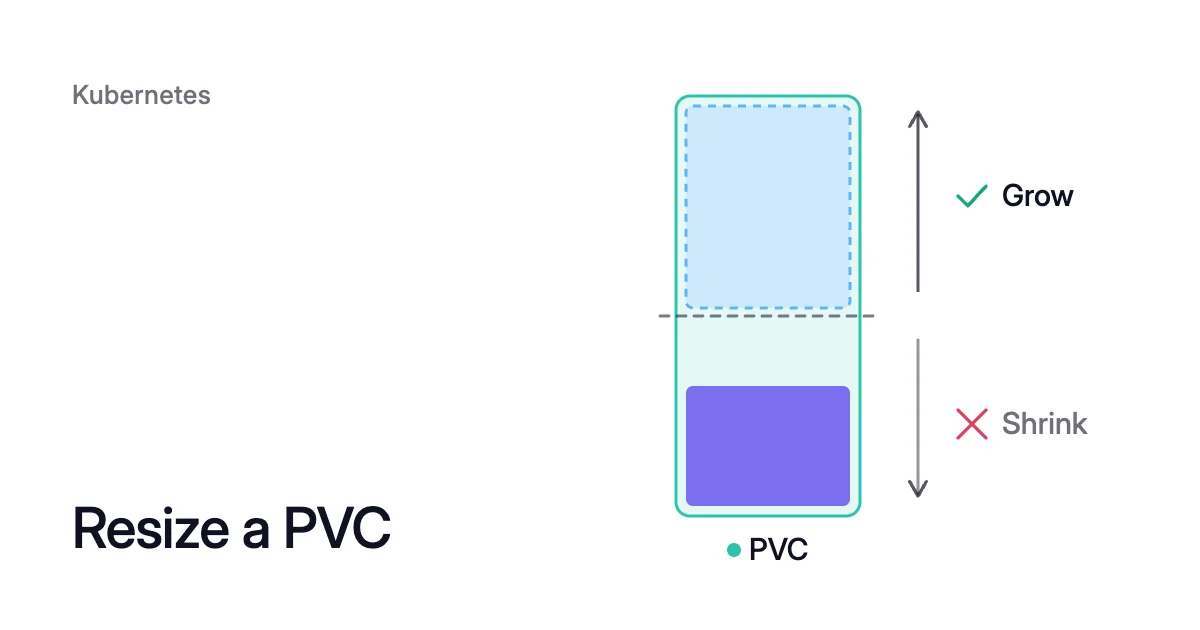
Short answer. To resize a PVC (PersistentVolumeClaim) in Kubernetes, raise its storage request once its StorageClass sets allowVolumeExpansion: true and its storage driver supports expansion. The disk and its filesystem grow, and the pod can keep running, but a PVC can’t shrink: a smaller claim means copying the data.
What you need to resize a PVC in Kubernetes
Picture a database pod on Azure Kubernetes Service (AKS) whose 100Gi claim is nearly full. You raise its request to 200Gi, the disk behind it grows, and the pod can keep running.
If the data later drops back, the claim and its disk stay at 200Gi. You keep paying for the larger disk.
A PVC is a request for storage. The PersistentVolume (PV) bound to it is the storage that serves it, usually a cloud disk.
Expanding a PVC has been stable since Kubernetes 1.24 and is on by default. It needs three things:
- The class allows it. Kubernetes accepts a larger size only for claims whose StorageClass sets
allowVolumeExpansionto true. - The driver supports it. Kubernetes leaves expansion to each Container Storage Interface (CSI) driver. The Azure Disk driver on AKS and the Amazon Elastic Block Store (EBS) driver both support it.
- The filesystem can grow. If the volume holds a filesystem, it’s XFS, ext3 or ext4, the three Kubernetes can resize.
How to expand a PVC in Kubernetes
Check the class, then patch the claim:
- Find the claim’s class in the STORAGECLASS column of
kubectl get pvc, then check the class’s YAML:$ kubectl get pvc <pvc-name> $ kubectl get storageclass <class-name> -o yaml
- If
allowVolumeExpansion: trueis missing, add it to the existing class:$ kubectl patch storageclass <class-name> --type merge --patch '{"allowVolumeExpansion": true}' - Patch the claim’s storage request to the new size:
$ kubectl patch pvc <pvc-name> --type merge --patch '{"spec": {"resources": {"requests": {"storage": "200Gi"}}}}' - Watch the CAPACITY column of
kubectl get pvc <pvc-name>until it shows the new size. If it doesn’t, read the claim’s events withkubectl describe pvc <pvc-name>.
Kubernetes resizes the volume that already backs the claim. In the docs’ words, “a new PersistentVolume is never created to satisfy the claim.”
The CSI driver expands the cloud disk, then the filesystem grows on the node. That second step happens when a pod starts with the claim, or while the pod runs if the filesystem can grow while mounted. A claim that no pod uses can’t finish expanding until a pod mounts it.
If you ask for more than the storage system can supply, Kubernetes keeps retrying. On Kubernetes 1.32 or later, you can then retry with a smaller request than the one that failed.
The new request must still be higher than the claim’s .status.capacity. This recovery is beta and on by default in 1.32, and stable since 1.34.
How to resize a PVC on AKS
On AKS, an expansion request goes to the Azure Disk CSI driver. Microsoft’s docs say the built-in managed-csi class “already supports expansion.”
Of the other built-in classes:
- The default class creates Standard SSD disks.
managed-csi-premiumcreates Premium SSD.managed-csi-premium-v2provisions Premium SSD v2, on Kubernetes 1.35 or later.
The limit to know is 4 TiB. A Standard HDD, Standard SSD or Premium SSD volume grows without downtime while the new size stays at 4 TiB or less.
Growing one of those from 4 TiB or less to more than 4 TiB means unmounting the disk and detaching it from the node. So you scale the workload to zero replicas before you patch the claim.
Premium SSD v2 and Ultra Disk volumes don’t have that limit. The disk-level steps are in how to expand an Azure disk without downtime.
How Azure charges for the new size
The size you pick also sets what you pay, and not one GiB at a time. Azure charges for a managed disk on its provisioned size, rounded up to the nearest offered disk size.
Premium SSD v2 is charged per GiB, so it doesn’t round. Which disk each AKS class creates covers each built-in class’s disk type and redundancy.
Of the 256 GiB you pay for, 56 GiB (256 − 200) is space the claim can’t use. A 128 GiB claim sits exactly on E10. Growing it to 130 GiB moves it to E15: twice the capacity (256 ÷ 128) for 2 GiB more room.
So when you grow a Standard SSD or Premium SSD claim, ask for the full size of the tier you pay for. Here that’s 256 GiB. To price other sizes, use the Azure disk pricing calculator.
A gp3 StorageClass that can grow on EKS
On Amazon Elastic Kubernetes Service (EKS) with the Amazon EBS CSI driver, a class like this one creates gp3 volumes and allows expansion:
apiVersion: storage.k8s.io/v1
kind: StorageClass
metadata:
  name: gp3
provisioner: ebs.csi.aws.com
parameters:
  type: gp3
volumeBindingMode: WaitForFirstConsumer
allowVolumeExpansion: true
Naming type keeps the class readable, though the driver creates gp3 when none is given. Unless you set them, the filesystem is ext4 and a gp3 volume’s throughput is 125 MiB/s.
With WaitForFirstConsumer, the driver waits for a pod before it creates the volume, so the volume lands in that pod’s Availability Zone. The driver’s docs recommend this mode for dynamic provisioning.
If the class sets input/output operations per second (IOPS) with iopsPerGB, you can set allowAutoIOPSIncreaseOnModify to "true". That lets the driver adjust IOPS as the volume grows, so the IOPS-per-GiB ratio holds.
You expand a claim of this class like any other. Growing an EBS volume in place covers what happens to the volume underneath. The case for gp3 over gp2 is in comparing gp2 and gp3.
How to resize a PVC in a StatefulSet
You can’t resize a StatefulSet’s claims through its template: the API server treats volumeClaimTemplates as immutable and rejects the edit. Each pod gets its own claim from that template.
The claim is named after the template, the StatefulSet and the pod’s ordinal, such as www-web-0 for pod web-0. So grow the claims that exist, then recreate the StatefulSet object around its pods.
- Patch each claim to the new size, listing them by the StatefulSet’s pod label:
$ kubectl get pvc -l <pod-label> $ kubectl patch pvc <template>-<statefulset>-0 --type merge --patch '{"spec": {"resources": {"requests": {"storage": "200Gi"}}}}' - As insurance for the next step, set each claim’s PV to keep its disk if the claim is ever deleted:
$ kubectl patch pv <pv-name> --type merge --patch '{"spec": {"persistentVolumeReclaimPolicy": "Retain"}}' - Delete the StatefulSet object without its pods. Without
--cascade=orphan, the delete removes the pods as well, so check the flag before you run it. With it, Kubernetes deletes only the StatefulSet and leaves its pods running.$ kubectl delete statefulset <statefulset> --cascade=orphan
- Apply the manifest again with the new size in
volumeClaimTemplates, so new replicas get claims at that size. The recreated StatefulSet adopts pods that are Running and Ready. A pod it relaunches mounts its original volume again, as the Kubernetes StatefulSet tutorial shows.
When the claims show the new size, set each PV’s reclaim policy back to what it was. A dynamically provisioned PV inherits its class’s policy, which defaults to Delete. A PV left on Retain keeps its disk, and its cost, after the claim is gone.
Can you shrink a PVC in Kubernetes?
No. The Kubernetes docs say “Kubernetes does not support shrinking a PVC to less than its current size.”
Microsoft’s AKS docs give the reason, “due to the risk of data loss,” and show this error for a smaller patch:
The persistentVolumeClaim "pvc-azuredisk" is invalid: spec.resources.requests.storage: Forbidden: field can not be less than previous value.
So a claim sized for a peak keeps that size, and so does its cost.
Why a claim can’t shrink
The disk underneath is a block device whose filesystem can keep data in any block, including the last ones.
Removing the end of the device would remove part of that data. Only the operating system using the filesystem can move it first.
So grow a claim as its data accumulates, instead of allocating a large volume up front. The cloud disks underneath can’t shrink in place either: see Azure managed disks and EBS volumes.
How to move the data to a smaller claim
To get a smaller claim, copy the data to a new one. The data is unavailable from step 2 to step 5.
- Set the old claim’s PV to
Retain, with the patch in the StatefulSet section, so deleting the claim later keeps the disk. - Scale the workload to zero so nothing writes during the copy. A StatefulSet’s
persistentVolumeClaimRetentionPolicymay setwhenScaled: Delete. If it does, scaling down deletes the claims of the removed pods, so set it toRetainbefore you scale. - Create a claim in the same class, sized to the data plus the headroom you want.
- Run a one-off pod that mounts both claims and copies the files across, with a tool that keeps ownership, permissions and links. The rsync flags for that are in how to shrink an EBS volume. With
WaitForFirstConsumer, the new disk is created when this pod starts. - Point the workload’s
claimNameat the new claim and scale it back up. - Delete the old claim once you trust the copy. Because its PV is set to
Retain, the PV becomes Released and keeps the disk. Deleting the PV leaves the disk in place too. Delete the disk itself in Azure or AWS last, since its data goes with it. Until then it stays provisioned, and the cloud keeps charging for it.
Keep the claim name in a StatefulSet
In a StatefulSet the claim’s name is fixed, so the new disk has to end up behind a claim with the old name. The Kubernetes docs give these steps for binding a recreated claim to an existing PV after a failed expansion.
After the copy:
- Delete the old claim, whose PV you set to
Retain. - Set the new PV to
Retain, then delete the temporary claim. - Clear that PV’s
claimRef. - Create a claim under the original name, in the same class and at the new size, whose
volumeNameis that PV. - Once it binds, restore that PV’s reclaim policy.
- Delete the StatefulSet with
--cascade=orphan, then apply it again with the smaller template size and its usual replica count.
The same grow-only rule on VM data disks
An Azure Disk or EBS claim sits on a cloud disk. Outside Kubernetes, the same grow-only rule applies to a virtual machine’s (VM’s) data disks.
Amoeba, Zoorik’s block storage optimization product, optimizes Azure managed disks and Amazon EBS volumes. It works on the data disks of Windows and Linux VMs, not on PVCs, and never touches the OS disk or root volume.
Amoeba moves a VM’s data disks onto one btrfs pool sized to your data, with room to grow. It copies your data while your services run. Then it switches each mount to the pool, with a short restart of the services that use it.
After that, it grows the pool before it fills, and sooner when data arrives fast. When your data goes down and stays down, it shrinks the pool one disk at a time. So you pay for close to what you use.
Azure managed disk cost optimization and EBS cost optimization cover Amoeba on each cloud.
Coral, Zoorik’s Kubernetes optimization product, rebalances CPU and memory requests and drains spare nodes on AKS and EKS. For the compute side of a cluster’s cost, see Kubernetes cost optimization.
Sources: Kubernetes, “Persistent Volumes” (opens in a new tab); Kubernetes, “Feature Gates” (opens in a new tab) (RecoverVolumeExpansionFailure); Kubernetes, “StatefulSet Basics” (opens in a new tab); Kubernetes, “StatefulSets” (opens in a new tab); Kubernetes source, “StatefulSet update validation (pkg/apis/apps/validation/validation.go)” (opens in a new tab); Microsoft Learn, “Create and manage persistent volumes with Azure Disks in Azure Kubernetes Service (AKS)” (opens in a new tab); Microsoft Learn, “Select a disk type for Azure IaaS VMs” (opens in a new tab); Amazon EBS CSI driver (Kubernetes SIGs), “CreateVolume (StorageClass) Parameters” (opens in a new tab).