Published 1 November 2026 · By Rupeshankar (opens in a new tab), Marketing, Zoorik · Published by Zoorik
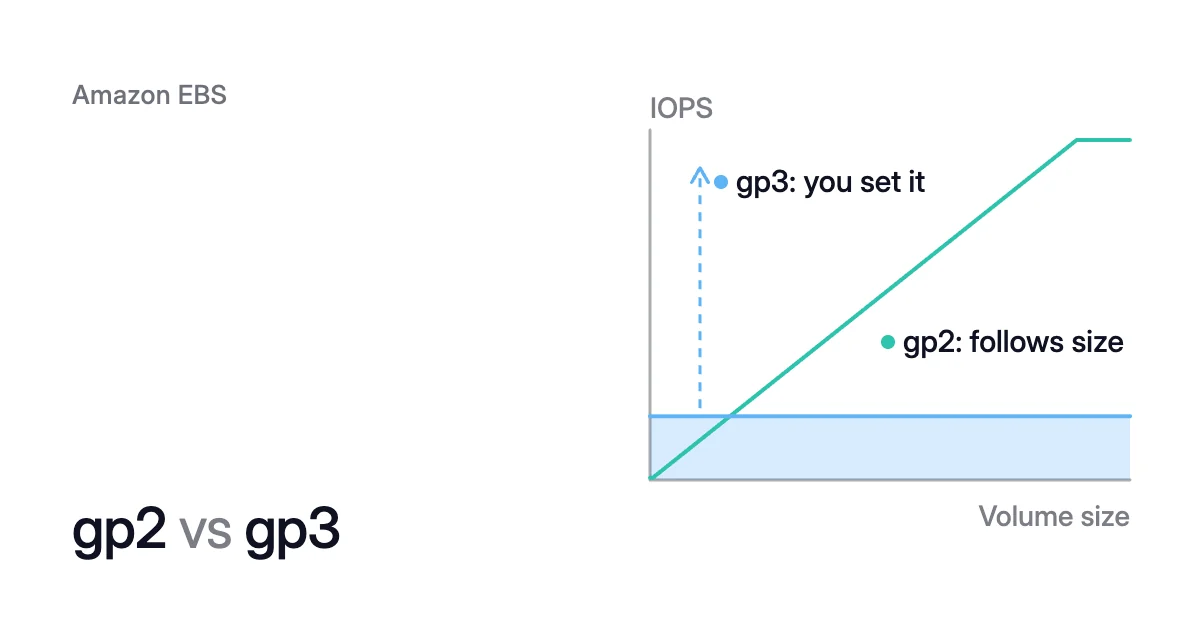
Short answer. gp2 vs gp3 is a choice between performance that follows size and performance you set. The gp3 type includes 3,000 IOPS (input/output operations per second) and 125 MiB/s at any size, and costs 20% less per GB. On a supported instance, modify-volume switches a volume to gp3 while it stays in use.
gp2 vs gp3: gp2 ties performance to size, and gp3 lets you set it
Picture a busy 100 GiB gp2 volume with a baseline of 300 IOPS. A full balance of I/O credits lets it burst to 3,000 IOPS for 2,000 seconds, about 33 minutes. Then it falls back to its baseline.
On gp3, the same volume holds 3,000 IOPS all day, ten times its gp2 baseline. It costs $8.00 a month instead of $10.00, at the list prices in the table below.
Both are General Purpose SSD types in Amazon Elastic Block Store (EBS). AWS released gp3 in December 2020, and documents the same single-digit millisecond latency and 99.8 to 99.9 percent durability for both.
| gp2 | gp3 | |
|---|---|---|
Price, US East (N. Virginia), October 2026 | $0.10 per GB-month, performance included | $0.08 per GB-month, plus $0.005 per IOPS-month above 3,000 and $0.04 per MiB/s-month above 125 |
Baseline IOPS | 3 per GiB: 100 at 33.33 GiB and below, 3,000 at 1,000 GiB, 16,000 from 5,334 GiB | 3,000 at any size |
Burst | To 3,000 IOPS below 1 TiB, while I/O credits last | None: provisioned performance is sustained |
Most IOPS per volume | 16,000 | 80,000, at up to 500 IOPS per GiB |
Throughput | 128 MiB/s at 170 GiB and below, 250 MiB/s from 334 GiB | 125 MiB/s included, up to 2,000 MiB/s at 0.25 MiB/s per IOPS |
Size | 1 GiB to 16 TiB | 1 GiB to 64 TiB |
Performance without more GiB | Not possible: performance follows size | Set IOPS and throughput on their own |
Prices differ by Region and change, so check the EBS pricing page (opens in a new tab) for yours. That page counts a GB as 1024³ bytes, which is a GiB. For the other types, see EBS volume types.
gp2 vs gp3 performance: gp3 sustains what gp2 bursts to
Under 1,000 GiB, a gp2 volume reaches 3,000 IOPS only in bursts paid for with I/O credits. Its baseline is 3 IOPS per GiB, with a floor of 100 and a ceiling of 16,000. The BurstBalance metric in Amazon CloudWatch shows the percentage of credits left.
Throughput follows size too:
- 170 GiB or less: up to 128 MiB/s.
- Over 170 and under 334 GiB: bursts of up to 250 MiB/s.
- 334 GiB or more: 250 MiB/s.
The gp3 type doesn’t burst. AWS says gp3 volumes “can indefinitely sustain their full provisioned IOPS and throughput performance”. A gp2 baseline needs 1,000 GiB to reach the 3,000 IOPS that gp3 includes at any size.
In AWS’s 100 GiB example, a full refill takes 18,000 seconds (5 hours).
How gp3 IOPS and throughput are set
gp3 IOPS and throughput are two separate settings:
- IOPS: 3,000 included, up to 80,000, at no more than 500 IOPS per GiB. So the maximum needs 160 GiB or more.
- Throughput: 125 MiB/s included, up to 2,000 MiB/s, at no more than 0.25 MiB/s per provisioned IOPS. So 2,000 MiB/s needs at least 8,000 IOPS.
Elastic Volumes, AWS’s name for changing a volume in place, can change either setting later without touching the size.
Left at gp3’s baseline, such a volume gets less than it had. Raise its throughput or IOPS in the switch if its workload uses them.
The instance has EBS limits of its own, which no volume setting changes. On Nitro instances other than bare metal, two CloudWatch metrics report when an application tries to go past them: InstanceEBSIOPSExceededCheck and InstanceEBSThroughputExceededCheck.
For latency-sensitive workloads, AWS recommends io2 Block Express, which io2 vs gp3 compares.
gp2 vs gp3 pricing: gp3 costs less even with performance matched
A gp2 volume has one price, per GB-month, with its IOPS and throughput included. A gp3 volume has three, the last two only when you provision them:
- Storage, at 20% less per GB.
- IOPS above 3,000.
- Throughput above 125 MiB/s.
AWS’s Prescriptive Guidance says gp3 volumes “are always cheaper than gp2 volumes if they’re configured at the same performance levels”.
The same guidance prices three cases at the table’s rates:
- 100 GiB: $10.00 a month on gp2, against $8.00 on gp3, or $8.12 with throughput set to gp2’s 128 MiB/s.
- 1,000 GiB: $100 on gp2, against $80 on gp3, rising to $85 with 250 MiB/s.
On gp3 the same performance costs $550 a month, which is $50, or 8%, less:
- Storage is 6,000 × $0.08 = $480.
- The 13,000 IOPS above 3,000 add 13,000 × $0.005 = $65.
- The 125 MiB/s above 125 add 125 × $0.04 = $5.
In AWS’s examples, gp2 to gp3 cost savings run from that 8%, with performance matched in full, to 20% at the gp3 baseline. Where you land depends on what you use.
A 1,000 GiB volume that never drives more than 125 MiB/s has no reason to pay $5 a month for 250. AWS’s General Purpose SSD page links a calculator for the saving on your own gp2 volumes.
A gp2 to gp3 migration in five steps
A gp2 to gp3 migration changes the type of the volume you already have. It keeps the size, so there’s nothing to grow inside the instance afterwards.
New volumes can still arrive as gp2. The EC2 console selects gp3 when you create a volume or an AMI from a snapshot. In other cases, AWS says “gp2 is the default selection”, so check your launch templates and scripts before you migrate what they made.
- List the gp2 volumes in a Region.
$ aws ec2 describe-volumes \ --filters Name=volume-type,Values=gp2 \ --query "Volumes[*].{ID:VolumeId,Size:Size,Iops:Iops,State:State}" - Check what each volume uses. A gp2 volume under 1,000 GiB never goes above its 3,000 IOPS burst ceiling, so the gp3 baseline covers its IOPS.
On a Nitro instance, the CloudWatch metrics
VolumeAvgIOPSandVolumeAvgThroughputreport each minute’s average IOPS and throughput, the second in KiB/s. Compare a larger volume’s peak IOPS with 3,000. A throughput peak above 128,000 KiB/s, which is 125 MiB/s, is a sign the volume needs more than the gp3 baseline. - Take a snapshot if the volume holds data you care about, so you can roll back.
- Change the type and name both performance values. You can’t cancel a modification once it’s submitted, so check the volume ID and the values first.
This example suits a gp2 volume of 334 to 1,000 GiB and keeps its 250 MiB/s. Above 1,000 GiB, set
--iopsto at least the measured peak.$ aws ec2 modify-volume \ --volume-id <volume-id> \ --volume-type gp3 \ --iops 3000 \ --throughput 250Leave IOPS and throughput out, and the EBS user guide says EBS provisions the gp2 volume’s equivalent or the gp3 baseline, whichever is higher. The AWS CLI reference lists 3,000 IOPS and 125 MiB/s as the defaults instead. Name both, and the result doesn’t depend on which applies.
- Watch the modification until it reports
completed.$ aws ec2 describe-volumes-modifications --volume-ids <volume-id>
gp2 to gp3 migration downtime: the volume stays in use
On an instance that supports Elastic Volumes, the change runs “without detaching the volume or restarting the instance”, AWS says. Modifying a volume costs nothing, and the gp3 price applies as soon as the modification starts.
The modification moves through three states: modifying, optimizing and completed. While it’s optimizing, AWS says performance sits between the source and target configurations. Unless you’re reducing IOPS, it “will be no less than the source volume performance”.
AWS gives a few minutes to a few hours for a performance change, and typically about 6 hours for a fully used 1 TiB volume. A volume that isn’t fully initialized can take more than 24 hours.
Each volume takes one modification at a time, up to four in a rolling 24-hour period. To tune IOPS straight after the switch, wait for completed first.
AWS has a fallback for a previous-generation instance type that doesn’t support Elastic Volumes, or after an error from the modify call. Detach a non-root volume, modify it and attach it again. For a root volume, stop the instance.
A volume attached before 3 November 2016 at 23:40 UTC needs Elastic Volumes support initialized first. For other type and size changes, see EBS Elastic Volumes.
Switching to gp3 keeps every GiB you provision
AWS charges for volume storage by “the amount of GB you provision per month until you release the storage”. Elastic Volumes can’t make a volume smaller, either: “You can’t decrease the volume size.”
Take a 1,000 GiB gp2 volume that holds 300 GiB of data. After the switch it costs $80 a month at the gp3 baseline instead of $100. Yet 700 GiB of it still holds nothing.
At $0.08 per GB-month, that empty space costs $56 a month. That’s more than the $20 the switch saved.
Reducing that takes a copy. AWS’s route is to create a smaller volume and move the data with an application-level tool such as rsync.
How to shrink an EBS volume has the steps, including the short stop the move needs. Checking EBS volume usage shows how to measure the used space first.
If a volume is mostly empty, create the new one as gp3, and the copy changes type and size in one move. The EBS pricing calculator prices a volume’s empty space on gp2 or gp3.
Where Amoeba fits
Switching to gp3 reduces the price of each GiB. Amoeba optimizes block storage on Azure and AWS. On AWS, its EBS cost optimization works on the number of GiB you pay for.
What Amoeba does on AWS
- The pool. Amoeba moves a running instance’s EBS data volumes onto one btrfs pool of gp3 volumes, sized to your data with room to grow. Each mount keeps its path, and the root volume is never touched.
- Performance. Each pool volume gets at least gp3’s included performance, and more when the instance’s load needs it.
- The move. Amoeba copies your data while your services run. Then it switches each mount to the pool, with a short restart of the services that use it. If the switch fails, it puts the original mounts back and tries again.
- Rightsizing. Amoeba grows the pool before it fills. When your data goes down and stays down, it shrinks the pool one volume at a time. So the GiB you pay for follow your data.
- The old volumes. Once the switch is checked, Amoeba snapshots and deletes each old volume, then deletes the snapshots a few days later. You pay for both sets only while the move runs, then for the snapshots.
What an instance needs
Amoeba works on Windows and Linux instances. On AWS, an instance must be running, managed by AWS Systems Manager and a Nitro type. It needs an EBS data volume and a few free attachment slots for the pool.
On Linux, it needs a recent kernel with btrfs, and every service that keeps a data mount open must run under systemd.
Sources: AWS, “Amazon EBS General Purpose SSD volumes” (opens in a new tab); AWS, “Amazon EBS pricing” (opens in a new tab); AWS Prescriptive Guidance, “Migrate Amazon EBS volumes from gp2 to gp3” (opens in a new tab); AWS, “Modify an Amazon EBS volume using Elastic Volumes operations” (opens in a new tab); AWS, “Monitor the progress of Amazon EBS volume modifications” (opens in a new tab); AWS CLI Command Reference, “modify-volume” (opens in a new tab); AWS CLI Command Reference, “describe-volumes” (opens in a new tab); AWS, “Amazon CloudWatch metrics for Amazon EBS” (opens in a new tab).