Published 2 November 2026 · Published by Zoorik
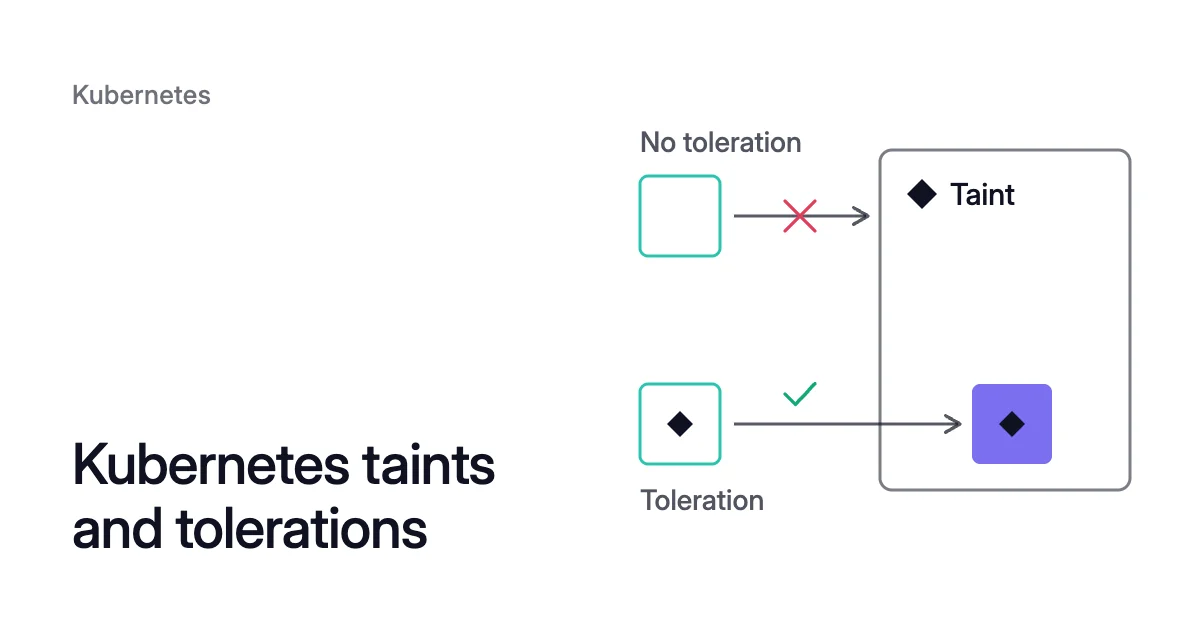
Short answer. Kubernetes taints and tolerations work as a pair. A node’s taint keeps off pods without a matching toleration, and its effect decides whether running pods are evicted.
What a taint and a toleration do in Kubernetes
A taint is a mark on a node that repels pods. A toleration on a pod lets that pod past a matching taint. The Kubernetes docs give three uses for the pair:
- Dedicated nodes, kept for one team or one app.
- Nodes with special hardware, such as GPUs, kept for the pods that need it.
- Eviction timing, set per pod, for when a node has problems.
To dedicate nodes, the docs’ example taints them dedicated=groupName:NoSchedule and gives one group’s pods the toleration. Those pods may still run on any other node too. So it also labels the same nodes dedicated=groupName and gives the pods required node affinity for that label.
The three taint effects: NoSchedule, PreferNoSchedule and NoExecute
A taint’s effect decides what happens to pods that don’t tolerate it:
NoSchedule: no new pod lands without a matching toleration. Pods already running stay.PreferNoSchedule: the control plane tries to keep those pods off the node, but the docs say “it is not guaranteed.”NoExecute: running pods without a matching toleration are evicted immediately, and new ones don’t land.
Under NoExecute, a pod that tolerates the taint with no tolerationSeconds stays bound for good. With tolerationSeconds: 3600, it stays an hour after the taint is added, then it’s evicted. If the taint is removed first, the pod stays.
A node can carry several taints, and a pod several tolerations. Kubernetes ignores each taint the pod tolerates. Any NoSchedule taint left keeps the pod off, and any NoExecute taint left also evicts it if it’s already running there.
Add and remove a taint with kubectl taint
$ kubectl taint nodes <node-name> dedicated=<group>:NoSchedule
$ kubectl taint nodes <node-name> dedicated=<group>:NoSchedule-
The first command adds the taint, and the second, ending in NoSchedule-, removes it. kubectl describe node <node-name> lists a node’s taints.
kubectl taint changes only the nodes you name. Nodes that a pool adds later come up with the pool’s own taints.
How Kubernetes tolerations match a taint
Tolerations go in the pod spec. Either one below lets a pod onto a node tainted dedicated=batch:NoSchedule. The first names the value with Equal:
tolerations:
- key: "dedicated"
  operator: "Equal"
  value: "batch"
  effect: "NoSchedule"
The second uses Exists and leaves the value out:
tolerations:
- key: "dedicated"
  operator: "Exists"
  effect: "NoSchedule"
The rules for a match:
- The key and the effect must both be the same as the taint’s.
Equal, the default operator, also needs the same value.Existsmatches any value, so the toleration sets none.- An empty key with
Existsmatches every key, though the effect must still match. An empty effect matches every effect for that key.
Built-in taints Kubernetes adds to nodes
The node controller taints a node when certain conditions are true. The scheduler checks those taints, not the node conditions, when it places a pod.
| Taint | Effect | Added when |
|---|---|---|
node.kubernetes.io/not-ready | NoExecute | The node isn’t ready: its Ready condition is False |
node.kubernetes.io/unreachable | NoExecute | The node controller can’t reach the node: Ready is Unknown |
node.kubernetes.io/memory-pressure | NoSchedule | The node is short of memory |
node.kubernetes.io/disk-pressure | NoSchedule | The node is short of disk space or inodes |
node.kubernetes.io/pid-pressure | NoSchedule | The node is short of process IDs |
node.kubernetes.io/network-unavailable | NoSchedule | The node’s network is unavailable, for example before its cloud routes are set up |
node.kubernetes.io/unschedulable | NoSchedule | The node is unschedulable, for example after a cordon |
node.cloudprovider.kubernetes.io/uninitialized | NoSchedule | The kubelet started with an external cloud provider, until the cloud-controller-manager initializes the node |
node.kubernetes.io/out-of-service | NoExecute | You add it, for a non-graceful node shutdown |
Kubernetes adds tolerations for not-ready and unreachable to every pod, with tolerationSeconds: 300, unless you or a controller set them. So pods stay bound to a node for 5 minutes after one of these problems is detected.
DaemonSet pods tolerate not-ready and unreachable with no tolerationSeconds, so those problems never evict them. They also tolerate the memory, disk and PID pressure taints and unschedulable. That’s how node agents land on cordoned nodes and stay on failing ones.
The control plane also gives every pod outside the BestEffort quality of service (QoS) class a toleration for memory-pressure. So only new BestEffort pods are kept off a node short of memory.
Taints and tolerations on AKS and EKS node pools
Set a node pool’s taints where the pool is defined, not with kubectl. That’s the Azure Kubernetes Service (AKS) or Amazon Elastic Kubernetes Service (EKS) API, or a Karpenter NodePool. New nodes then come up with them.
AKS: node pool taints, and the system and Spot pools
Microsoft’s example below taints a node pool with sku=gpu:NoSchedule. The same command with --node-taints "" removes the pool’s taints.
$ az aks nodepool update \
  --resource-group <resource-group> \
  --cluster-name <cluster-name> \
  --name <node-pool> \
  --node-taints "sku=gpu:NoSchedule"
Taints set through the AKS node pool API can’t be changed through the Kubernetes API, or the other way round. AKS doesn’t allow changes to its system taints.
For a dedicated system node pool, Microsoft recommends the CriticalAddonsOnly=true:NoSchedule taint. It keeps application pods off the nodes that run critical system pods.
A Spot node pool gets the kubernetes.azure.com/scalesetpriority=spot:NoSchedule taint and a matching label. Pods need the toleration and node affinity to run there, as in Microsoft’s example:
# in the pod spec
tolerations:
- key: "kubernetes.azure.com/scalesetpriority"
  operator: "Equal"
  value: "spot"
  effect: "NoSchedule"
affinity:
  nodeAffinity:
    requiredDuringSchedulingIgnoredDuringExecution:
      nodeSelectorTerms:
      - matchExpressions:
        - key: "kubernetes.azure.com/scalesetpriority"
          operator: In
          values:
- "spot"EKS managed node groups and Karpenter NodePools
The EKS API spells the effects NO_SCHEDULE, PREFER_NO_SCHEDULE and NO_EXECUTE, and a managed node group holds up to 50 taints. To add or change one on an existing group:
$ aws eks update-nodegroup-config \
  --cluster-name <cluster-name> \
  --nodegroup-name <node-group> \
--taints 'addOrUpdateTaints=[{key=<key>,value=<value>,effect=NO_SCHEDULE}]'removeTaints in place of addOrUpdateTaints takes a taint off. Either way, the running nodes get the change without being replaced. A taint removed from a node by hand isn’t added back, even though the node group still lists it.
A Karpenter NodePool puts the taints in its spec.template.spec.taints on every node it launches. Karpenter won’t use that NodePool for a pod that doesn’t tolerate them.
Karpenter treats startupTaints as temporary. It provisions nodes for pods that don’t tolerate them, and another system, such as a DaemonSet, must clear them before pods run there.
Changing a NodePool’s taints counts as drift, so EKS Auto Mode and Karpenter drain and replace its nodes. Change a taint on one node with kubectl taint, and they put the NodePool’s version back.
A taint on GPU nodes also repels a device-plugin DaemonSet you install yourself. Give it the toleration too. Otherwise the node reports no allocatable GPUs, and GPU pods stay Pending.
How Coral checks taints before it drains a node
Before Coral drains a spare node, it simulates the scheduler on the live cluster. Every pod there must fit on another node, with its affinity, taints, spread, ports and zones.
It also respects PodDisruptionBudgets (PDBs) and do-not-disrupt. A node holding a pod that fits nowhere else isn’t drained. The Coral FAQ explains how it avoids scheduling failures.
Sources: Kubernetes, “Taints and Tolerations” (opens in a new tab); Kubernetes, “Well-Known Labels, Annotations and Taints” (opens in a new tab); Kubernetes, “Assigning Pods to Nodes” (opens in a new tab); Microsoft Learn, “Use node taints in an Azure Kubernetes Service (AKS) cluster” (opens in a new tab); Microsoft Learn, “Add an Azure Spot node pool to an Azure Kubernetes Service (AKS) cluster” (opens in a new tab); Microsoft Learn, “Use System Node Pools in Azure Kubernetes Service (AKS)” (opens in a new tab); AWS, “Prevent Pods from being scheduled on accelerated nodes” (opens in a new tab); Karpenter, “NodePools” (opens in a new tab).