Published 1 November 2026 · By Anuragee (opens in a new tab), Guest author · Data engineer · Published by Zoorik
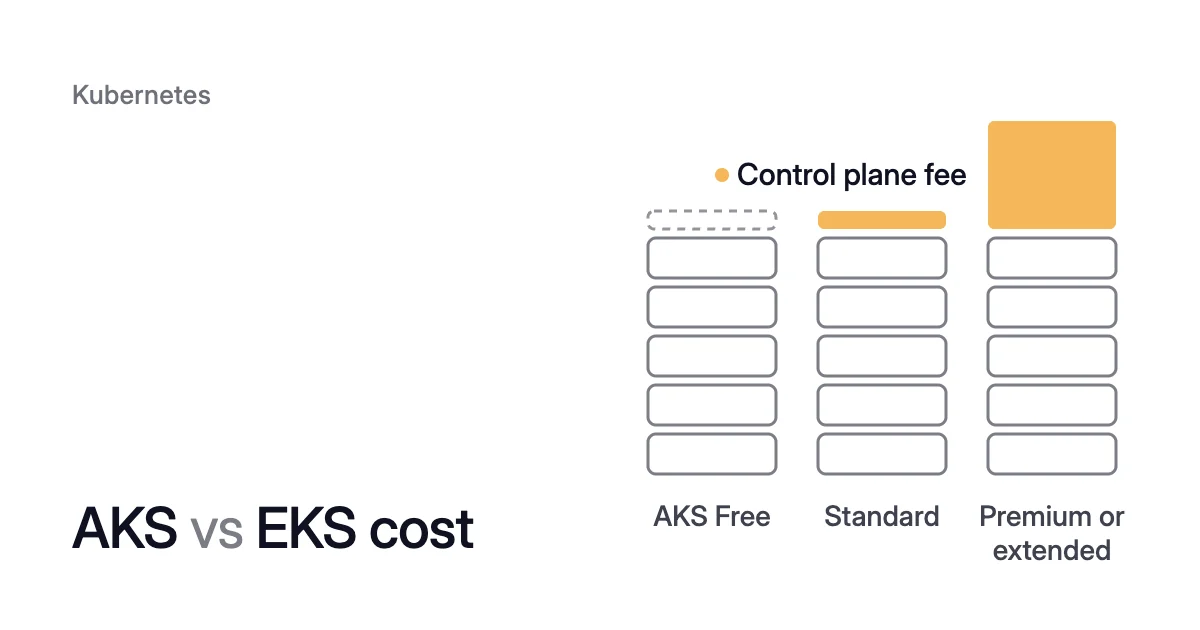
Short answer. AKS vs EKS cost differs mainly in the per-cluster control plane fee, since worker nodes are charged as ordinary virtual machines on both clouds. At October 2026 list prices, AKS charges $0, $73 or $438 a month by tier in Central US, and EKS $73 or $438 by version.
What you pay for an AKS or EKS cluster
Picture a cluster of ten general-purpose Linux nodes, each with 4 vCPUs and 16 GiB of memory. It runs on Azure Kubernetes Service (AKS) or Amazon Elastic Kubernetes Service (EKS).
In October 2026, two machines of that size list at the same $0.192 an hour for Linux, one on each cloud:
- Standard_D4s_v5 in Azure’s East US region, at pay-as-you-go prices.
- m6i.xlarge in AWS’s US East (N. Virginia) region, at On-Demand prices.
Each cloud charges for the cluster in three parts:
- The control plane. A fee per cluster for the control plane, which runs the Kubernetes API server. The AKS Free tier charges none.
- The worker nodes. Virtual machines (VMs), charged like any other VM for as long as they run.
- What surrounds them. The nodes’ disks, IP addresses and network traffic.
Only two lines differ between the clouds: the control plane fee, and an optional fee when the cloud manages the nodes for you. The rest follows each cloud’s ordinary VM, storage and network price lists for your region.
A $73 control plane, for AKS Standard or an EKS version in standard support, brings nodes and fee to $1,474.60. The fee is about 5% of that. At $438, for AKS Premium or an EKS version in extended support, they come to $1,839.60 and the fee is about 24%.
AKS vs EKS cost, line by line
For an AKS vs EKS cost comparison, these are the rows where AKS vs EKS pricing differs, at list prices in October 2026. Prices change, so check both pricing pages for your region before you decide.
| What you decide on | AKS | EKS |
|---|---|---|
Cheapest control plane | Free tier: no fee and no financially backed service level agreement (SLA), recommended for fewer than 10 nodes | $0.10 per cluster per hour, with no free option |
Production control plane | Standard tier: $73 per cluster per month, with a financially backed uptime SLA | The same $0.10 per hour while the version is in standard support |
Staying on an older Kubernetes version | Premium tier with Long Term Support (LTS): $438 per cluster per month, opt-in | Extended support: $0.60 per cluster per hour ($438 over 730 hours), on by default |
A version nobody upgrades | The tier and the fee don’t change. From June 2027, AKS upgrades the cluster after a 60-day grace period | Charged $0.60 an hour for up to 12 months, then AWS upgrades the control plane |
Nodes managed by the cloud | AKS Automatic: a hosted control plane fee plus a fee per vCPU, on top of the VMs | EKS Auto Mode: a fee per instance, set by instance type, on top of the EC2 price |
Worker nodes | Azure VM list price for the size and region, pay-as-you-go | EC2 list price for the type and region, charged per second for Linux (60-second minimum) |
Two rows carry most of the difference. AKS offers a free control plane, and EKS doesn’t.
EKS charges six times its standard rate for a version past standard support. AKS charges more for an old version only when you opt in to Premium.
AKS pricing tier: Free vs Standard vs Premium
The tier sets the control plane line of your AKS cluster cost and leaves the nodes alone. They’re the same VMs at the same prices on every tier.
- Free. Microsoft recommends it for development, test and evaluation, and for clusters with fewer than 10 nodes. Cluster management is free. The tier supports up to 1,000 nodes but carries no financially backed uptime SLA.
- Standard. The AKS pricing page lists it at $73 per cluster per month in Central US. That buys a financially backed uptime SLA for the Kubernetes API server: 99.95% with availability zones and 99.9% without. It also gives room for up to 5,000 nodes, and AKS Automatic clusters start on this tier.
- Premium. Standard plus LTS, at $438 per cluster per month. AKS normally gives each Kubernetes version one year of community support, and LTS adds a second year. Premium and LTS are turned on and off together.
AKS Automatic, which Microsoft recommends as the default for most production workloads, is priced on its own terms.
In Central US, the AKS pricing page lists its hosted control plane at $0.16 an hour per cluster, $116.80 over a 730-hour month. On top comes an hourly fee for each vCPU of the VMs it runs, $0.009644 per General Purpose vCPU.
How to check and change an AKS tier
To see a cluster’s tier, and to move a Free cluster to Standard:
$ az aks show --resource-group <resource-group> --name <cluster-name> --query sku
$ az aks update --resource-group <resource-group> --name <cluster-name> --tier standard
Moving a cluster out of Premium also takes --k8s-support-plan KubernetesOfficial on the same az aks update command. That works only while the cluster’s Kubernetes version is still in community support.
EKS control plane cost follows the Kubernetes version
Every EKS cluster pays $0.10 per cluster per hour while its Kubernetes version is in standard support. So an EKS cluster cost starts at $73 a month before any node.
Standard support lasts 14 months from the version’s release in Amazon EKS. Extended support follows for 12 more months at $0.60 per cluster per hour, the standard rate plus $0.50.
The higher rate starts at the beginning of the day (UTC) that the version leaves standard support. A cluster’s upgrade policy decides what happens at the end of standard support.
AWS’s pricing example takes a cluster created on a version’s release day and never upgraded. It pays an average of $0.33 an hour over 26 months: 14 months at $0.10 and 12 at $0.60.
In October 2026, Kubernetes 1.31, 1.32 and 1.33 are in extended support on EKS, and 1.34 leaves standard support on 2 December 2026. Extended support for 1.31 ends on 26 November 2026.
After that date AWS upgrades the control plane itself, at a time it doesn’t announce. Managed node groups and self-managed nodes stay on the old version until you update them.
EKS Provisioned Control Plane is optional. It runs the control plane on a scaling tier you choose, from $1.65 per cluster per hour for XL. That’s charged on top of the version support fee.
How to check a cluster’s upgrade policy
To check a cluster’s policy:
$ aws eks describe-cluster \
  --name <cluster-name> \
  --query "cluster.upgradePolicy.supportType"
EXTENDED means the cluster will enter extended support and pay its fee. STANDARD means no extended support fee. But AWS then upgrades the cluster automatically at the end of standard support, on its schedule rather than yours.
Set the policy while the version is still in standard support. Once a cluster is in extended support, you can’t switch it back to STANDARD. The way back to $0.10 is to upgrade it to a version in standard support.
How AKS treats an old version
AKS treats an old version the other way round. It never enrolls a cluster in LTS or changes its tier by itself, so an unsupported version doesn’t raise the fee.
From 1 June 2027, AKS upgrades any cluster still on an unsupported version once its 60-day grace period ends. That upgrade doesn’t follow your maintenance window.
So on EKS an old version raises your cost, while on AKS, from June 2027, it hands the upgrade timing to Microsoft.
Worker nodes are charged as ordinary VMs on both clouds
Outside EKS Auto Mode, AWS charges for EKS worker nodes through the services they use. The EKS pricing page lists these lines:
- The instances, through Amazon EC2.
- Their volumes, through Amazon Elastic Block Store (EBS).
- Their public IPv4 addresses, as a line of their own.
- Any traffic from nodes to the control plane that crosses Availability Zones.
Azure charges for AKS compute by the type and running time of the VMs AKS launches. You pay as you go for the other resources the cluster consumes.
So the node line on either cloud is that cloud’s VM price list for your region. Machines of the same size can cost exactly the same, as the two in the example above do.
List prices leave out discounts. On the Azure pricing page, the D4s v5 above costs about 31% less in East US on a one-year savings plan. On three years, it’s more than 50% less.
AWS offers Savings Plans, Reserved Instances and Spot Instances for EC2. Both clouds charge for these machines only while they run. So a node you remove stops adding to your cost once it’s gone.
The number of nodes depends mostly on your workloads, not on the cloud. It depends on what your pods request, and on how well those requests fill the machines you chose.
Once a cluster runs, the control plane fee is fixed per cluster, and the node count is the line you can move. The Kubernetes cost optimization guide shows how to reduce it, requests first and nodes second.
How to compare AKS and EKS cost for your clusters
For your own clusters, work in this order:
- Count the clusters. The control plane fee is charged per cluster, not per node. Twenty Standard-tier AKS clusters cost $1,460 a month in fees before a single node runs. Twenty EKS clusters in standard support cost the same.
- Match each AKS cluster to a tier. Free suits development, test and clusters under 10 nodes. Standard adds the financially backed SLA. Premium buys LTS, a second year of support on one version.
- Plan each EKS cluster’s upgrades. Upgrade before the version leaves standard support to stay at $0.10 an hour. Otherwise, plan for $0.60 an hour, or $438 a month.
- Price the machines you’d run. Other families, sizes and regions don’t always match, so compare the exact machines. The EKS and AKS pricing calculator prices a node pool at AWS and Azure list prices.
- Count the nodes. Kubernetes cost estimation shows how to count the nodes your workloads need and price them.
How Coral prices a cluster on AKS and EKS
Coral optimizes Kubernetes on both clouds, for clusters on Kubernetes 1.30 or later. It prices every node at your cloud’s published list price for the region, with spot nodes at the spot rate and a 730-hour month. Discounts, reservations and savings plans are left out.
So an AKS cluster and an EKS cluster show their running cost, and the share that’s recoverable, in the same terms. The Coral FAQ shows how the saving is worked out.
The saving sits in the node line. Coral rebalances each container’s CPU and memory requests to what it really uses. A smaller request reduces your cost only when the freed capacity lets a node go.
Coral also empties spare nodes one at a time so your autoscaler can remove them. On AKS it works through a role that can read the cluster and delete its machines. On EKS it uses an IAM role that can terminate instances in the cluster’s Auto Scaling groups.
AKS cost optimization and EKS cost optimization cover what Coral does on each cloud.
On our own AKS development cluster, the machines cost $368.65 a month when Coral was connected, and $154.76 eight days later, 58% less. Both figures are at Azure pay-as-you-go list prices over 730 hours, and the case study walks through each step.
To see your own clusters in the same terms, the free assessment writes one PDF with your estimated saving at list price. It prices nodes only, so control plane fees, storage, network and discounts stay out of that figure.
Sources: AWS, “Amazon EKS pricing” (opens in a new tab); AWS, “Understand the Kubernetes version lifecycle on EKS” (opens in a new tab); AWS, “View current cluster upgrade policy” (opens in a new tab); AWS, “Amazon EC2 On-Demand Pricing” (opens in a new tab); Microsoft Learn, “Azure Kubernetes Service (AKS) Free, Standard, and Premium Pricing Tiers” (opens in a new tab); Microsoft Learn, “Long-Term Support for Azure Kubernetes Service (AKS) Versions” (opens in a new tab); Microsoft Azure, “Azure Kubernetes Service (AKS) pricing” (opens in a new tab); Microsoft Azure, “Linux Virtual Machines Pricing” (opens in a new tab).