Published 1 November 2026 · By Saumya Shukla (opens in a new tab), Guest author · Software engineer at Samsung · Published by Zoorik
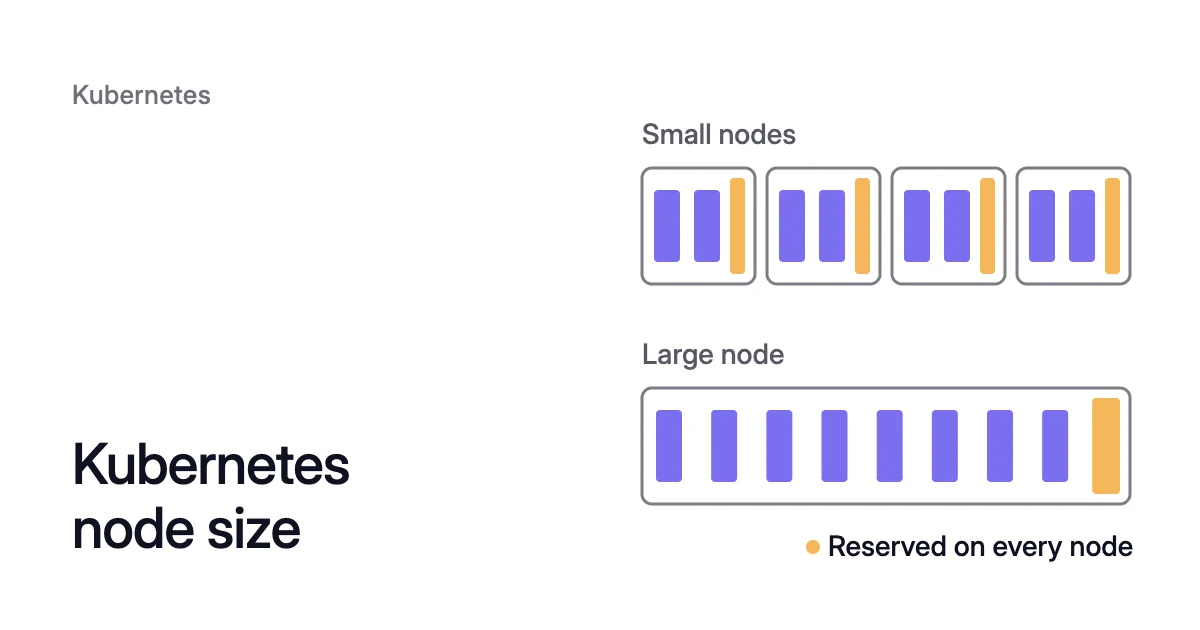
Short answer. Kubernetes node size best practices come down to one trade-off: larger nodes spread fixed overhead, while smaller ones leave less idle and empty more easily. AWS advises the largest nodes your workloads can fully use that still meet your availability goals.
Fewer, larger nodes pay the per-node overhead fewer times
Every node carries a fixed overhead, whatever it runs:
- its reserved CPU and memory
- a copy of every DaemonSet
- its load on the API server
Picture an AKS pool of 16 cores and 64 GB. Built from four 4-core, 16 GB nodes, it reserves more than twice the CPU and three times the memory of one 16-core, 64 GB node. It also runs four copies of every DaemonSet instead of one.
How the reserve scales with node size
The reserve is the CPU and memory kept back for the kubelet and other system components. Pods can claim only what’s left, the node’s allocatable. You pay for the reserve, and no pod can request it.
For Kubernetes node sizing, what matters is how that reserve scales with the machine. On AKS, the CPU reserve grows much more slowly than the node. Microsoft’s table gives 140 millicores (written 140m, each a thousandth of a core) on a 4-core node, 260m on 16 cores and 740m on 64.
That’s 3.5%, 1.6% and 1.2% of each node.
Memory works differently on AKS 1.29 and later. Kube-reserved memory mostly follows max pods, not node size. Microsoft’s formula is 20 MB per max pod plus 50 MB, or 25% of the node’s memory, whichever is less.
At the Azure CNI Overlay default of 250 max pods, the formula gives 5,050 MB. Max pods is set per pool at creation, and raising it takes a new pool. So plan that reserve for the pool’s life.
One large node in their place reserves 260m and 5,050 MB, about 8% of its memory.
Every node runs its own DaemonSet pods
A DaemonSet runs one copy of its pod on every node, or on a chosen set. The EKS user guide says “fewer, larger instances are better, especially if you have a lot of Daemonsets”. Each instance also adds calls to the API server.
Large nodes are harder to fill and to empty, and costlier to lose
Pod slots can run out before CPU does
Take a 64-core AKS node at 110 max pods. It has at most 63.26 cores allocatable, 64 cores less the 740m reserve. To fill it, its pods must average about 575m of CPU each.
Pods that request 100m each take all 110 slots with 11 cores requested (110 × 100m). That leaves 52.26 cores, most of the machine, unrequested.
Max pods depends on the cloud and its settings:
- AKS defaults to 250 max pods on Azure CNI Overlay and 110 on Azure CNI Pod subnet and kubenet. Its ceiling is 250.
- On EKS, a managed node group without a custom AMI caps max pods at 110 below 30 vCPUs and 250 above.
- EKS Auto Mode holds every node to 110 or fewer.
AWS also notes that each instance type caps the EBS volumes it can attach. A node full of pods with their own volumes can reach that cap first.
Node autoscalers buy capacity a whole node at a time
One pending pod that requests 500m, in a node group of 64-core machines, brings up 64 more cores. You pay for all of them until work arrives to fill them.
With the Cluster Autoscaler, the group fixes that step, because “Inside a node group, all machines have identical capacity”. Its expander chooses only among the groups you’ve defined.
A large node is harder to empty
The Cluster Autoscaler removes a node only when both of these hold:
- its pods’ CPU and memory requests are each under 50% of its allocatable, the default utilization threshold, which you can change
- every pod on it, other than DaemonSet and static pods, can move
One pod that can’t move keeps the whole machine, and every extra pod is one more chance of that. Each blocker is covered in Cluster Autoscaler not scaling down.
One failure takes more with it
In AWS’s example of a cluster of three very large instances, “1 instance outage could impact 1/3 of the cluster”. Spread the same capacity over nine nodes and one outage takes a ninth.
Kubernetes node size best practices: what AKS and EKS recommend
There’s no single Kubernetes recommended node size, but both clouds publish a starting point.
On AKS, a system node pool needs a VM of at least 4 vCPUs and 4 GB of memory. B-series burstable VMs aren’t supported there.
The recommended minimum is higher: three system nodes of 8 vCPUs, or two of at least 16. That applies especially to large clusters with several CoreDNS replicas and add-ons.
Microsoft also says system pools shouldn’t run your applications. So Kubernetes worker node sizing happens in your user pools.
On EKS, AWS’s scalability guidance recommends slightly larger nodes, 4xlarge to 12xlarge, so less of each node goes to DaemonSets and system reserves.
The guidance stops below the very large sizes with non-uniform memory access (NUMA). Most applications needn’t pay their performance cost, since Kubernetes scales out. AWS also advises against burstable T-series instances where performance must be consistent.
How to choose Kubernetes node sizes for each pool
A Kubernetes node size calculator is five lines of arithmetic. Do it per pool, with your own requests. The scheduler places pods by their requests, not by what they use.
- Find the room for your pods on a candidate size. That’s its allocatable CPU and memory, minus the requests of every DaemonSet pod on it.
- Check that your largest pod fits in that room. If it barely fits, every copy of it needs a node to itself.
- Work out pods per node. It’s the smallest of three numbers:
- CPU room divided by the average pod CPU request
- memory room divided by the average pod memory request
- max pods minus the DaemonSet pods
- Divide the pool’s pods by pods per node and round up. That’s the node count this size implies.
- If the count is one or two, try a smaller size. For a production cluster with a single system node pool, Microsoft recommends at least three nodes in it. The reasons are fault tolerance and availability zones. A pool spread across three zones needs three nodes anyway.
For a candidate node’s monthly cost at list price, and what Kubernetes keeps on it, see the EKS and AKS pricing calculator.
Pick a machine family that fits your requests
Match the machine family’s CPU-to-memory ratio to your pods’ requests, or one resource fills first and strands the other. On Azure, the VM series differ in that ratio:
- the D-series is general purpose, with a balanced ratio
- the F-series is compute optimized, with more CPU per GB
- the E-series is memory optimized
Separate pools for batch and steady work
Split pools by churn, and keep sizes similar inside each one. The Cluster Autoscaler needs similarly sized node groups to scale them consistently.
AWS suggests 4xlarge instances for small batch work that comes and goes quickly. For a low-churn service such as Kafka at 8 vCPU, it suggests the 12xlarge family.
Let Karpenter or NAP pick the size from a range
A fixed node group makes size a decision you revisit by hand, usually with a new pool and a drain. The guides to changing an AKS node pool VM size and changing an EKS node group instance type show the steps.
Karpenter on EKS and node auto-provisioning (NAP) on AKS turn size into a range. NAP uses Karpenter’s NodePool API.
By default, Karpenter uses a broad set of compatible instance types. AWS says it picks one at provisioning time “based on pending workload requirements, availability, and cost”.
NAP’s default NodePool allows the D family and sets the WhenEmptyOrUnderutilized consolidation policy. With it, underused nodes can be replaced later. Karpenter consolidation covers the policies.
Set the range with NodePool requirements
On AKS, bound the range rather than pin one size. NAP’s karpenter.azure.com/sku-cpu selector limits the CPU counts it may launch:
requirements:
- key: karpenter.azure.com/sku-family
  operator: In
  values:
  - D
- key: karpenter.azure.com/sku-cpu
  operator: In
  values:
  - "4"
  - "8"
  - "16"
On EKS, Karpenter’s karpenter.k8s.aws/instance-category and karpenter.k8s.aws/instance-size labels do the same job.
A range helps only when requests are right. Karpenter and NAP launch machines to fit pending pods’ requests, so inflated requests buy machines for load that never comes. That’s Kubernetes overprovisioning, and the fix is setting requests from measured use.
How Coral works with your node sizes
Coral optimizes Kubernetes on AKS and EKS, and never creates machines itself. Instead, it works on what decides whether a node size fits: the requests, and the nodes they leave spare.
What Coral changes
- Requests. Coral rebalances each container’s CPU and memory requests to what it really uses. The same autoscaler can then run fewer or smaller nodes. Pod sizing starts when you switch on “Automatically optimize” for a policy or a workload.
- Spare nodes. Node optimization is on from install and works out from pod requests how many nodes each pool needs. Coral drains spare nodes one at a time for your Cluster Autoscaler, NAP or Karpenter to remove. Pools that Karpenter or NAP already consolidate are left to them.
- Machine size. With Karpenter or NAP, a rebalance replaces the nodes you choose with cheaper machines that still fit the work. Your Karpenter or NAP launches them, and the old nodes are drained and removed one by one. A rebalance never goes past a PDB. Where Coral starts a new copy first, the old copy goes only once the new one is Ready and serving. A node that can’t be emptied is kept.
- Cluster Autoscaler only. Coral drains spare nodes for it to remove but never changes their size.
When a node is emptied, a single-copy app that can’t get a new copy first gets a short restart. StatefulSets are one example.
What one real cluster showed
On our own AKS development cluster, node optimization removed one of two 4-CPU workers on 6 October. On 12 October, a rebalance swapped the remaining worker for a cheaper machine with the same 4 CPUs. That was AMD at $81.03 a month in place of Intel at $147.46.
Apps that run a single copy were back in 5 to 82 seconds. By then, the cluster’s machines cost $154.76 a month instead of $368.65, at Azure list prices. The case study has the full run.
Sources: AWS, “Kubernetes Data Plane” (opens in a new tab) (Amazon EKS Best Practices Guide); AWS, “Node and Workload Efficiency” (opens in a new tab) (Amazon EKS Best Practices Guide); AWS, “Choose an optimal Amazon EC2 node instance type” (opens in a new tab); Microsoft Learn, “Node resource reservations in Azure Kubernetes Service (AKS)” (opens in a new tab); Microsoft Learn, “Concepts - IP address planning in Azure Kubernetes Service (AKS)” (opens in a new tab); Microsoft Learn, “Use system node pools in Azure Kubernetes Service (AKS)” (opens in a new tab); Microsoft Learn, “Configure node pools for node auto-provisioning (NAP) in Azure Kubernetes Service (AKS)” (opens in a new tab); Kubernetes Cluster Autoscaler, “Frequently Asked Questions” (opens in a new tab).