Published 1 November 2026 · By Harsh, Guest author · Network engineer at Palo Alto Networks · Published by Zoorik
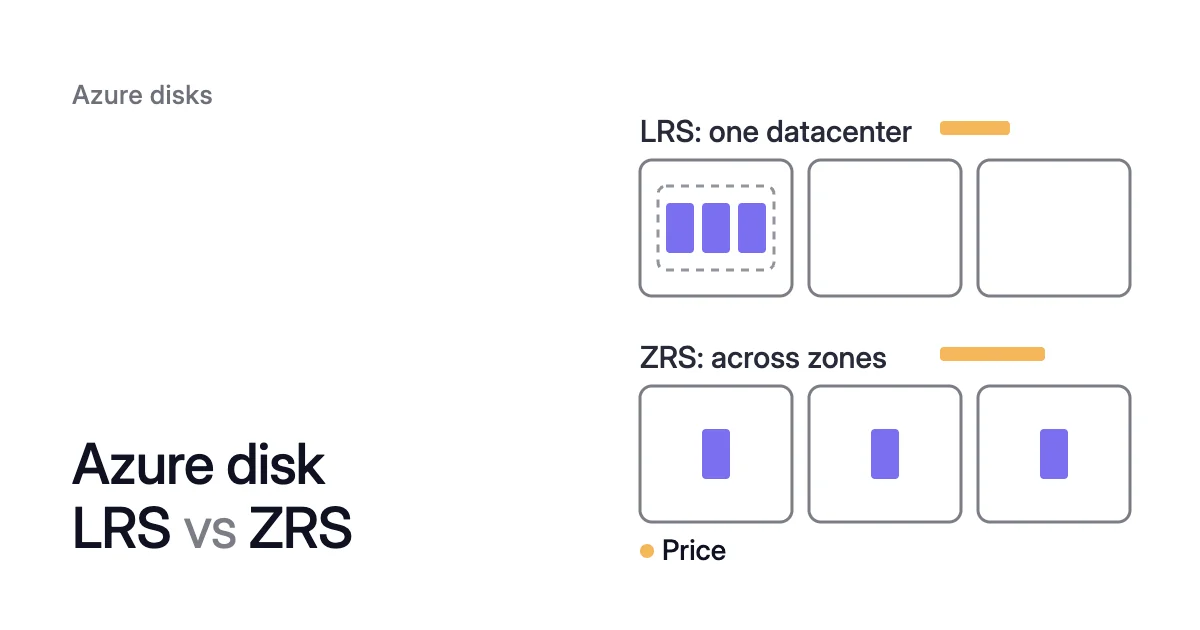
Short answer. Azure disk LRS vs ZRS decides where a managed disk’s three copies live: one datacenter for locally redundant storage, three availability zones for zone-redundant storage. ZRS keeps data available through a zone outage but adds write latency, and lists at 1.5 times LRS in most regions (October 2026).
Where LRS and ZRS keep your three copies
Picture a VM in zone 1 of East US with four 512 GiB Premium SSD data disks. At October 2026 list prices, ZRS adds $146.36 a month to them.
In return, if zone 1 goes down, ZRS data stays available from the other two zones. Zonal LRS disks in zone 1 are unavailable until it recovers.
Every managed disk keeps three copies of its data. The redundancy option decides where: one datacenter, or three availability zones. A zone is a physically separate group of datacenters inside a region.
LRS: three copies in one datacenter
LRS is the default. It writes all three copies synchronously inside a single datacenter. Microsoft states at least 99.999999999% (11 nines) of durability over a year for it.
LRS protects against drive and server rack failures. In Microsoft’s words, it “doesn’t account for disasters such as fire or flooding within a datacenter.”
An LRS disk comes in two forms, charged at the same rate. A zonal LRS disk is pinned to one zone and attaches only to VMs in that zone. A regional (nonzonal) disk is created without a zone, and Azure may place it in any zone.
ZRS: copies in three zones
ZRS replicates the disk synchronously across three zones. Each zone has its own power, cooling and networking. Microsoft states at least 12 nines for it.
A write completes only after the data is stored in multiple zones, which adds write latency. Microsoft gives no latency figure and advises benchmarking your workload on both.
Otherwise, Microsoft says ZRS disks “are identical to disks using LRS”. They have the same scale targets, so a Premium SSD P20 gets the same IOPS and throughput either way.
In a zone outage, LRS waits and ZRS keeps the data
When the outage hits a zonal LRS disk’s zone, all three copies are inside it. Microsoft says a single zonal LRS disk is unavailable until the zone recovers. The data isn’t lost, and it can be recovered once the zone is back.
With a single VM, spotting the outage is your job. So is moving traffic to another VM, if any. Microsoft doesn’t notify you when a zone goes down, though Azure Resource Health and Service Health alerts can.
With ZRS, the outcome depends on what the outage reaches:
- The VM stays healthy. Only the disk’s storage in one zone is affected. Azure redirects disk operations to the healthy zones, and the VM keeps running.
- The VM fails. ZRS keeps the data available but doesn’t move the VM. You force detach the disk, which works on data disks only, and attach it to a VM in a healthy zone.
- The disk is shared. Take a shared ZRS disk attached to a primary VM and a secondary VM in different zones. When the primary’s zone fails, the disk is already available to the secondary. Microsoft expects no data loss and no downtime for that disk.
$ az vm disk detach --resource-group <resource-group> --vm-name <failed-vm-name> --name <disk-name> --force-detach
When the VM fails, ZRS protects the data. You still need a second VM, or a plan to create one, to keep serving it.
Azure LRS vs ZRS pricing: 1.5 times in most regions
Microsoft’s reliability guide says ZRS “incurs a higher cost than LRS”, by an amount that varies by region and disk type. The Azure Retail Prices API, Microsoft’s unauthenticated source of list prices, shows how much.
Most regions list ZRS at 1.5 times LRS
In October 2026, 42 regions list a P20 ZRS disk. Of those, 40 price it at 1.5 times the P20 LRS disk. Only Japan West and New Zealand North differ.
Standard SSD’s E20 shows the same 1.5 in 39 of 41 regions. Every other tier from P1 to P80 and E1 to E80 does the same, with one to four exceptions each.
Four disks cost 4 × $73.22 = $292.88 a month on LRS. On ZRS they cost 4 × $109.81 = $439.24. Converting all four adds $439.24 − $292.88 = $146.36 a month, or 12 × $146.36 = $1,756.32 a year.
A single 1,024 GiB P30 goes from $135.17 to $202.73.
Prices change by region and over time, so check the managed disks pricing page. Our Azure disk pricing calculator gives a Premium SSD or Standard SSD disk’s LRS list price, and ZRS is 1.5 times that in most regions.
Reservations, shared disks and snapshots
Three smaller items round out the ZRS vs LRS cost:
- Reservations. The Retail Prices API lists one-year disk reservations for Premium SSD P30 to P80 on LRS. It lists none for any ZRS SKU.
- Shared disks. Each extra mount of a shared Premium SSD has a monthly charge. The pricing page says shared disk pricing is the same for LRS and ZRS.
- Snapshots. Incremental snapshots always sit on Standard HDD storage. There, LRS and ZRS snapshots cost the same: $0.05 per GB a month in East US, charged on the data they hold.
Disk type is a separate choice, covered in Premium SSD vs Standard SSD on Azure. So is raising IOPS with performance tiers.
Which Azure managed disks can use ZRS
Azure managed disk ZRS support covers two of the five disk types. A Premium SSD ZRS disk uses the SKU Premium_ZRS, and a Standard SSD one uses StandardSSD_ZRS. Premium SSD v2, Ultra Disk and Standard HDD are LRS only.
So if you’re weighing Premium SSD v2 against Premium SSD, the move gives up ZRS. For the LRS-only types, Microsoft’s route to zone resilience is several VMs in different zones, each with its own zonal LRS disks.
A ZRS managed disk needs a region with availability zones, and Microsoft says every such region offers one. LRS reaches further, since regions without zones offer it too. In October 2026, the Retail Prices API lists a P20 disk on LRS in 66 regions and on ZRS in 42.
To see which of your disks are ZRS, list them with their SKU. A _ZRS suffix means zone-redundant.
For an LRS disk, az disk show tells you which form it is. No value in zones means a regional disk, and a zone number means a zonal one.
$ az disk list --resource-group <resource-group> --query "[].{Name:name, Sku:sku.name}" --output table
$ az disk show --name <disk-name> --resource-group <resource-group> --query "{Sku:sku.name, Zones:zones}"The AKS storage class guide explains when a built-in Kubernetes class creates a ZRS disk instead of LRS.
How to convert a disk from LRS to ZRS
The route depends on the disk’s form, regional or zonal, as az disk show reports.
A regional disk changes type in place
Changing the type needs the VM deallocated. Microsoft calls the change itself instantaneous. A disk’s type can change twice a day.
- Deallocate the VM. That stops its services until you start it again.
$ az vm deallocate --resource-group <resource-group> --name <vm-name>
- Change the disk’s SKU. For a Standard SSD, use
StandardSSD_ZRS.
$ az disk update --resource-group <resource-group> --name <disk-name> --sku Premium_ZRS
- Start the VM.
$ az vm start --resource-group <resource-group> --name <vm-name>
Microsoft’s disk type conversion guide says the same steps work in reverse, with Premium_LRS or StandardSSD_LRS. A ZRS disk’s zone configuration can’t change, though. Moving its data onto a zonal disk means a new disk created from a snapshot.
A zonal disk is copied through a snapshot
A zonal LRS disk can’t be converted to ZRS directly. Microsoft’s LRS to ZRS guide has you copy it:
- Snapshot the disk. A snapshot of a stopped VM is the cleanest copy, and stopping it is downtime.
- Create a new ZRS disk from the snapshot.
$ az disk create --resource-group <resource-group> --name <new-disk-name> --sku Premium_ZRS --size-gb <size-gb> --source <snapshot-id>
- Create a new VM with the new disks.
You pay for the old disks, next to the new ones, until you delete them.
Azure disk LRS vs ZRS: when ZRS is worth paying for
| What you decide on | LRS | ZRS |
|---|---|---|
Where the three copies live | One datacenter | Three availability zones, written synchronously |
Durability Microsoft states | At least 11 nines a year | At least 12 nines a year |
In a zone outage | A zonal LRS disk might be unavailable until the zone recovers | The data stays available; a data disk can be force detached and attached to a VM in a healthy zone |
Writes | Less latency | More latency |
IOPS and throughput | Set by the disk’s tier | The same as LRS for that tier |
Disk types | All five | Premium SSD and Standard SSD |
Regions | Wherever managed disks run (LRS is the default) | Regions with availability zones |
512 GiB Premium SSD (P20), East US, Oct 2026 | $73.22 a month | $109.81 a month |
512 GiB Standard SSD (E20), East US, Oct 2026 | $38.40 a month | $57.60 a month |
One-year disk reservations | P30 to P80 | None listed |
Microsoft recommends ZRS for the best reliability. Whether that’s worth 1.5 times the price depends on what else protects the data.
Microsoft says ZRS disks are appropriate in two cases. One is a workload that can’t write synchronously to two zones at the application level. The other is an application that must meet a zero recovery point objective (RPO), the amount of recent data you can afford to lose.
Which disks go on which
- ZRS for a single VM whose data must stay available through a zone outage, with no lost writes. Choose it when nothing in the application copies the data to another zone.
- ZRS for a shared disk behind a cluster spread over zones, such as a SQL Server failover cluster instance or SAP ASCS/SCS.
- LRS when the application already replicates across zones. SQL Server Always On is Microsoft’s example. Microsoft calls VMs with zonal LRS disks in each zone the most common high-availability setup for web servers, application tiers and database clusters.
- LRS when the data can be rebuilt or restored, such as caches, scratch space, build output or a dev and test VM.
- LRS with snapshots when losing the writes since your last snapshot is acceptable. Microsoft lists frequent ZRS snapshots as one way to protect an LRS disk. Incremental snapshots use ZRS automatically where the region offers it. Each one after the first holds only the changes since the last.
- LRS with Azure Site Recovery for cross-zone disaster recovery. Microsoft notes it doesn’t give a zero RPO.
The provisioned size is the other lever on a disk’s price, covered in Azure disk cost optimization.
Amoeba pools are locally redundant
Amoeba optimizes block storage on Azure and AWS, and every pool it builds is locally redundant. Data on ZRS disks moves to an LRS pool. It loses zone redundancy and keeps the drive and rack protection of LRS.
Amoeba moves a VM’s data disks onto one btrfs pool sized to your data, with room to grow. It grows the pool before it fills. When your data goes down and stays down, it shrinks the pool one disk at a time.
On Azure, the pool uses Premium SSD v2 where your VM’s region and zone offer it, and Premium SSD otherwise.
A move only goes forward. Once the switch is checked, Amoeba snapshots and deletes each old disk. It keeps the snapshots for a few days, then deletes them too.
So onboard only VMs whose data can live in one zone. That includes data the application already replicates across zones, and data you can rebuild. Leave a VM off if its ZRS disks are what carries it through a zone outage.
Amoeba acts only on the VMs you onboard, so you can start with one VM. Amoeba is in early access.
Sources: Microsoft Learn, “Redundancy options for Azure managed disks” (opens in a new tab); Microsoft Learn, “Reliability in Azure Disk Storage” (opens in a new tab); Microsoft Learn, “Convert a disk from LRS to ZRS” (opens in a new tab); Microsoft Learn, “Convert managed disks storage between different disk types” (opens in a new tab); Microsoft Learn, “Create an incremental snapshot” (opens in a new tab); Microsoft Learn, “Virtual Machines - Attach Detach Data Disks - REST API (Azure Compute)” (opens in a new tab); Microsoft Learn, “Azure Retail Prices REST API overview” (opens in a new tab); Microsoft Azure, “Pricing - Managed Disks” (opens in a new tab).