Published 1 November 2026 · By Somay Chauhan (opens in a new tab), Guest author · Full stack engineer at Cal.com · Published by Zoorik
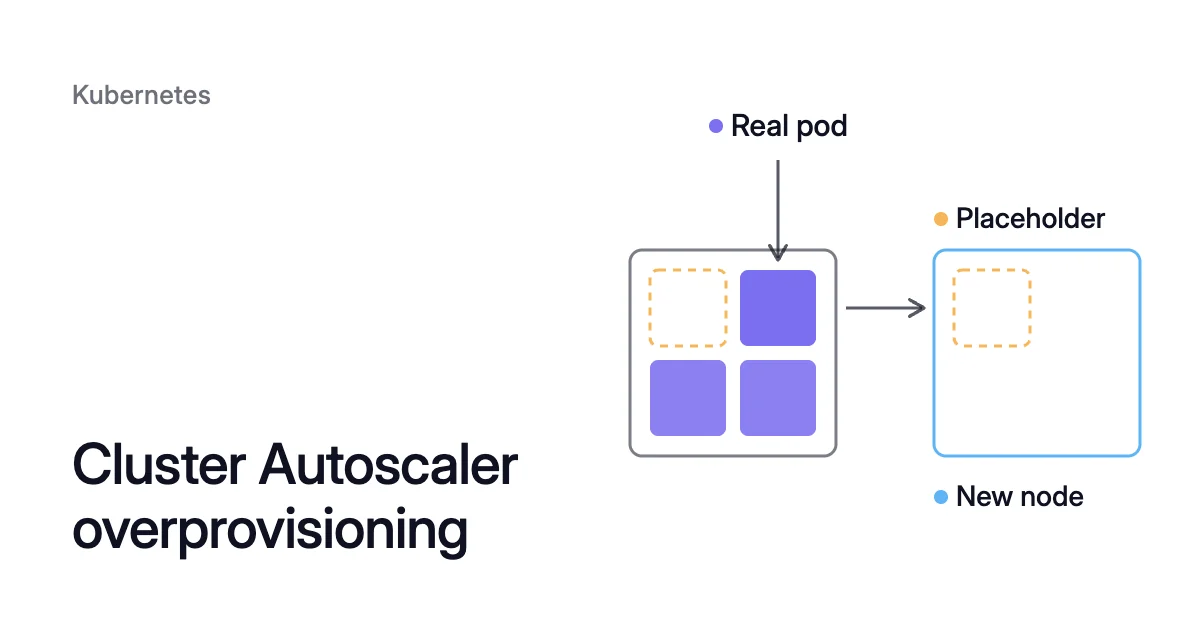
Short answer. Cluster Autoscaler overprovisioning keeps spare node capacity warm with placeholder pods: a pending real pod preempts one instead of waiting for a node. Give them a priority from -10 to -1, because the Cluster Autoscaler adds nodes for their Pending replacements only at -10 or above.
Cluster Autoscaler overprovisioning starts your pod now and adds the node after
This page is about headroom you reserve on purpose. Requests set far above what containers use are the other kind, covered in Kubernetes overprovisioning.
Picture a node pool where every node is full. A Deployment scales out by one replica that requests 1 CPU, and the new pod waits Pending.
The Cluster Autoscaler adds a node only when a pod can’t be scheduled for lack of resources, and a new node isn’t instant. The Amazon Elastic Kubernetes Service (EKS) best practices guide says nodes “can take multiple minutes to become available”. That can make pod scheduling latency an order of magnitude longer.
Overprovisioning, in the same guide’s words, “trades cost for scheduling latency”. You keep headroom, spare node capacity that is already running, so the new pod doesn’t wait for a machine.
Placeholder pods hold it. Each one runs a minimal pause container and requests the CPU and memory you want to keep free. Its priority sits below every real workload’s.
From there, the cycle runs by itself:
- The placeholders run on your nodes and hold their requests.
- A real pod arrives and fits nowhere. The scheduler preempts (evicts) placeholders on one node, and the real pod takes their space.
- The Deployment replaces the evicted placeholders. The replacements fit nowhere, so they stay Pending, and the Cluster Autoscaler adds a node for them.
- The placeholders start on the new node, and the headroom is back.
Priority -10 is the lowest the Cluster Autoscaler still adds nodes for
Kubernetes pod priority and preemption
Each pod’s priority comes from a PriorityClass: a cluster-wide object (it has no namespace) that maps a name to an integer. A higher value means more important. A class can take any 32-bit integer up to 1 billion.
A pod names its class in priorityClassName, and pods that name none get priority 0, unless a PriorityClass is marked globalDefault. Pod priority and preemption has been stable since Kubernetes 1.14.
Preemption is what makes the placeholders give way. When a pod can’t be scheduled, the scheduler finds a node where evicting pods with less priority would let it fit, and evicts them. Workloads without a class keep the default of 0, so any of them can preempt a negative placeholder.
The Cluster Autoscaler treats pods below -10 as expendable
The Cluster Autoscaler adds a rule of its own. Pods with a priority below its cutoff, -10 by default, are expendable to it. They don’t trigger scale-ups, and they don’t stop it removing the nodes they run on.
Its FAQ reserves -10 for overprovisioning pods as “the lowest priority that triggers scaling clusters”. It also discourages changing the cutoff with the --expendable-pods-priority-cutoff flag.
Microsoft’s documentation states the same rule for Azure Kubernetes Service (AKS). Nodes don’t scale up for pods with a PriorityClass value below -10.
They hold only space that is already free, and after a preemption the headroom returns only if other pods free the space. The autoscaler can also remove a node that runs only placeholders. With the Cluster Autoscaler, set the value to -10.
A pod whose PriorityClass sets preemptionPolicy: Never can’t preempt anything. It waits in the queue until enough resources are free, usually on a new node, so the headroom doesn’t help it.
Create the placeholder Deployment in its own namespace
- Create a namespace for the placeholders, outside kube-system. The Cluster Autoscaler FAQ lists the pods that can stop it removing a node. Among them are kube-system pods that have no PodDisruptionBudget (PDB) and don’t run on the node by default.
$ kubectl create namespace headroom
- Save this as
capacity-reservation.yaml, which defines the PriorityClass and a Kubernetes placeholder pod Deployment with two replicas:
apiVersion: scheduling.k8s.io/v1
kind: PriorityClass
metadata:
  name: overprovisioning
value: -10
globalDefault: false
description: "Placeholder pods that hold spare capacity for real workloads."
---
apiVersion: apps/v1
kind: Deployment
metadata:
  name: capacity-reservation
  namespace: headroom
spec:
  replicas: 2
  selector:
    matchLabels:
      app.kubernetes.io/name: capacity-placeholder
  template:
    metadata:
      labels:
        app.kubernetes.io/name: capacity-placeholder
    spec:
      priorityClassName: overprovisioning
      terminationGracePeriodSeconds: 0
      affinity:
        podAntiAffinity:
          preferredDuringSchedulingIgnoredDuringExecution:
          - weight: 100
            podAffinityTerm:
              labelSelector:
                matchLabels:
                  app.kubernetes.io/name: capacity-placeholder
              topologyKey: kubernetes.io/hostname
      containers:
      - name: pause
        image: registry.k8s.io/pause:3.9
        resources:
          requests:
            cpu: "1"
memory: "2Gi"The headroom is replicas times requests: here 2 × (1 CPU, 2 GiB), so 2 CPU and 4 GiB. The other fields each do one job:
- No grace period.
terminationGracePeriodSeconds: 0frees the space without a wait. A preempted pod gets its graceful termination period before the real pod can use its room. The Kubernetes docs suggest zero or a small number for low-priority pods. - A preferred spread. The anti-affinity spreads the placeholders one per node where it can, with
kubernetes.io/hostnameas the topology key. It’s a preference, so the scheduler can still put two placeholders on one node. - No PDB, on purpose. Kubernetes honors PDBs during preemption on a best-effort basis. If preemption would break a PDB on the lowest-priority pods, the scheduler may pick a node with higher-priority pods instead. Budgets belong on the real workloads, which PDB best practices covers for AKS and EKS.
- Apply it and check that both replicas run:
$ kubectl apply -f capacity-reservation.yaml
$ kubectl --namespace headroom get deployment capacity-reservation
- Test the headroom. Scale a real Deployment past the free capacity and watch a replacement placeholder go Pending. When the Cluster Autoscaler decides to add a node for it, it records a TriggeredScaleUp event on the pod:
$ kubectl --namespace headroom describe pods <placeholder-pod>
If a replacement placeholder stays Pending with no such event, check two things. Its priority must be -10 or higher, and the node pool must be below its maximum size.
Size placeholders for your largest pod and how long a node takes to start
The placeholders’ requests are capacity you pay for around the clock, the same as the pods they make room for. So size the headroom to the wait you need to avoid. The EKS and AKS pricing calculator shows what a node costs a month at list price.
Size each placeholder for the largest pod you want to start without waiting. Preemption works one node at a time, so a pod that requests 2 CPU can’t use two 1-CPU placeholders on two different nodes.
A new pod that requests up to that fits in one placeholder’s room, but a 2-CPU pod can’t use the two together. To start 2-CPU pods without waiting, give each placeholder 2 CPU. The headroom then becomes 4 CPU (2 × 2), about a whole node.
Size the total for what arrives while one node is starting. The EKS guide compares how often you need a new node with how long one takes to arrive. If you need one every 30 seconds and EC2 takes 30 seconds to provision it, one node of headroom keeps a spare ready.
To improve zonal scheduling, the guide suggests overprovisioning as many nodes as your Auto Scaling group has Availability Zones. Then the scheduler can choose the best zone.
A fixed replica count doesn’t grow with the cluster. The Cluster Autoscaler FAQ pairs the placeholders with the cluster-proportional-autoscaler, for headroom set as a share of the cluster, such as 20%. That autoscaler raises the replica count as the cluster grows and reduces it when the cluster gets smaller.
The same Deployment works on AKS and with Karpenter
AKS overprovisioning with the Cluster Autoscaler works as described above. Node auto-provisioning (NAP) on AKS is different, and the Karpenter notes below apply to it too. Microsoft says NAP is based on the open-source Karpenter project and provisions nodes in response to pending pod pressure.
Karpenter overprovisioning uses the same Deployment. Karpenter launches nodes for pending pods, a pending placeholder included, by simulating how they would pack onto new machines. Two things behave differently:
- Preferences act like requirements. Karpenter starts by treating preferred affinities as required, and relaxes them one at a time only when they can’t be met. As the kubernetes.io page warns, the replica count then also sets a minimum node count. With the anti-affinity above, 2 replicas keep at least 2 nodes, so drop it if you’d rather Karpenter pack the placeholders together.
- Consolidation counts placeholders as pods. Karpenter’s consolidation deletes a node only if all of its pods can run on free capacity elsewhere. It replaces one only if they fit on other nodes plus one cheaper machine. When several nodes qualify, it prefers nodes whose pods have less priority. Preferred anti-affinity can also make consolidation less effective. Karpenter may keep a node to honor a preference, even when the scheduler could fit the pods elsewhere.
Keep warm headroom alongside Coral with the Read-only policy
Coral, Zoorik’s Kubernetes optimization for AKS and EKS, keeps no idle spare nodes. It rebalances each container’s CPU and memory requests to measured use. The headroom sits inside each pod’s request.
Sudden growth is handled by your autoscaler adding nodes. So a pending placeholder still gets its node from the Cluster Autoscaler, Karpenter or NAP.
Put the placeholders on the Read-only policy
To keep warm node capacity as well, run the placeholder Deployment on Coral’s Read-only policy (readonly). The FAQ answer on how much spare capacity is kept advises this.
A pause container uses almost no CPU or memory. So a policy with automation on would shrink the very requests that make up your headroom.
- The Read-only policy. It gives recommendations only and never changes a workload. It’s also the one built-in policy that doesn’t manage Horizontal Pod Autoscalers (HPAs), so Coral won’t create an HPA for the Deployment. Pick it on the workload’s page, or name it in the workload’s annotation, shown below.
- The ignore label.
coral.zoorik.com/ignore: "true"on the namespace, workload or pod template also stops Coral changing the placeholders’ sizes or HPAs. - Node moves. These work by node pool, not by namespace, and the ignore label doesn’t stop them. Before consolidation moves anything, Coral checks on the live cluster that every pod on the node fits on another Ready node.
- The namespace. A kube-system pod with no PDB is one of the common reasons Coral won’t empty a node. That’s one more reason to give the placeholders a namespace of their own.
Set the policy in the manifest
To set the policy from the manifest, add Coral’s per-workload annotation to the Deployment’s metadata. A workload with this annotation is managed from its manifest, so its console controls are locked.
metadata:
  name: capacity-reservation
  namespace: headroom
  annotations:
    coral.zoorik.com/configuration: |
scalingPolicyName: readonlySources: Kubernetes, “Overprovision Node Capacity For A Cluster” (opens in a new tab); Kubernetes, “Pod Priority and Preemption” (opens in a new tab); Kubernetes autoscaler, “Cluster Autoscaler FAQ” (opens in a new tab); Microsoft Learn, “Cluster autoscaling in Azure Kubernetes Service (AKS) overview” (opens in a new tab); Microsoft Learn, “Overview of Node Auto-Provisioning (NAP) in Azure Kubernetes Service (AKS)” (opens in a new tab); Amazon EKS Best Practices Guide, “Cluster Autoscaler” (opens in a new tab); Karpenter, “Scheduling” (opens in a new tab); Karpenter, “Disruption” (opens in a new tab).